Excel Formulas

How to Calculate Utilization Percentage in Excel: 3 Methods

Method 1 - Calculate Utilization Percentage of Working Hours ✍️ Steps: Select a cell (i.e. C6) where you want to get the utilization percentage ...

How to Cap Percentage Values Between 0 and 100 in Excel (3 Methods)

What Is Cap Percentage? Cap percentage can be defined as a percentage limit in which your dataset percentage will be contained. For example, you ...

How to Change the Decimal Separator in Excel -7 Methods

The Decimal Separator The decimal separator (also known as the radix character) is used to separate the integer and fractional parts of a number. It ...

Calculating Probability in Excel with Mean and Standard Deviation

Obviously, you heard the term weather forecasting where weather forecasters determine the likelihood that it will rain, snow, have clouds, etc. on a ...

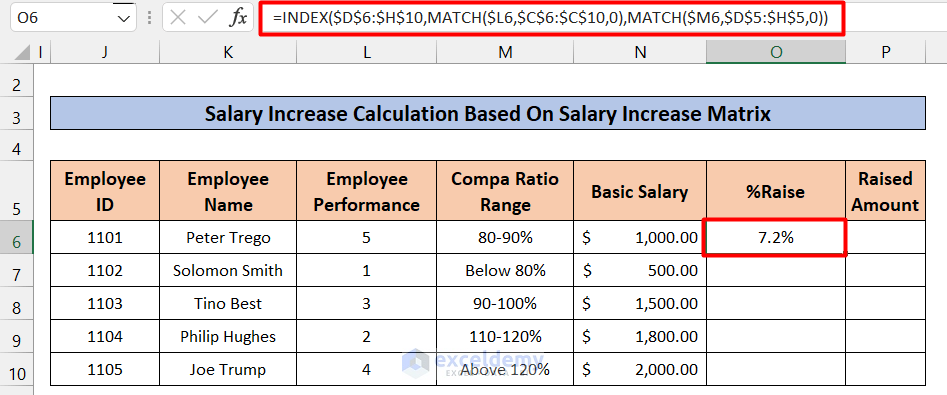
How to Create a Salary Increase Matrix in Excel

What Is a Salary Increase Matrix? A salary increase matrix, also known as a merit increase matrix or merit matrix, is a mathematical grid used ...

How to Calculate Empirical Probability with Excel Formula

In mathematics, we are very familiar with the term empirical probability. We use it to count the occurrence of certain events with a simple formula. ...

How to Add 1 Hour to Time in Excel (7 Examples)

Example 1 - Applying Conventional Formula   Steps: Enter the following formula in Cell D5. =C5+(1/24) Press Enter and use ...

Leave Salary Calculation in Excel (With Easy Steps)

Step 1 - Creating the Dataset The dataset for the Leave Salary Calculation should include the employee names and a few quantities like Total working ...

How to Calculate Mean Percentage Error in Excel

The mean percentage error is one kind of error calculation technique. It presents the mean or average error. In this article, we will discuss how to ...

How to Calculate Savings Percentage in Excel: 3 Easy Methods

Method 1 - Utilizing Percent Style Button Step 01: Calculate Fraction of Discount Create a new column named Savings Percentage, as shown in the ...

How to Calculate Probability in Excel (3 Practical Examples)

Sometimes, you need to calculate probability with your database. You can calculate this probability using Excel. In this article, I will show how to ...

How to Calculate Lag Time in Excel (2 Methods)

What Is Lag Time? Lag Time or Time Lag is a delay between two successive tasks, whereas the later task should start as soon as the earlier task ...

How to Find Marginal Probability in Excel (2 Simple Ways)

While working in Microsoft Excel, you may want to calculate the marginal probability distribution of a dataset. Manually performing these ...

How to Subtract 10 Percent in Excel (3 Easy Ways)

Subtracting percentages is a very common affair in our day-to-day life. Especially when we need to calculate any price without a discount, we need to ...

How to Apply Weighted Probability in Excel: 3 Useful Methods

Method 1 - Combining MATCH and RAND Functions to Apply Weighted Probability in Excel Steps: Create a new Cumulative column. On cell ...

Close the CTA

Advanced Excel Exercises with Solutions PDF


ExcelDemy
Logo