Excel Basics

How to Skip Columns in Excel (3 Methods)

Dataset Overview Let’s suppose we have a sample data set containing various Salesmen and their sales per month (January to June). Method 1 ...

How to Select Only Filtered Cells in Excel Formula (5 Methods)

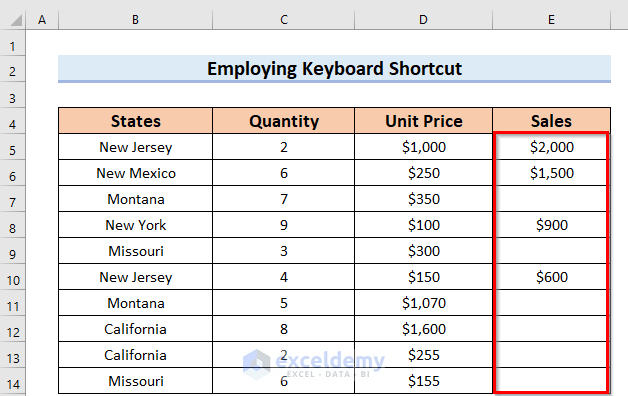
The sample dataset, contains 3 columns, States, Quantity, and Unit Price. Method 1 - Employing Go To Special feature to Select Only ...

How to Paste in Reverse Order in Excel – 7 Methods

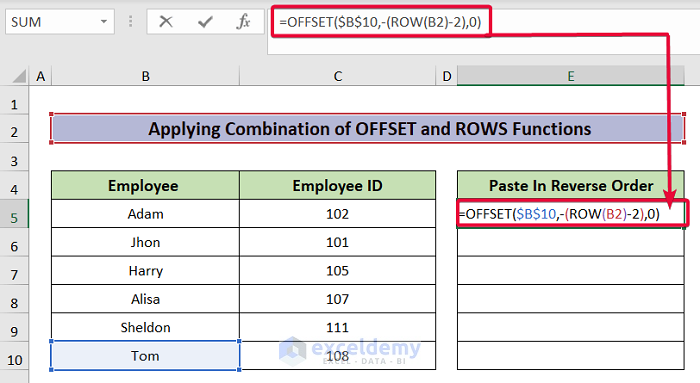
This is the sample dataset. Method 1 - Using the Sort Command 1.1 Pasting in Reverse Order Vertically Steps: Select D5 and enter 1. ...

How to Mirror Cells with Formula in Excel (3 Simple Ways)

Sometimes, we have to deal with a huge amount of data stored in several worksheets. In that case, we can mirror the cells in Excel instead of writing ...

How to Reverse Order of Data in Excel (4 Useful Methods)

To illustrate, we have used 2 types of datasets in Excel; one for horizontally reversing, and the other one for vertically reversing, the data order ...

How to Merge Datasets in Excel (5 Easy Methods)

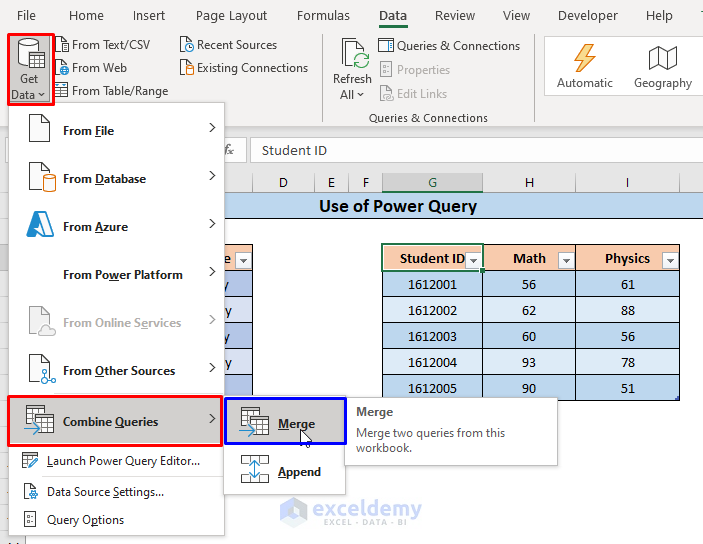
The below dataset contains a table displaying, Student IDs and Names and another table containing Student IDs, Math, and Physics Scores. We will ...

How to Fix Formula in Excel (9 Easy Methods)

While working in Excel, you may have trouble using formulas. To get rid of this problem, you need to know how to Fix Formulas in Excel. In this ...

How to Rename Column in Excel (3 Easy Ways)

The default column name in Excel, denoted by the alphabet, does not represent the actual data that the column contains. So we need to change the ...

How to Select Visible Cells in Excel (5 Quick Tricks)

When working with large data sets containing hidden cells, one can easily select the visible cells along with the hidden cells by dragging the mouse ...


How to Cut Text Using Formula in Excel (6 Simple Methods)

Method 1 - Combine LEFT and FIND Functions to Cut Text in Excel To cut the first text from cell B5 of the dataset, we will use the LEFT and FIND ...

How Do I Quickly Select Thousands of Rows in Excel (2 Ways)

We have a large dataset that we need to select rows from. Method 1 - Using the Name Box to Quickly Select Thousands of Rows Steps: ...

How to Clear Multiple Cells in Excel: 4 Ways

Using Context Menu Select the cells/ranges to clear. Right-click on the selection for the context menu. Select the Clear Contents command. ...

How to Remove Last Modified By in Excel (3 Ways)

Why Should We Remove “Last Modified By”? In a word - confidentiality. Every Excel file contains some information like Author name, Organization ...

How to Reverse a Number in Excel – 6 Quick Examples

Only 4-digit numbers were used. Example 1. Combining the SUM and the VALUE Functions Steps: Go to C5 and enter the formula: ...

How to Insert Last Modified Date and Time in Excel Cell

We’ll use a sample dataset, with Input in column B and the Timestamp in column C. We'll input the timestamp in column C whenever we modify the ...

Close the CTA

Advanced Excel Exercises with Solutions PDF


ExcelDemy
Logo