


Choosing a Power BI license has become more confusing since Microsoft introduced Fabric. Power BI Pro and Power BI Premium Per User still exist, and Microsoft Fabric now provides the capacity-based option that organizations previously associated with Power BI Premium. Choosing the right Power BI (and Microsoft Fabric) license depends on four things: how many people need to create content, how many need to view it, the technical features you require (model size, refresh frequency, advanced AI, deployment pipelines, etc.), and whether you need only Power BI reporting or the broader Fabric data platform (lakehouses, warehouses, Spark, real-time analytics, etc.).
In this tutorial, we will explain the differences among Power BI Premium, Pro, and Fabric to answer one question: which license do you actually need? This will help you determine which option fits your organization.
As of 2026, the licensing landscape has simplified around three practical options for most organizations:
- Power BI Pro (per-user)
- Power BI Premium Per User (PPU) (per-user)
- Microsoft Fabric capacity (F SKUs — capacity-based; this has largely replaced the old Power BI Premium P SKUs for new purchases)
Power BI Premium per capacity (P SKUs) is legacy for most new customers and is being retired/consolidated into Fabric F SKUs.
Quick Overview of the Options
| License | Model | Approx. US List Price (2026) | Best For | Free Viewers Allowed? |
|---|---|---|---|---|
| Power BI Free / Fabric Free | Per-user | $0 | Personal exploration, My workspace only | N/A (very limited sharing) |
| Power BI Pro | Per-user | $14/user/month (billed yearly) | Small-to-medium teams that collaborate on reports | No, every creator and viewer needs Pro |
| Power BI Premium Per User (PPU) | Per-user | $24/user/month (billed yearly) | Power users / BI teams needing advanced Power BI features without buying capacity | No, every user needs PPU |
| Microsoft Fabric Capacity (F SKUs) | Capacity (compute) | Starts ~$263/month (F2 PAYG); F64 often ~$5,000–$8,400 depending on reserved vs PAYG | Large audiences, enterprise scale, or full Fabric workloads | Yes, on F64 and above, free users can view Power BI content |
Notes on pricing: These are approximate US list prices. Actual costs vary by region, currency, Microsoft 365 agreements (Pro is included in Microsoft 365 E5), reserved capacity discounts, and partner deals. Always check the official Power BI pricing page and the Azure pricing calculator for Fabric.
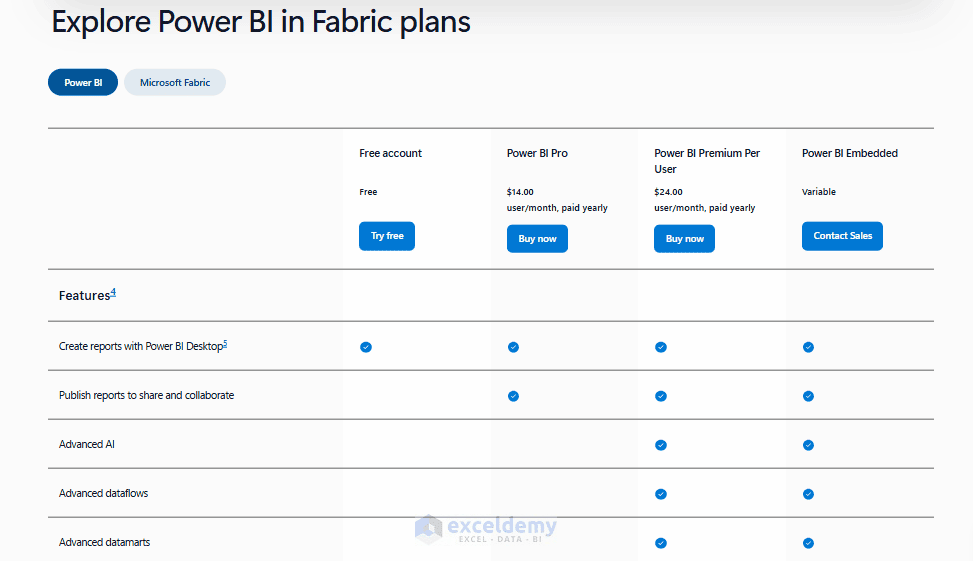
Power BI Free: For Personal Exploration
Free is only for first-time personal use or for learning the Power BI platform.
- You can author reports in Power BI Desktop and view certain app content
- You can’t share your work with colleagues the normal way
- If your organization is on Fabric capacity of F64 or above, Free users gain the ability to view content hosted there
Outside of these scenarios, Free is a dead end for any team collaboration.
Power BI Pro: Default License (Best for Standard Power BI Collaboration)
Power BI Pro is the standard paid license for most Power BI users. At the time of writing, Microsoft’s U.S. list price is $14 per user/month when paid yearly. Power BI Pro is also included with Microsoft 365 E5 and Office 365 E5 subscriptions.
With Pro, users can:
- Create reports in Power BI Desktop
- Publish reports to the Power BI service
- Create and use shared workspaces
- Share dashboards and reports with other licensed users
- Collaborate with colleagues
- Access reports shared with them
The important restriction is that, in a standard Pro workspace, both the person sharing the report and the person consuming it need an appropriate paid license such as Pro or PPU.
Suppose you have 20 people who need access, and none of them require advanced modeling features. In that case, 20 Pro licenses at $14/month ($280/month total) will beat any capacity-based alternative by a wide margin.
When Pro Makes Sense
Choose Power BI Pro when:
- Your organization mainly uses Power BI rather than the wider Fabric platform
- Your reports use normal-sized semantic models
- Everyone who needs shared reports can have a Pro license
- You do not need advanced Premium features
- Your team is relatively small or medium-sized
Limitations:
- Dataset size caps (1 GB per model)
- No paginated reports
- No dataflows with advanced compute
- No deployment pipelines
- Refresh limited to 8 times/day
For many organizations getting started with Power BI, Pro is all they need.
Power BI Premium Per User (PPU): Premium Features Without Buying Capacity
Power BI Premium Per User, usually called PPU, sits above Pro. Microsoft currently lists PPU at $24 per user/month when paid annually in the U.S. PPU includes the capabilities of Power BI Pro, along with additional Premium features per user, without requiring the workspace to sit on dedicated capacity.
What PPU Adds
Compared with Pro, PPU provides capabilities such as:
- Larger dataset sizes (100 GB vs. 1 GB)
- More frequent refreshes, up to 48 scheduled refreshes per day
- Paginated (pixel-perfect) reports
- AI-powered visuals and features
- Advanced dataflows
- Deployment pipelines
- XMLA endpoint read/write access
That makes PPU particularly useful for analysts, BI developers, and small data teams that need advanced functionality without purchasing organizational capacity.
When PPU Makes Sense
PPU is a good fit when:
- Your team needs larger semantic models
- You need up to 48 scheduled refreshes per day
- You need deployment pipelines or XMLA endpoint capabilities
- Only a limited group needs Premium Power BI functionality
- You are primarily using Power BI rather than Fabric data engineering workloads
For example, if eight BI developers need advanced Power BI features and primarily share reports among themselves, purchasing eight PPU licenses can make more sense than purchasing organizational capacity.
The Important PPU Limitation:
- PPU does not remove per-user licensing requirements
- Only PPU-licensed users can access PPU workspace content; you cannot share a PPU workspace report with a free user or even a Pro user
- A normal Pro license is not enough to consume content from a PPU workspace
This is the single most common PPU mistake: teams buy PPU for their report builders, forget that every viewer downstream also needs it, and either blow their budget or end up locking people out.
Microsoft Fabric Capacity: More Than Just Power BI
Microsoft Fabric changes the licensing model. Instead of licensing only individual users, your organization can purchase Fabric capacity. Here’s where things get genuinely more complex, because Microsoft has been actively transitioning the market.
Premium Capacity (P1–P5, the old model): An organizational license; you pay for a block of dedicated compute, not per person. All Free users in your organization can consume content from Premium workspaces without needing a paid license at all. However, P SKUs are being phased out in favor of F SKUs under Microsoft Fabric. If you’re licensing new capacity today, you should be looking at Fabric, not legacy Premium.
Microsoft Fabric (F SKUs): This is the model that replaced Power BI Premium per capacity, which Microsoft is actively retiring. Fabric capacity unlocks free-tier viewing for large populations at F64 and above, supports all Premium features, and additionally enables broader Fabric workloads like Lakehouse and Data Factory. This means Fabric isn’t just “Premium 2.0”; it’s a full data platform (data engineering, data science, real-time analytics, data warehousing) with Power BI as one workload inside it.
It is identified by F SKUs such as F2, F4, F8, F16, F32, F64, F128, F256, and larger. The number represents the amount of Capacity Units (CUs) available.
| Fabric SKU | Capacity Units (CUs) | Approx. PAYG Price/Hour | Approx. PAYG Price/Month |
|---|---|---|---|
| F2 | 2 | $0.36 | $263 |
| F4 | 4 | $0.72 | $526 |
| F8 | 8 | $1.44 | $1,051 |
| F16 | 16 | $2.88 | $2,102 |
| F32 | 32 | $5.76 | $4,205 |
| F64 | 64 | $11.52 | $8,410 |
| F128 | 128 | $23.04 | $16,819 |
| F256 | 256 | $46.08 | $33,638 |
| F512 | 512 | $92.16 | $67,277 |
| F1024 | 1,024 | $184.32 | $134,554 |
| F2048 | 2,048 | $368.64 | $269,107 |
| F4096 | 4,096 | $737.28 | $538,214 |
| F8192 | 8,192 | $1,474.56 | $1,076,429 |
Unlike Power BI Pro or PPU, Fabric pricing is capacity-based and varies according to the SKU, region, reservation, and whether you use pay-as-you-go pricing. Microsoft offers both pay-as-you-go Fabric capacity and capacity reservations.
This makes Fabric the more appropriate option when your organization is building an end-to-end analytics platform rather than simply creating Power BI reports.
The Important F64 Rule: One of the most important Power BI licensing rules involves F64. With an F64 or larger Fabric capacity, users with a free Microsoft Fabric license can view Power BI content when the content is stored on that capacity and the user has the appropriate Viewer permissions. In short, on F64 and above, report viewers can use free licenses, provided they meet the required Viewer conditions.
Below F64: From F2 through F32, Power BI viewers still need a Pro, PPU, or eligible trial license. In other words, on these smaller capacities, Power BI viewers still need paid per-user Power BI licenses.
This distinction can make F64 particularly interesting for organizations that have a small number of report developers but hundreds or thousands of report consumers.
However, capacity does not mean everyone suddenly becomes a Power BI author for free. Users who create, edit, publish, and collaborate on Power BI content generally still require Pro or PPU licensing.
A related historical note: if you’ve heard of “Power BI Embedded” as its own product, Microsoft retired the standalone A SKUs in 2024 and folded embedding rights into Fabric F SKUs. When people refer to Power BI Embedded today, they mean a Fabric capacity with embedding enabled.
Decision Framework: Which One Do You Actually Need?
Start with these questions:
- How many people will regularly view reports?
- Under ~100–150 active users → Pro is usually cheapest and simplest
- 150–350 users → Compare total Pro/PPU cost vs. an F64 capacity
- Hundreds or thousands of viewers → Fabric F64+ almost always wins on cost because free users can view
- Do you need advanced Power BI features (large models >1 GB, 48 refreshes, paginated reports, deployment pipelines, XMLA)?
- Small team of advanced users → PPU
- Broader organization or need for scale → Fabric capacity
- Do you need more than just Power BI reporting?
- Only dashboards and reports → Pro or PPU is fine
- Data engineering, lakehouses, warehouses, real-time analytics, unified OneLake, Spark notebooks, etc. → You need Fabric capacity
- Is Microsoft 365 E5 already in play?
- E5 includes Power BI Pro. Many organizations start here and only add PPU or Fabric where needed
Practical Recommendations by Scenario
- Small team / department (10–50 people) collaborating on reports → Power BI Pro
- Simple, predictable, and included in Microsoft 365 E5
- BI/analytics team that needs bigger models, more refreshes, paginated reports, or ALM (pipelines) but still under ~200–250 users → Premium Per User (PPU)
- Avoids capacity management overhead
- Large viewer audience (hundreds+) or need for dedicated performance → Fabric F64 (or higher)
- Creators keep Pro/PPU licenses; viewers go free
- Modern data platform + BI (lakehouse, warehouse, real-time, AI/ML alongside Power BI) → Fabric capacity is the clear choice
- Power BI becomes one workload among many
- Existing Premium P SKU customers → Plan migration to Fabric F SKUs at renewal (Microsoft is consolidating in this direction)
- Bottom line:
- Most small-to-medium teams need Pro
- Advanced Power BI users without massive scale need PPU
- Large organizations or those building a full analytics platform need Fabric capacity (especially F64+)
Licensing can change, and pricing is regional, so always verify against current Microsoft documentation (Power BI service features by license type and Fabric licenses) before purchasing.
Rough Cost Break-Even
- At ~250–350 total users (depending on author/viewer ratio and reserved pricing), an F64 capacity + Pro licenses for creators often becomes cheaper than licensing everyone with PPU or even pure Pro for a large viewer base
- Below that, per-user licensing is usually more economical and simpler to manage
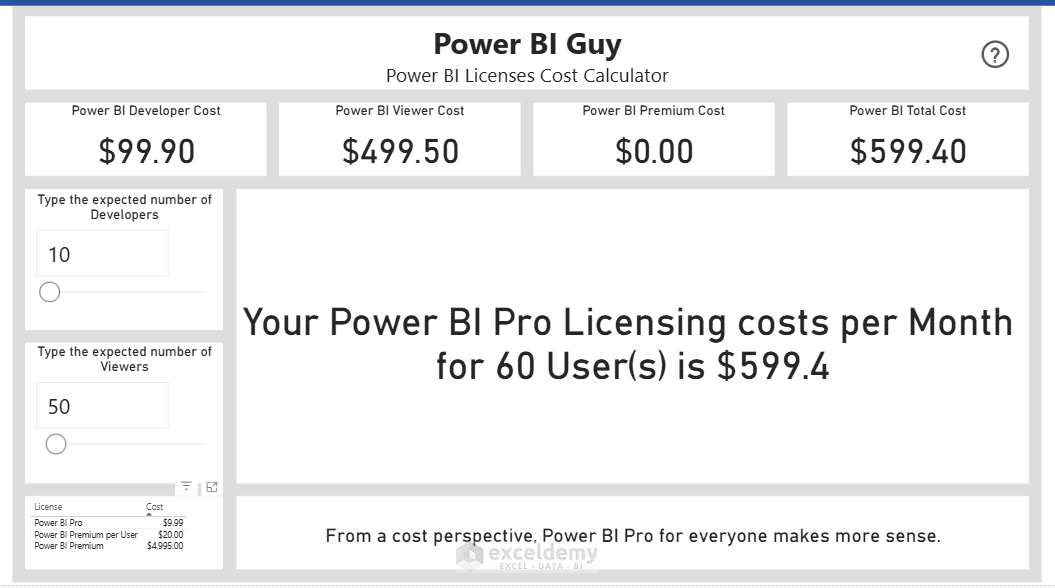
You can use the Power BI License Cost Calculator to estimate cost based on licenses and users.
Common Pitfalls to Avoid
- Assuming “Premium” always means free viewers; that’s only true on capacity (F64+/P1+)
- Buying PPU expecting Fabric workloads; PPU is Power BI features only
- Underestimating creator licenses: even with Fabric capacity, people who publish or edit still need Pro or PPU
- Ignoring workspace location: content must live in a capacity workspace for free viewing benefits
- Forgetting that Pro is included in Microsoft 365 E5; check existing licenses first
Conclusion
This article should help you decide which license you actually need: Power BI Premium, Pro, or Fabric. Pro is usually enough for everyday Power BI collaboration. Premium Per User is useful when a smaller group needs advanced Power BI capabilities. Fabric capacity becomes important when analytics extends beyond Power BI, dedicated compute is required, or reports need to be distributed at organizational scale. The most common mistake is thinking that Fabric automatically replaces every Power BI license, but it does not. In many organizations, the right solution is actually a combination of Fabric capacity and Power BI Pro or PPU licenses for content creators.
Before purchasing licenses, calculate how many people will create content, how many will only consume it, which Premium capabilities you require, and whether your organization plans to use Fabric workloads beyond Power BI. That usually makes the correct licensing model much easier to identify.
Get FREE Advanced Excel Exercises with Solutions!

