Excel Basics

How to Rename Sheet in Excel (6 Suitable Ways)

While working in Excel, often we have to rename a sheet. Properly named and organized worksheets are important for the look of the spreadsheet. In ...

How to Convert Range to Table in Excel (4 Methods)

Converting a range to a table in Excel means transforming a selected group of cells, typically containing data, into an Excel Table.  In Excel, you ...

How to Autofill a Column in Excel (7 Easy Ways)

Below you can see a dataset with missing entries. In this article, we’ll cover 7 methods that use autofill to fill up the empty cells. ...

How to SUM with IF Condition in Excel (6 Suitable Examples)

Here's an overview of using the SUMIF function to check how many values fulfill a condition. Download the Practice Workbook SUM IF ...

How to Sum Between Two Numbers Formula in Excel

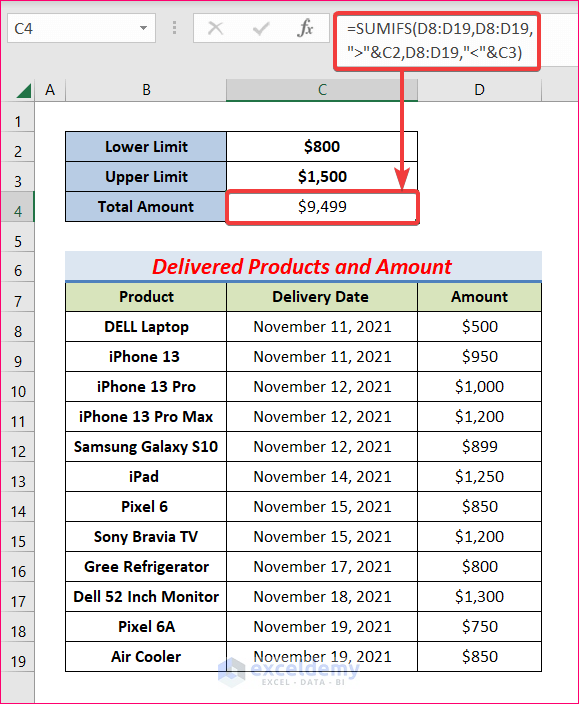
Every now and then we need to find out the sum of data for a range between two numbers in Excel. In this article, we use functions such as SUMIFS, ...

How to Compare Cells in Excel (10 Easy Methods)

We will use the sample dataset below to demonstrate how to compare two cells in Excel. Method 1 - Compare Two Cells Side by Side Using ...

How to Delete Duplicates But Keep One Value in Excel (7 Methods)

You can see the Country, Name, and Position columns in the following dataset. Using this dataset, we will go through 7 different methods to delete ...

How to Lookup and Return the Value in a Range in Excel – 5 Methods

This is an overview.   The following dataset has the Income Greater than, Income Lower than or Equal, and Tax Rate columns. ...

SUMIFS: Sum Range Across Multiple Columns (6 Easy Methods)

To demonstrate how to sum ranges, we have the following dataset of product sales for different months. Let's determine the total number of sales for ...

How to Convert Bulk Text to Number in Excel (6 Suitable Ways)

In this article, we will show you how to convert bulk text to numbers in Excel in 6 ways. Consider the following dataset of Product and Order IDs. ...

How to Convert Text to Date and Time in Excel (5 Easy Ways)

Here's a brief overview of how you can convert various text formats into the date formatting in Excel. We will discuss several functions that ...

How to Create Dynamic List From Table in Excel (5 Quick Ways)

We have a sample Sales Dataset containing the “Product”, “Quantity”, “Unit Price” and “Total Sales” columns shown in cells B4:E18. We want to ...

Excel VBA to Transpose Array (3 Suitable Examples)

The generic syntax of transposing an Array with VBA is: WorksheetFunction.Transpose(Arg1) Arg1 = It is a required argument which is a range ...

How to Delete Blank Rows in Excel?

Method 1 - Delete a Couple of Blank Rows Manually Press & hold the Ctrl key and select the blank rows. Right-click > Go to the ...

How to Rotate Text in Excel ( 3 Easy Techniques)

By default, Excel cells store horizontally aligned text. But for our purposes, very often we need to change the orientation of the text in cells from ...

Close the CTA

Advanced Excel Exercises with Solutions PDF


ExcelDemy
Logo