Excel Basics

How to Calculate Average Percentage Increase in Excel

What Is Average Percentage Increase The average growth per period over a number of periods is called the average percentage increase. The formula ...

Row Height Units in Excel: How to Change It

The default row height unit is Inches. Where 1 inch equals 96 pixels. In Microsoft Excel, 1 inch is divided into 72 DPI (Dots Per Inch). The ...

The Excel Freeze Panes are Not Working – 5 Causes with Solutions

In the sales dataset below the column headers in Freeze Panes are not working.   What is an Excel Freeze Pane? The Excel Freeze Panes ...

How to Add 10 Percent to a Number in Excel (2 Easy Methods)

Here's an overview of incrementing values by a percentage. How to Add 10 Percent to a Number in Excel: 2 Easy Ways We have the following ...

How to Exclude a Cell in Excel AVERAGE Formula (4 Methods)

Method 1 - Input Argument Manually to Exclude a Cell in Excel AVERAGE Formula In the sample dataset, we have Sales Amounts for different persons on ...

How to Calculate the Monthly Growth Rate in Excel – 2 Methods

This is an overview. Introduction to the Monthly Growth Rate To calculate the month-over-month growth rate, subtract the first month from ...

How to Print Excel Sheet with Lines (3 Methods)

Method 1 - Using ‘Sheet Options’  Navigate to the Page Layout tab on the ribbon. Look for Sheet Options under the Page Layout tab. ...

How to Use the Exponential Growth Formula in Excel (2 Methods)

Method 1 - Using the Excel GROWTH Formula Description The GROWTH function in Excel predicts future exponential growth based on existing data. ...

How to Freeze the Top 3 Rows in Excel (3 Methods)

  Method 1 - Using the Freeze Panes Command to Freeze the Top 3 Rows Steps: Select the 4th row. Go to the View tab and click on Freeze ...

How to Calculate Dividend Growth Rate in Excel (2 Methods)

While doing stock valuation, you need to find the dividend growth rate for accomplishing a better decision. Interestingly, you can compute the growth ...

How to Print Selected Area in Excel (2 Examples)

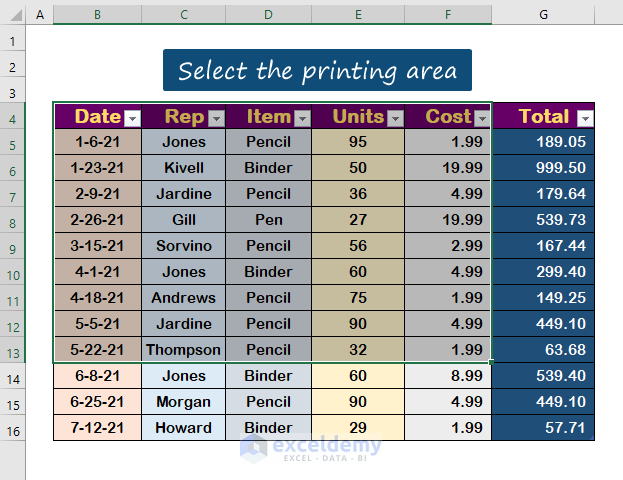
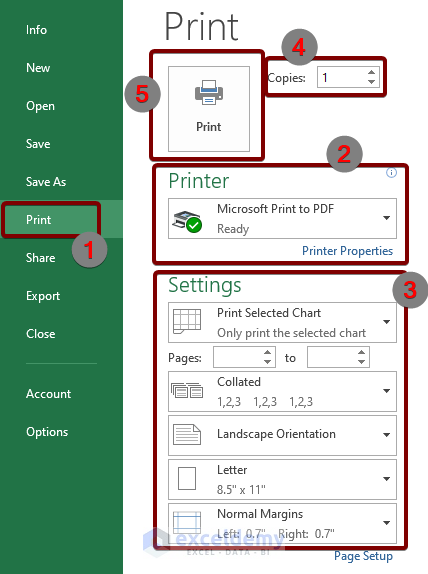
You will need to print Worksheets on a number of occasions. There are times, however, when publishing the entire report is unnecessary, resulting in ...

How to Hide Rows Based on Cell Value in Excel (5 Methods)

We have a Sales dataset consisting of columns Order Date, Region, Product, and Quantity. We want to use any of the cell values in the column to hide ...

How to Use Profit and Loss Percentage Formula in Excel (4 Ways)

In this article we will cover several simple and effective ways to use a profit and loss percentage formula in Excel. To demonstrate our methods, ...

How to Print Graph in Excel (5 Ways)

We have a data table of two columns called the Yearly Revenue Increment. If we plot a stacked column chart of it, it looks like the following: ...

How to Repeat a Number Pattern in Excel (5 Methods)

Suppose you have the following dataset: Method 1 - Use a Keyboard Shortcut to Repeat a Number Pattern Steps (Single Repeated Cell): ...

Close the CTA

Advanced Excel Exercises with Solutions PDF


ExcelDemy
Logo