Latest Blog Posts

How to Use UPPER Function in Excel (4 Examples)

In Microsoft Excel, the UPPER function is generally used to convert all the letters in a string of text to block ones. In this article, you’ll get to ...

How to Use the SEARCH Function in Excel – 3 Examples

This is an overview of the SEARCH function. Introduction to the SEARCH Function Summary The SEARCH function returns the number of ...

How to Use Excel PROPER Function (2 Ideal Examples)

Fortunately, there are several text functions in Excel to help you perform your desired tasks easily and swiftly. Today, we are going to show you how ...

How to Use TEXT Function in Excel (10 Examples)

Here's an overview of a few applications of the TEXT function in Excel. Introduction to the TEXT Function Function Objective: ...

How to Use RIGHT Function in Excel: 6 Suitable Examples

Method 1 - Using RIGHT Function to Get a Substring Until Space Step 1: Write down the below formula in cell C5. ...

How to Use MID Function in Excel (5 Ideal Examples)

The MID function extracts a specified number of characters from a cell with a customizable starting point. In this article, we will demonstrate 5 ...

How to Use LEFT Function in Excel: 4 Suitable Methods

Method 1 - Basic Use of LEFT Function: Extract String from Left Side Steps: Select Cell D5 and insert the following formula. =LEFT(B5,4) ...

How to Use REPT Function in Excel: 8 Suitable Examples

Method 1 - Basic Use of REPT Function in Excel In Column B, there are some characters or texts and in Column C, the number of times those characters ...

How to Use Excel’s MAX Function (6 Examples)

Overview of the MAX Function Introduction to MAX Function in Excel The MAX Function is categorized under Excel STATISTICAL functions. This ...

How to Copy and Paste Without Changing the Format in Excel: 4 Methods

Method 1 - Quickest Method: Use the ‘Keep Source Column Widths (W)’ Command Step 1: Select source cells B6:C16 and press Ctrl+C to copy them. ...

How to Use Excel LOWER Function (5 Suitable Examples)

MS Excel provides us with various functions to help us customize the case of the text. Among them, the LOWER function is used to change the case of ...

How to Copy a Sheet to Another Workbook with Excel Formulas – 2 Methods

The Excel workbook contains different worksheets. This worksheet showcases the following dataset: Use this formula to calculate the Average ...

How to Use REPLACE Function in Excel (3 Suitable Examples)

In Microsoft Excel, the REPLACE function is generally used to replace or substitute a text. The replacement is based on its starting position and ...

How to Use Excel COUNTBLANK Function (5 Ideal Examples)

Excel provides several statistical functions to help you perform tasks easily and swiftly. Today we are going to show you how to use a statistical ...

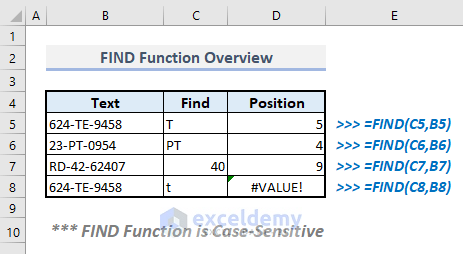
How to Use the FIND Function in Excel (7 Methods)

Method 1 – Extracting the Position of a Specified Character in a Text In the following dataset, Column B contains text values, and Column C ...

Close the CTA

Advanced Excel Exercises with Solutions PDF


ExcelDemy
Logo