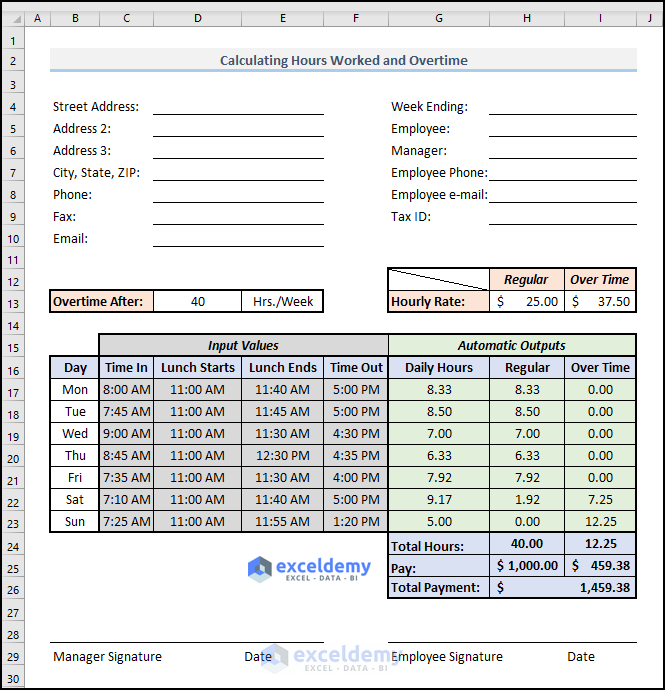
Most companies calculate work hours and overtime based on a 40 hour workweek (8 hours per day). In this article, we'll calculate overtime based on ...
Here's an overview of using an Excel formula to add Markup %. Basic Formula to Add a Percentage Markup in Excel Markup is the ...
Different companies calculate overtime in diverse ways. But the most effective way is calculating overtime when a work week will be over 40 hours. In ...
Dataset Overview To demonstrate the 4 methods, we'll use a list of 19 numbers. Read More: How to Use Different Types of COUNT Functions in ...
In the following image, we have switched the first and last name in Excel with comma. We will use the following dataset to show how to switch ...
Method 1 - Converting Commas to Decimal Points to Remove Commas from Numbers The following dataset contains Numbers with Commas. To convert the ...
In the following overview image, we have added 6 days to an Order Date of 12 October 2023 using two different functions. As the two functions ...
We will use the following dataset to return a cell reference based on a text value. Method 1 - Use the INDEX and MATCH Functions to Find a ...
Example 1 - Select a Single Cell and Refer to a Whole Range of Cells We have two sample Excel worksheets with the names AAPL and MSFT. Both ...
Subtraction definition and nomenclature Minuend: A quantity or number from which another is to be subtracted. In the above example, 9 is the ...
Basics of Percentage (%) Percentage (%) is one of the most important mathematical concepts that we use in our daily lives. The percentage is level ...
Option 1 - Performing Calculations from Left to Right 100 – 50 + 30 – 20 + 10 = 10 + 30 +50 - 20 = 40 + 30 = 70 Option 2 - ...
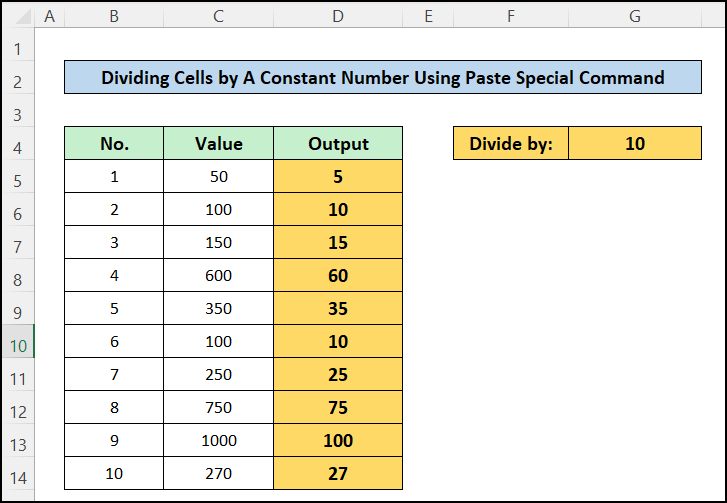
Method 1 - Applying Formula to Divide Entire Column Values by Specific Number in Excel Steps: In the cell C5, insert this formula: =B5/10 ...
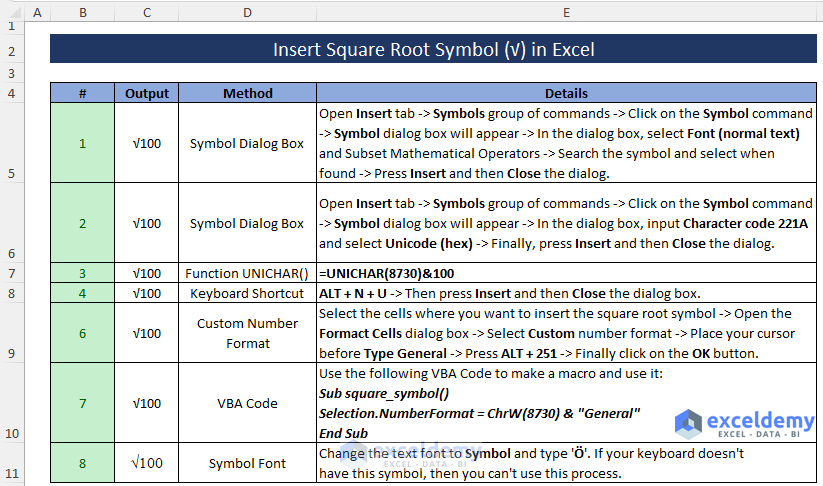
Here's an overview of inserting the square root symbol via various methods. Method 1 - Using the Insert Tab to Insert the Square Root Symbol ...
What Is Yield to Maturity? Yield to Maturity is the measure of the total return where the bond is held for a maturing period. We can express it as ...
Advanced Excel Exercises with Solutions PDF