Excel Basics

How to Undo Remove Duplicates in Excel: 3 Methods

Method 1 - Using Keyboard Shortcut to Undo Remove Duplicates in Excel Step 1: Go through the data set for this procedure. Check if any ...

How to Flip Columns and Rows in Excel (2 Easy Methods)

Many times in Excel, we do not get the required data in the appropriate orientation. Sometimes we may need to flip the columns and rows to make the ...

How to Use IF Function and Structured Reference in Excel

Excel is the most widely used tool for dealing with massive datasets. We can perform myriads of tasks of multiple dimensions in Excel. Excel provides ...

How to Use Relative Cell Reference in Excel (5 Suitable Examples)

Whenever working with Excel, relative cell reference is frequently used. There are various uses of relative cell reference in Excel. The main ...

How to Mirror an Image in Excel – 2 Methods

Suppose you have an image in your Excel workbook. To mirror it: Method 1 - Use the Format Picture Option to Mirror an Image in Excel ...

How to Undo Text to Columns in Excel: 3 Simple Methods

Method 1 - Using Ampersand Operator Steps: Double-click on cell D5 and type in the following formula: =(B5&” “%C5) Press ...

How to Draw Shapes in Excel: 2 Suitable Ways

Method 1 - Using Shapes Feature to Draw Shapes in Excel Steps: Open your workbook. Go to the Insert tab and click the Shapes feature as ...

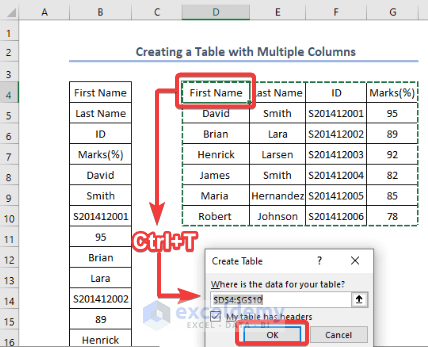
How to Create a Table in Excel with Multiple Columns

We have a column with First and Last Names, ID, and their respective marks in a single column, starting with B4. We will convert this into a table ...

[Fixed!] Up and Down Arrows Not Working in Excel (8 Solutions)

Try the following solutions one-by-one to try and solve the issue of up and down arrow keys not working in Excel. Solution 1 - Turn Off Scroll ...

How to Add Bullets in Excel Cell (10 Quick Ways)

Here is a dataset showing the obtained marks of 5 students in a school. We will insert bullets before the names. Method 1 - Add Bullets in ...

Excel Formula to Return Blank If Cell Value Is Negative

There are 2 suitable ways to return a blank if the cell value is negative in an Excel formula: by using the IF function and by using the Format Cells ...

How to Turn Off the Sheet View in Excel – 2 Steps

The sample dataset: Dataset to Turn Off Sheet View, showcases Branch Name, Sales Rep, Product Name, and Sales.   Step 1 - Activating ...

How to Show the Quick Access Toolbar in Excel – 3 Methods

This is the Quick Access Toolbar:   Method 1 - Applying the Ribbon Display Options Click Ribbon Display Options. Check ...

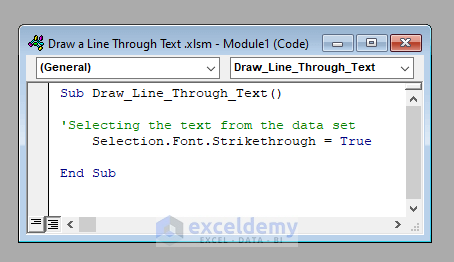
How to Draw a Line Through Text in Excel (6 Easy Ways)

Excel is excellent for working with numbers, but formatting text values in the way you want is not always obvious. The example of strikethrough is ...

How to Flip Data in Excel Chart (5 Easy Methods)

We’ll use a sample dataset with Salesperson in Column B and Sales in Column C. We'll flip the data in the dataset. Method 1 - Flipping ...

Close the CTA

Advanced Excel Exercises with Solutions PDF


ExcelDemy
Logo