Excel Basics

How to Name a Group of Cells in Excel (3 Easy Methods)

Although naming ranges of cells is one of the most useful features in Excel, making formulas more readable, easy to understand, and maintainable, it ...

How to Highlight Row If Cell Contains Any Text in Excel

Here's a GIF overview of using conditional formatting to highlight rows based on certain values inside them. How to Highlight Row If the ...

How to Edit Defined Names in Excel: 2 Methods

Step 1 - Opening the Name Manager Window in Excel Go to the Formulas tab. Click on Name Manager from the Defined Names group. The Name ...

Table Name in Excel: All You Need to Know

A table in Excel is a list of data with multiple rows and columns. What Excel tables offer more than a conventional data list is Excel tables ...

How to Remove Hidden Double Quotes in Excel: 6 Easy Ways

Method 1 - Using Find and Replace Step 1: Go to Home Tab > Select Find & Select (in Editing section) > Click on Replace (from the ...

How to Remove Number Error in Excel (3 Ways)

While working in an Excel worksheet, you may meet error values in using formulas and other situations. Among those errors, number error is quite ...

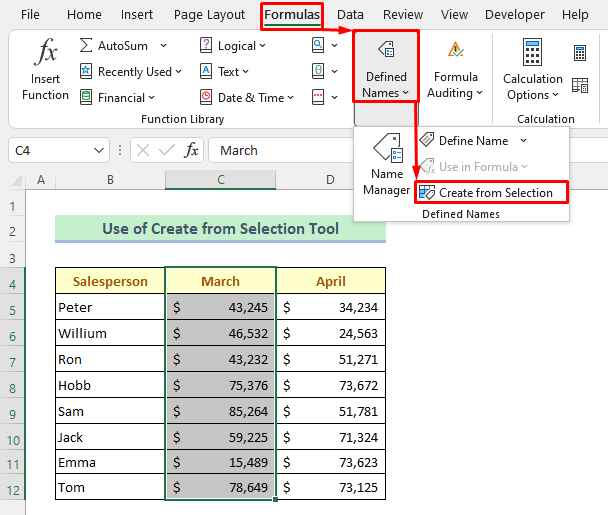
Define Names with the Create from Selection Tool in Excel (2 Examples)

There are a lot of built-in tools in Excel which make our work easier and increase the work speed. If we use names, we can make your formulas much ...

How to Remove Error in Excel: 8 Methods

Method 1 - Using Go To Special to Remove Error Remove errors; use the Go To Special. Open the Home tab >> go to Editing group >> from ...

How to Apply Conditional Formatting to Multiple Rows (5 Ways)

Without a doubt, Conditional Formatting is a nifty feature of Excel that allows us to highlight cells based on any criteria. So, we can, at a glance, ...

How to Highlight Text in Excel (7 Easy Ways)

Here's an overview of where you can find the conditional highlight options in Excel. Method 1 - Highlight Text in Excel Using the Font ...

How to Concatenate Apostrophe in Excel: 6 Easy Methods

Method 1 - Using Ampersand Operator (&) to Concatenate Apostrophe Steps: Type the following formula in cell D5. ...

How to Remove a Value in Excel (9 Methods)

The below dataset has 5 columns: Product Name, Order ID, Price, Order Date, and Status. Method 1 - Using a Keyboard Shortcut Steps: ...

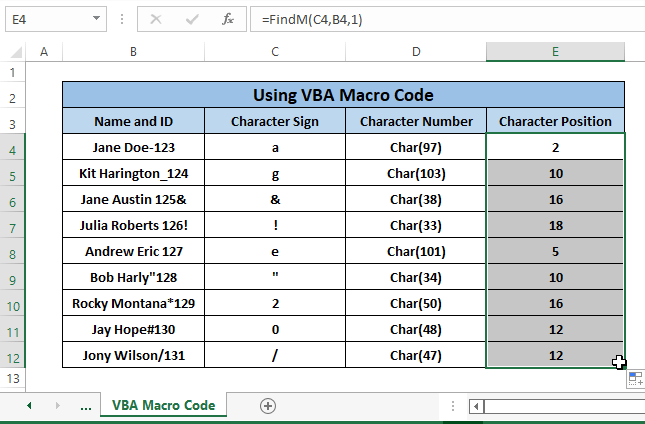
How to Find a Character in Excel String (8 Easy Ways)

If we want to find specific characters of an Employee’s Name and ID, we have to find characters appearing in the Character Sign column. For a better ...

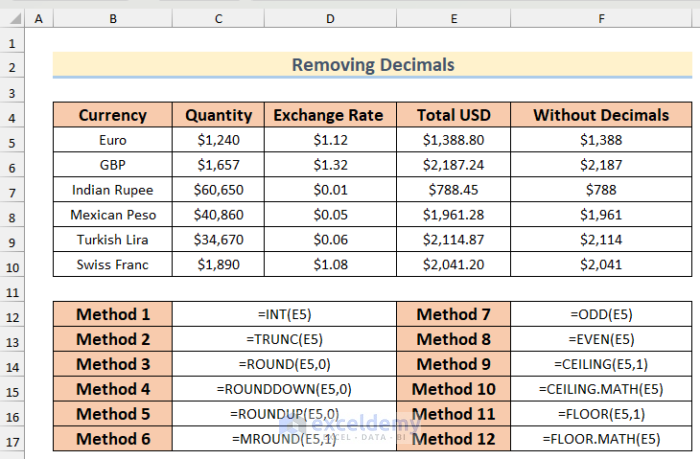
How to Remove Decimals in Excel (13 Methods)

    In the sample dataset, there are a variety of different currencies, quantities and their exchange rate to USD. The decimals need ...

How to Remove Semicolon in Excel?

Method 1 - Removing Ending Semicolon from Cells In the dataset below (B4:B9) containing some Microsoft Product names, there is a semicolon at the ...

Close the CTA

Advanced Excel Exercises with Solutions PDF


ExcelDemy
Logo