How to Reverse Data in Excel Chart: 4 Useful Methods

Method 1: Reverse Data in Excel Chart by Formatting Axis Select cell range B4:C10. Go to the Insert tab and click on Bar Chart under ...

How to Calculate the Car Payment in Excel – 6 Steps

The dataset below details the Cost of Car, the Down Payment, the Interest rate and the period to pay the loan.   Step 1 - Compute ...

How to Create List of Unique Values from Multiple Sheets in Excel

To demonstrate the different methods to obtain unique values from columns in multiple sheets, we will use 3 Excel sheets as a dataset. Each of them ...

How to Create a Summary Sheet in Excel (4 Easy Ways)

Consider an Excel workbook that contains 4 worksheets named Level-1, Level-2, Level-3 and Level-4, respectively. Each worksheet contains a dataset ...

How to Merge Two Tables Based on One Column in Excel (3 Ways)

We have two sheets named Table 1 and Table 2. In the first sheet, we have a table that contains the seller’s info. In the second sheet, we ...

What-If Analysis in Excel with Examples: Complete Guide

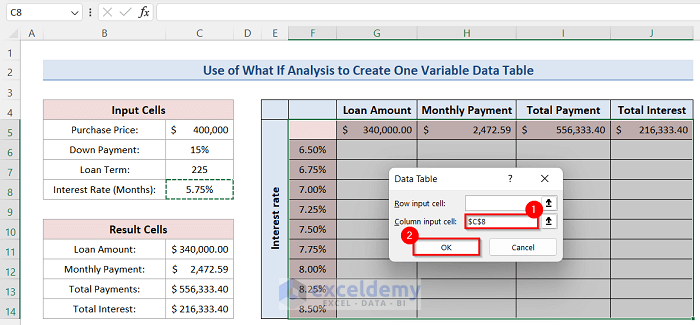
Method 1 - What-If Analysis of House Rent in Excel Our first example is based on the house rent. Using the scenario manager, you can find out which ...

How to Create a Search Box in Excel for Multiple Sheets (2 Methods)

Method 1 - Searching Multiple Sheets in Excel Using Conditional Formatting Follow these steps to apply conditional formatting and quickly search ...

How to Skip Every Other Column Using Excel Formula (3 Methods)

Sometimes you need to skip every other column in Excel. Using Excel Formulas, you can do such a job in a few moments. In this article, we will show ...

How to Flip Axis in Excel Scatter Plot (2 Easy Ways)

Before making a chart with the variables from the spreadsheet, you may need to arrange them. This is comparable to the process of making a scatter ...

How to Reverse Text to Columns in Excel: 6 Handy Methods

Method 1 - Utilizing Flash Fill Feature to Reverse Text to Columns in Excel Steps: Create a new column at the right of the Last Name column. ...

How to Put Comma After 5 Digits in Excel (5 Methods)

Commas are used to represent numbers properly. There is some format of using commas with a number. Usually, commas are used after 3 digits in a ...

How to Combine Daily and Monthly Data in an Excel Chart – 3 Steps

There are two datasets below. The first one showcases daily data and the second monthly data. Step 1 - Extract the Month from the Date ...

How to Use Integration in Excel to Find Area Under a Curve

The following dataset shows some coordinates of a random curve. Step 1 - Set Data Properly and Create Scatter Chart Set your data in ...

How to Count Missing Values in Excel (2 Easy Ways)

Sometimes, users have to list missing things in Microsoft Excel. While making these kinds of lists, it is important to count how many values are ...

How to Group and Summarize Data in Excel: 3 Suitable Ways

The following dataset contains three months: January, February, and March, and products for three months. Let's see how to group the dataset by month ...

Close the CTA

Advanced Excel Exercises with Solutions PDF


ExcelDemy
Logo