Excel Formulas

How to Find Missing Values in Excel (3 Easy Ways)

Let's use the following sample dataset to illustrate the methods for checking missing values. Method 1 - Using Combination of IF and ...

How to Merge Two Columns in Excel and Remove Duplicates

While working in Excel, sometimes we need to merge two columns into a single one. Along with it, we also need to remove the duplicate one as well. To ...

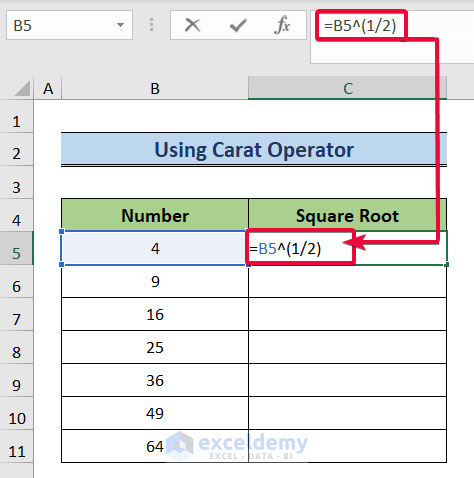
How to Calculate Square Root in Excel (6 Suitable Ways)

In analyzing datasets in Excel, we often need to find the square roots of the numerical data. The square root of any number is nothing but the ...

How to Calculate Travel Time Between Two Cities in Excel (2 Ways)

If we have the addresses of two specific cities or locations on the planet, we can calculate the travel time between them in Excel by making use of a ...

How to Find If the Date Is Within 3 Months in Excel – 5 Methods

The sample dataset showcases the End Dates of different projects. To see if the End Date is within 3 months from the Current Date: ...

Excel Formula If Date Is Greater Than 2 Years (3 Examples)

Example 1 - Use the DATEDIF Function to Return a Specific Text If a Date Is Greater Than 2 Years We will apply the DATEDIF function to calculate the ...

How to Create a Search Box in Excel (4 Easy Methods)

We have a dataset regarding the Bill Status of a Corporation. This dataset consists of four columns: Customer ID, Customer Name, Bill, and Status. We ...

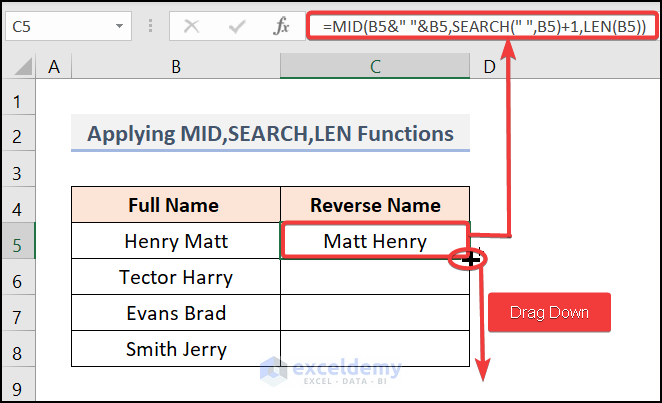
How to Reverse Names in Excel (5 Handy Methods)

Method 1 - Using Flash Fill Feature to Reverse Names in Excel Steps: Enter the first name in your desired order as shown below. ...

How to Create Reference with Another Workbook in Excel (5 Ways)

We use Excel basically to ease our workload and save work time. For this, sometimes we refer to another cell in an Excel sheet or another sheet of an ...

Find String in Column and Return Row Number in Excel (7 Ways)

We have a sample dataset that contains Sales Person and Sales information. We will find a name from the column named Sales Person and return the row ...

How to Merge Two Excel Sheets Based on One Column (3 Ways)

We have the salary and departmental information of some people on two different sheets. Here, we will show 3 ways to merge two sheets based on one ...

How to Return Value in Excel If Cell Contains Date: 5 Practical Examples

Consider the Interview Schedule dataset in the B4:C13 cells below, with Names of the employees and their scheduled Interview Dates. To determine ...

How to Edit Bank Statements in Excel (with Easy Steps)

  Step 1: Convert the PDF File to Excel to Edit the Bank Statement We will first try to convert the PDF file below. Go to the website ...

How to Sum If Cell Contains Text in Another Cell in Excel

Here's a dataset that contains the Order No., Item Names, Quantity and Sales of some products. We'll use it to create sums depending on certain ...

How to Sum Names in Excel (4 Suitable Ways)

We'll use the following dataset which contains order details. We'll use the Product or Customer names to sum values. Method 1 - Sum for ...

Close the CTA

Advanced Excel Exercises with Solutions PDF


ExcelDemy
Logo