Excel Basics

How to Calculate Barcode Check Digit with Excel Formula

In this article, we will share 2 methods to calculate barcode check digits with Excel formulas. We'll determine the check digits for the dataset ...

How to Apply Borders in Excel with Conditional Formatting

Method 1 - Applying Conditional Formatting with Borders for Non-Blank Cells Steps: Select the desired range to apply the formatting. To select ...

How to Align Data in Excel (Explained in Detail)

Overview of the Types of Alignment When working with data in Excel, proper alignment is crucial for effective data presentation. Not only does it ...

Excel Cell Alignment Not Working: 5 Methods

Method 1 - Modify Cell Format Steps We have the Product Information in the range of cells B4:C14. And the costs in column C are right ...

How to Align Numbers in Excel (6 Simple Methods)

While working in Microsoft Excel sometimes we need to align numbers to make final reports more lucrative. However, it might become difficult when ...

How to Show Tracer Arrows in Excel (2 Methods)

What Are Tracer Arrows in Excel? Tracer arrows are blue line arrows that visually represent the relationship between cells used in a formula. There ...

How to create an Auto Enter Barcode Scanner in Excel – 4 Steps

Step 1 - Prepare the Worksheet for Data Entry Create a data table to place the Barcode Numbers (B5:B14) and to automatically enter Date & ...

How to Middle Align in Excel (3 Quick Ways)

Middle alignment in Excel means showing the content vertically in the middle position of a cell border. The default alignment of numbers is in the ...

How to Add or Remove Dotted Border in Excel

In the image, the left side of the data has no border, while the right side is outlined with a dotted border, showing names and ages. 2 ...

How to Fill Blank Cells with Value Below in Excel (4 Easy Ways)

  We'll use the following sample dataset, with empty cells that will be filled by copying the first non-empty value from below. ...

How to Insert Trend Arrows Based on Another Cell in Excel – 5 Methods

This dataset includes SalesRep’s name, and sales for June and July in columns B, C, and D. Trend arrows can show the increase or decrease in ...

How to Cancel Moving Border in Excel (4 Quick Tricks)

In this tutorial, I am going to show you 4 quick tricks to cancel the moving border in Excel. You can quickly use these steps even in large datasets ...

How to Top Align in Excel (2 Quick Methods)

Top alignment in Excel refers to showing the content at the uppermost part of a cell, aligning text or data with the cell's top border. Top alignment ...

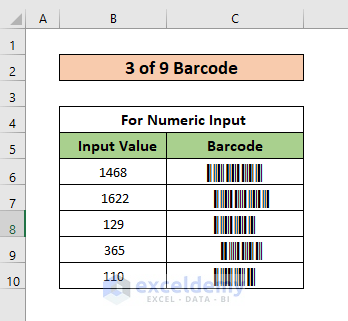
How to Create a Barcode Using the 3 of 9 Font in Excel

The 3 of 9 Barcode Font in Excel Barcode uses lines and spaces to represent information. Excel doesn’t include any barcodes fonts by default, but ...

How to Fix If the Barcode Scanner Is Skipping Lines in Excel

The List of ID and Barcodes dataset shown in the B4:C13 cells contain the ID number and the corresponding Barcode. Solution 1: Use the TAB ...

Close the CTA

Advanced Excel Exercises with Solutions PDF


ExcelDemy
Logo