VBA to Remove Formulas in Excel Keeping Values and Formatting

In this article, I’ll show you how you can remove formulas from a worksheet in Excel keeping the values and formatting with VBA. First, you’ll learn ...

How to Remove Error in Excel: 8 Methods

Method 1 - Using Go To Special to Remove Error Remove errors; use the Go To Special. Open the Home tab >> go to Editing group >> from ...

How to Apply Conditional Formatting to Multiple Rows (5 Ways)

Without a doubt, Conditional Formatting is a nifty feature of Excel that allows us to highlight cells based on any criteria. So, we can, at a glance, ...

How to Delete Everything After a Character in Excel -7 Methods

Method 1 - Applying the Find and Replace Option to Delete Everything After a Character in Excel Steps: Select the dataset (B5:B9). ...

How to Use Formula in Excel Table (4 Suitable Examples)

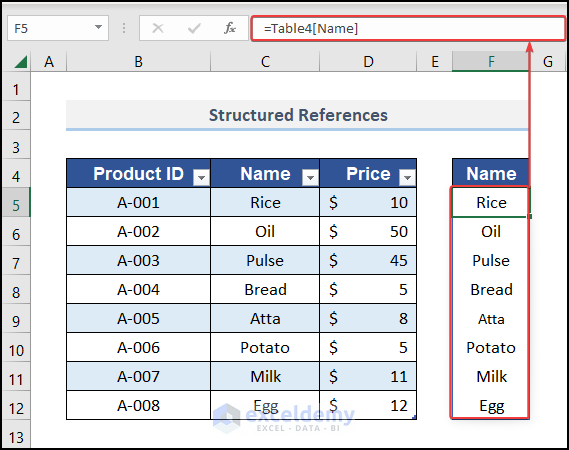
Excel Table allows you to create formulas that apply to the entire table, copy easily, and are more options than traditional formulas which are ...

How to Remove Non-Alphanumeric Characters in Excel?

Today, in this article, we will demonstrate how to remove non-alphanumeric characters from cells in Excel. It is a very common problem, especially ...

VBA Range with Variable Row Number in Excel – 4 Examples

This is an overview: Sub Range_with_Variable_Row_Number() First_Cell = InputBox("Enter the First Cell of the Range: ") Row_Number = ...

Find the Last Row with Data in a Range Using Excel VBA Macros – 7 Methods

This is the sample dataset. Opening the VBA Editor Press Alt+F11. Select Insert > Module. Method 1 - Use of the Range.End ...

Excel Formula to Compare and Return Value from Two Columns

We'll use a simple dataset of employees assigned to two projects for a few of the methods. Method 1 - Combining Excel IF and EXACT Functions to ...

How to Highlight Text in Excel (7 Easy Ways)

Here's an overview of where you can find the conditional highlight options in Excel. Method 1 - Highlight Text in Excel Using the Font ...

How to Concatenate Apostrophe in Excel: 6 Easy Methods

Method 1 - Using Ampersand Operator (&) to Concatenate Apostrophe Steps: Type the following formula in cell D5. ...

How to Sum Values by Day in Excel (8 Easy Ways)

In this article, we’ll demonstrate 8 easy ways to sum values by day in Excel. Here is an overview: 8 Easy Ways to Sum Values by Day in ...

How to Select Range Based on Cell Value VBA (7 Ways)

Method 1 - Selecting Range Based On Another Cell Value We will select the cell range in the Region and Sales column based on the string Apple in the ...

How to Convert Column Number to Letter in Excel (3 Methods)

Method 1 - Convert Column Number to Letter in Excel Consider the following dataset which we will be using as our example to convert column number to ...

How to Remove a Value in Excel (9 Methods)

The below dataset has 5 columns: Product Name, Order ID, Price, Order Date, and Status. Method 1 - Using a Keyboard Shortcut Steps: ...

Close the CTA

Advanced Excel Exercises with Solutions PDF


ExcelDemy
Logo