Excel Formulas

How to Use Multiple If Conditions in Excel based on the Age – 5 Methods

Method 1 - Using Multiple If Conditions through Nested IF Functions Based on the Age Enter the following formula in D5. ...

Excel Percentile Rank Inc vs Exc

We often need to rank or sort the data in ascending or descending order based on various criteria. In Excel, we can do it using the PERCENTILE ...

How to Remove a Space after a Number in Excel (6 Easy Ways)

The below dataset contains the names of 4 products and their codes. The product codes contain extra spaces after numbers. Method 1 – Using ...

How to Automatically Link a Cell Color to Another in Excel

To demonstrate how to link a cell color to another automatically, we'll use the following dataset containing some subjects in column B and ...

How to Split Names into Three Columns in Excel (3 Methods)

When you have a list of complete names and wish to separate them into first, middle, and last names, you may use Excel features to divide the cells. ...

How to Separate First Name Middle Name and Last Name in Excel Using Formula

This article will show how to separate the first name, middle name, and last name using Excel formula. To get a quick view of the formulas, consider ...

Growth Formula in Excel with Negative Numbers (3 Examples)

In Excel, it is a simple task to create an accurate growth formula when all the numbers have a positive value. But there is unfortunately no growth ...

How to Transpose Column to Multiple Rows in Excel: 6 Methods

Method 1 - Using Excel TRANSPOSE Function to Transpose Column to Multiple Rows Steps: Type the following formula in cell B12. ...

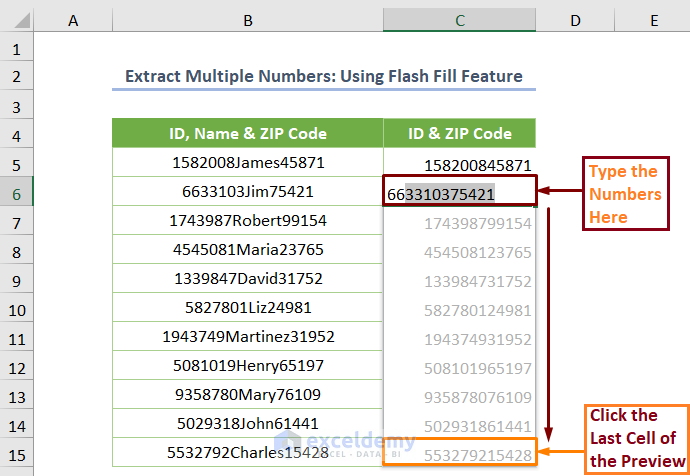
How to Extract Multiple Numbers from a String in Excel – 6 Methods

The dataset showcases  ID (7 digits), Name, and ZIP Code (5 digits) in a single cell. To extract ID and ZIP Code:   Method 1 - ...

How to Extract Specific Numbers from a Cell in Excel (11 Ways)

Consider the following dataset containing the product codes and sales records of some items. The product codes are created with a combination of the ...

How to Calculate Profit Percentage in Excel (3 Methods)

For each of the three methods in this tutorial, we'll assume that you're working from the following dataset of a clothing store with their selling ...

How to Separate Numbers in One Cell in Excel (5 Methods)

We will use a dataset that contains the Department and the ID Number of some employees, with the Name and ID Numbers together in one cell. ...

Auto Generate Invoice Number in Excel Template (4 Quick Steps)

Suppose we invoice a certain company repeatedly using an Excel Invoice Template. We want an auto generated invoice number every time we open the ...

Generate Random Number with Mean and Standard Deviation in Excel

What Is Mean? The average of a group of values is known as the mean. It refers to a data set's values being distributed evenly. Generally, the mean ...

How to Rank Data in Excel Using Sorting (3 Methods)

Dataset Overview In this guide, we’ll work with a dataset containing student scores in an exam, their current CGPA, and corresponding names. ...

Close the CTA

Advanced Excel Exercises with Solutions PDF


ExcelDemy
Logo