Excel Formulas

How to Calculate a 5 Star Rating Average in Excel (3 Easy Ways)

Method 1 - Calculate a 5 Star Rating Average Using SUM Function STEPS:  In cell E5, enter the following formula: =C5*D5 Press ...

Excel Formula to Find Displaced Moving Average (With Easy Steps)

In this article, I will discuss the details of the Displaced Moving Average (DMA) formula in Excel. DMA is a variation of the Simple Moving Average ...

How to Rank Within a Group in Excel (3 Methods)

Dataset Overview Suppose we have a dataset containing information about various types of products and electronic accessories. The data includes ...

How to Use the Average Attendance Formula in Excel (5 Methods)

Dataset Overview For your better understanding, we will use a sample dataset. The data set contains, Names, Months, Number of attendances, and ...

How to Calculate Centered Moving Average in Excel: 2 Examples

Method 1 - Calculate the Centered Moving Average for Odd No. of Periods Calculate this dataset's centered moving average for odd no periods. The ...

How to Determine Triple Exponential Moving Average in Excel

The Triple Exponential Moving Average (TEMA) indicator was familiarized in an article in the Technical Analysis of Stocks & Commodities magazine: ...

How to Calculate Percentage above Average in Excel (3 Easy Ways)

Method 1 - Conditional Formatting to Calculate the Percentage Above Average We will use a dataset of three columns that contains the Sales, Target ...

How to Link Cell to Another Sheet in Excel (7 Methods)

We have sales data for December’21 for three different cities: New York, Boston, and Los Angeles. They are in separate sheets, but all follow the ...

How to Rank with Ties in Excel (5 Simple Ways)

Consider the worksheet below, which contains the results of a sporting contest. We have the Names of the participants, their Scores, their Times, and ...

Remove Duplicate Rows Except for 1st Occurrence in Excel (7 Ways)

Method 1 - Remove Duplicate Rows Except 1st Occurrence Using Remove Duplicates Feature Select the entire datasheet. In the sample dataset, it is ...

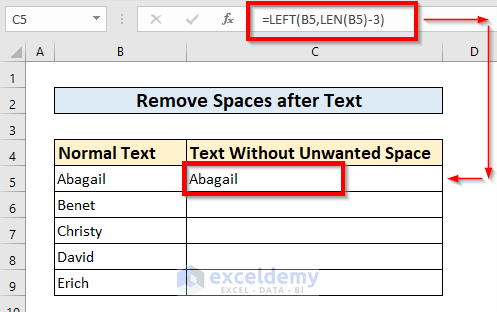
How to Remove Space in Excel after Text (6 Quick ways)

We have a list of names with unwanted spaces after text. We want to remove those spaces to perform further operations. We have included two columns, ...

How to Remove Duplicate Names in Excel (6 Simple Methods)

The following dataset contains the names of some salesmen, their state addresses, sales amounts in dollars, and target achievements. ...

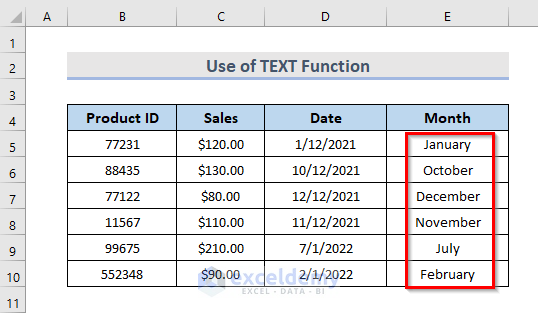
How to Extract Month from Date in Excel (5 Quick Ways)

The following dataset contains some Product IDs, Sales, and Dates in columns B, C, and D. We want to extract the months from the Date column. ...

How to Link Excel Workbooks – 4 Methods

You have sales data of different salesmen in the “Sales Data” sheet of the “Reference Workbook” workbook. To extract “Yearly Sales” from the ...

How to Calculate Rank Percentile in Excel: 7 Suitable Methods

Method 1 - Using a Formula to Calculate Percentile Rank in Excel Step-01: Before adding the serial numbers of these marks we have to sort the marks ...

Close the CTA

Advanced Excel Exercises with Solutions PDF


ExcelDemy
Logo