We have a dataset of some employees. It contains four columns: Employee name, Department, working Hours per day, and Salary. Here’s an overview of ...
Depreciation describes how an asset's value decreases over time. A Depreciation Schedule is a table that displays the amount of depreciation for a ...
Method 1 - Using MID and FIND Functions to Extract Text After a Character We'll use the following dataset. We'll extract the text after the hyphen ...
We're going to use a sample dataset as an example. The following dataset represents the Profit/Loss in the first 5 Days of January of a store. ...
The following picture shows the cumulative sum obtained by using one of the methods. 9 Ways to Perform Cumulative Sum in Excel ...
Let’s assume a scenario where we have an Excel file that contains information about the products that a country exports to different countries in ...
In this tutorial, I will discuss several methods regarding MS Excel's advanced Lookup functions. I will use the single Lookup Function to return ...
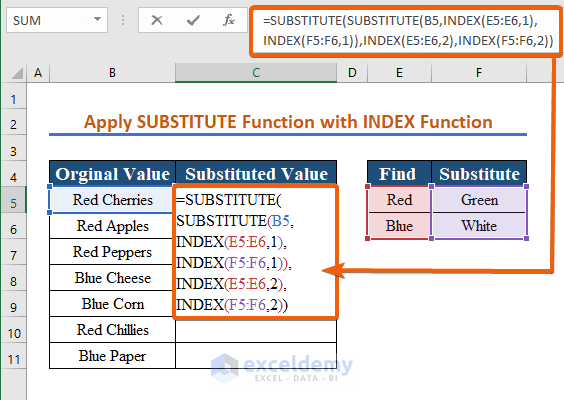
Method 1 – Using the SUBSTITUTE Function to Substitute Multiple Characters Below is a dataset of Microsoft Word version names. We want to ...
Let’s say we have sales data for three different cities, New York, Boston, and Los Angeles. These three are identical in form, so we'll show only one ...
Method 1 - Replacing Text using the Find and Replace Tool in Excel This is the sample dataset. Step 1: Go to the Home tab. Click ...
From time to time, we store various types of data in Excel sheets, and most of the time we need to Sum up cell values. This article will show you ...
Microsoft Excel provides us with the option to calculate the Sum of Squares very easily. We can also compute the Sum of Squares using mathematical ...
Example 1 - Use a Reference from Another Workbook Using the Paste Link Option Step 1: Open the worksheet: Closed.xlsm. Copy B5:C9. ...
Method 1 - Using an Array Formula to Lookup Multiple Values in Excel The VLOOKUP Function can only return a single match. We can use an array ...
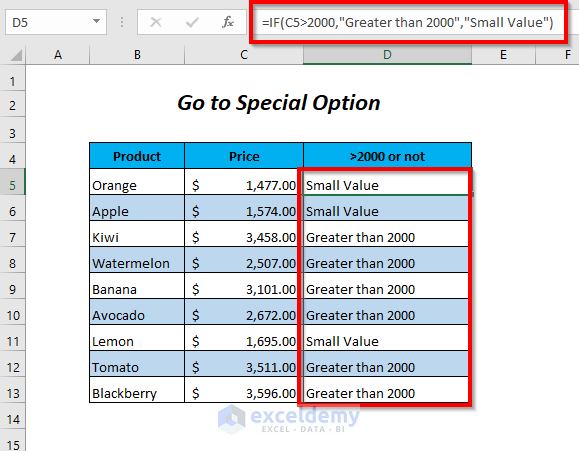
Scenario We have two formulas in the Discounted Price column and >2000 or not column, and we want to demonstrate how to change the text string or ...
Advanced Excel Exercises with Solutions PDF