What Is the Spearman Correlation? The Spearman Correlation is a derivative of the Pearson Correlation Coefficient in nonparametric form. This ...
In the sample dataset below, we have taken two columns A & B. We want to divide ‘A’ column data by ‘B’ column data. The ‘Result’ column shows the ...
Assume that you have a table like the following one in your Word document. Here, the Sales Report of Fruit Items is given along with the necessary ...
Method 1 - Combine FILTER, ISNUMBER, and SEARCH Functions to Create a Searchable Database in Excel Step 1: Select cell E5 in the sheet named ...
If you want to do some Statistical calculations, you can easily use correlation in Excel. This is one of the easiest statistical calculations in ...
Method 1 - Insert RANDBETWEEN Function to Generate 4 Digit Random Number STEPS: Select the cell where you want to put the formula using the ...
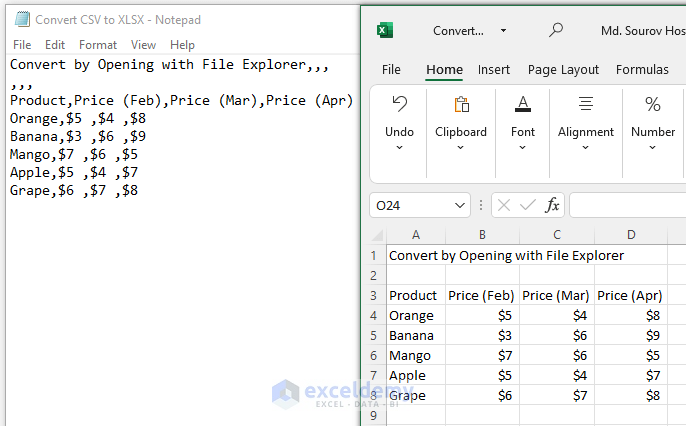
Below, we have a dataset in a comma-separated text file. The dataset represents sale details for a shop. Each piece of data is separated by a comma. ...
Method 1 - Clicking and Dragging to Adjust Excel Row Height and Fit Text Steps: Put the mouse cursor on the border of the row of which you want ...
The correlation coefficient is one of those things you come across very often in statistical analysis. The Pearson correlation coefficient is a ...
If you are looking for a special trick to calculate p value for Spearman correlation in Excel, you've come to the right place. In Microsoft Excel, ...
Method 1 - Using Open with from File Explorer to Convert CSV to XLSX Steps: Right-click on your CSV file. Click as follows from the Context ...
One of the common problems that most of us face in our daily lives while working with Macro in Excel is how to convert multiple Excel files to CSV ...
This is the sample dataset. Method 1 - Divide a Column by a Number Using a Formula To divide the revenue by the price per unit: Steps: ...
This is the sample dataset. Example 1. Embed VBA to Hide Rows Based on Cell Text Value in Excel To hide the row that contains ...
Method 1 - Insert FIND Function find_text Argument Find the first space position number; type the find_text argument. =FIND(" ", ...
Advanced Excel Exercises with Solutions PDF