Latest Blog Posts

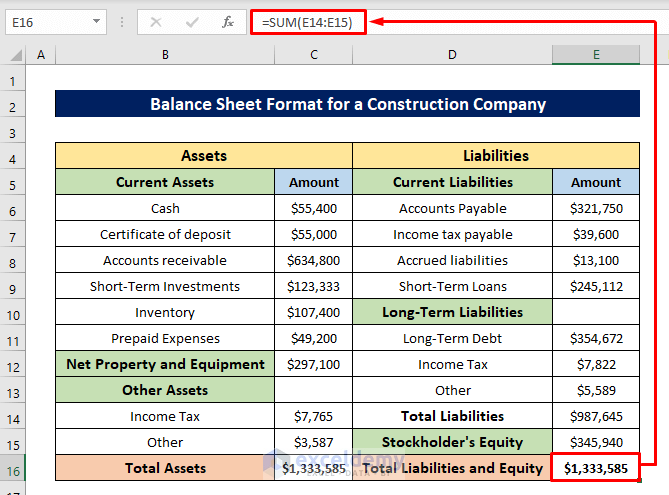
Balance Sheet Format for Construction Company in Excel: 9 Methods

Method 1 - Insert Current Assets Insert the amount for the current assets. A current asset is a term on a company’s balance sheet that might be ...

How to Convert Radians to Degrees in Excel (3 Easy Methods)

Method 1 - Converting Radians to Degrees Using the DEGREES Function Select the cell to store the result. In our case, the cell is C6. ...

How to Make an Accelerated Aging Calculator in Excel

Certainly, Microsoft Excel is a popular and useful tool for performing complex equations. Now, wouldn’t it be great if we could calculate accelerated ...

How to Use AVERAGEIFS Function for Multiple Columns

  Example 1 - Calculating the Average Price Our dataset is a Price Chart of Shoes. We'll determine the Average Price based on a few factors. ...

How to Remove Tracer Arrows in Excel

Tracer Arrows is a widely used tool in Excel. Though it is very helpful, we may want to remove these from the sheet after our desired work is done. ...

How to Convert Text to Currency in Excel – 5 Methods

Method 1 - Applying Cell Formatting Steps: Choose the cell range containing text data. Here, C5:C10. Go to the Home tab and, select Number. ...

How to Use Formula for Late Attendance in Excel

Step 1: Arranging Dataset Put the Name in column B, the Starting Time in column C, and the Actual Time in column D. We will use this dataset ...

How to Calculate Days with Aging Formula in Excel: 2 Practical Cases

Case 1 - Calculate Days Between Specific Dates Let’s say we have a sample dataset of names of some customers who have ordered some products from a ...

How to Use VLOOKUP with CHOOSE Function in Excel (5 Examples)

Introduction to the Excel VLOOKUP Function The VLOOKUP function is used to look up data in a table that is organized vertically. It is applicable ...

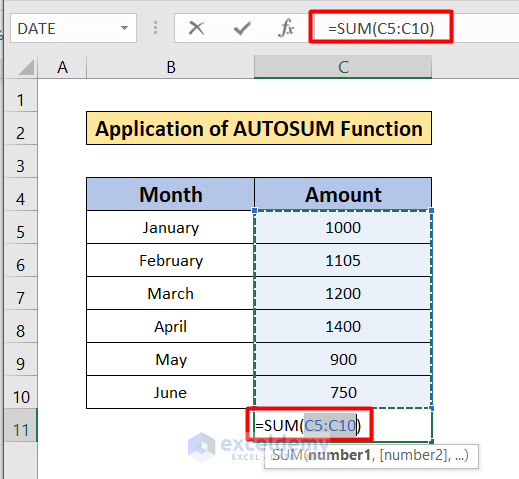
How to Autosum Column in Excel (4 Easy Methods)

When working in Excel, you need to do many kinds of operations. One of the most common operations is to make a sum of a column or a row. Calculating ...

How to Maintain Excel Header Alignment (with Easy Steps)

The sample dataset contains information about some people. We will put a header and maintain its alignment. Step 1 - Opening the Page ...

How to Apply the Advanced Uses of the CHOOSE Function in Excel (9 Applications)

Introduction to Excel CHOOSE Function The CHOOSE function requires two arguments: index_num and value1, along with optional additional values. ...

How to Find a Column Number Based on a Value in Excel – 3 Methods

This is a sample dataset. It is a Sales Report with information on Sold Items and Sales amount.   Method 1 - Using the MATCH Function to ...

How to Use AND Function in Excel with Text (8 Easy Examples)

We have a dataset of Payment Details of Customers. Note: This is a basic dataset to keep things simple. In a practical scenario, you may ...

How to Stop Excel from Changing Numbers to Dates (5 Ways)

Method 1 - Utilizing Format Cells Feature to Prevent Excel from Converting Numbers to Dates The format cells feature allows us to change the ...

Close the CTA

Advanced Excel Exercises with Solutions PDF


ExcelDemy
Logo