Excel Basics

How to Calculate Discount Percentage with Formula in Excel

Microsoft Excel is a powerful tool for basic and complicated calculations. With the help of it, you can easily calculate the percentage value, like a ...

How to Calculate the Variance Percentage in Excel – 3 Methods

What Is the Variance Percentage? The Variance Percentage indicates the percentage of change between two values. Formula(s) for ...

How to Multiply a Column in Excel by a Constant (4 Easy Ways)

Watch Video – Multiply a Column by a Constant in Excel Let us use the following dataset. We have the employee records of a ...

How to Sum Random Cells in Excel

We want to calculate the Total Sales of the Sales Representative Abigail from the Sales Report shown below. Note: We have used Office 365 when ...

How to Find the Percentage of Two Numbers in Excel

Method 1 - Using a Formula to Find a Percentage of Two Numbers Steps: Choose a cell (E5) and apply the following formula- =(C5-D5)/D5 ...

How to Multiply Two Columns and Then Sum in Excel (3 Examples)

Example 1 - Multiply Two Columns and Sum Their Products Using SUMPRODUCT Function in Excel Multiply column D and column E. The cell range for ...

How Do You Calculate Percentage Increase or Decrease in Excel

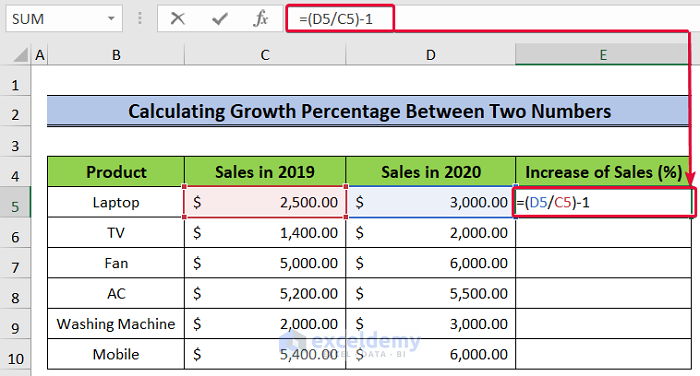
Method 1 - Calculate Percentage Increase or Decrease Using Generic Formula Select the cell where you want to calculate the percentage change and ...

How to Calculate Cumulative Percentage in Excel: 6 Methods

Method 1 - Manual Approach to Calculate Cumulative Frequency & Determining the Cumulative Frequency Percentage Steps: Select Cell D5. ...

How to Copy Only Visible Cells in Excel (Some Quick Methods)

To illustrate how to copy only visible cells in Excel, we'll use a sample worksheet data with hidden rows (9 to 17). Method 1 - Using ...

How to Link Data in Excel from One Sheet to Another (5 Methods)

Dataset Overview We’ll use a concise dataset with 6 rows and 2 columns. We’ve formatted all the cells containing dollar values in Accounting format, ...

Merging Cells in Excel – A Guide

In the example below B6:B14 are merged using the Merge & Center feature:   What Does ‘Merge Cells’ Mean in Excel? ...

Selecting Non-Adjacent or Non-Contiguous Cells in Excel (5 Easy Ways)

In this article, we will present 5 different methods for selecting non-adjacent (or non-contiguous) cells in Excel, All the methods will work in ...

How to Concatenate Multiple Cells in Excel (7 Easy Ways)

In the sample dataset, we have three columns: ID, First Name, and Last Name for some people. Method 1 – Using the CONCATENATE Function to ...

How to Move Rows in Excel Without Replacing (5 Easy Methods)

This tutorial will demonstrate several simple ways to move rows in Excel without replacing the existing data at the destination. Watch ...

How to Make All Cells the Same Size in Excel (7 Easy Ways)

Method 1 - Using Column Width Command to Make All Cells Same Size in Excel Steps: Click on the Select All option, which is marked inside a ...

Close the CTA

Advanced Excel Exercises with Solutions PDF


ExcelDemy
Logo



