Dataset Introduction The following dataset represents the Salesman, Net Sales, and Target of a company. Our first graph will be based on ...
Advanced Filter is one of the most useful and advantageous features of Excel that’s used pretty often to copy one range of cells from one location to ...
The sample dataset contains the Product Name, Product Category, and the shipping Address of customers. We will use Excel Advanced Filters does not ...
This is the sample dataset. Method 1 - Using an Advanced Filter for a Cell That Contains Unique Text Values The dataset ...
What is Excel Date Picker? The Excel Date Picker is a handy feature in Microsoft Excel. It provides a calendar pop-up that allows users to select ...
In this article, we will discuss the print preview in Excel and understand their significance. In various professional fields such as business, ...
Let’s say our company name is Marigold Sales, and the address has changed from 7 Oak Valley St., Lakeland, Florida 33801 to Marigold Sales, 71 ...
"Allow Circular Reference in Excel" is an easy way to insert self-reference a cell in Excel. By Microsoft’s definition, Circular Reference occurs ...
Dataset Overview We have a dataset that contains information about 10 different students. Student names and their identification numbers are ...
Method 1 - Creating a Bullet Or Number List within a Cell in Excel Double-click the cell where you want to create the list. Go to Insert > ...
In financial big data analysis, you could find that applying a filter to your analysis helps you examine your data more effectively. When data is ...
In this article, we will provide valuable insights on how to effectively print titles in Excel, enabling you to create well-organized and visually ...
We'll use the following sample dataset to highlight a row whenever we select a cell in that row. Method 1 - Highlighting the Active Row by ...
Consider the following data as a product price list. We have added a filter to the data. The drop-down icons at the right-bottom corners of the ...
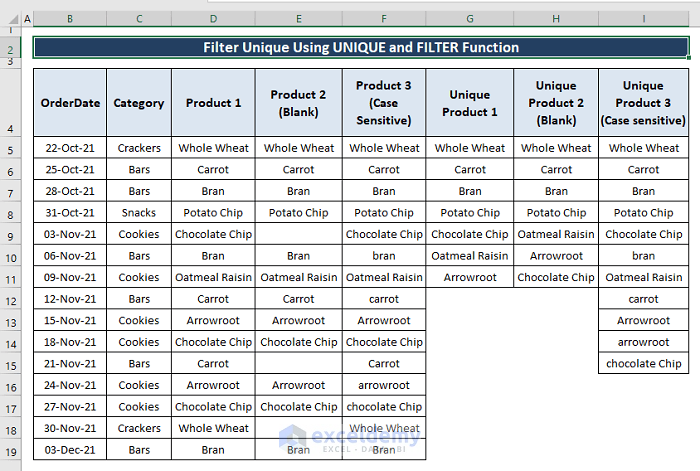
Let’s say we have three simple columns in an Excel dataset containing Order Date, Category, and Product information. We want the unique ordered ...
Advanced Excel Exercises with Solutions PDF