

In this Excel tutorial, we will discuss various examples of how to sum or subtract percentages. Adding or Subtracting percentages is often required while calculating discounts, sales tax, commissions, revenue growth, budgeting and expense change, etc. Now let’s delve into the examples of summing and subtracting percentages in Excel.
How to Sum Percentages in Excel
Consider the following dataset. We have unit prices and sales quantity for a few invoices. For a 5% tax, we want to calculate the total price for each invoice.

Apply the following formula in cell E8 => Press the Enter key => Drag down the Fill Handle icon.
=(C8*D8)+(C8*D8*$E$5)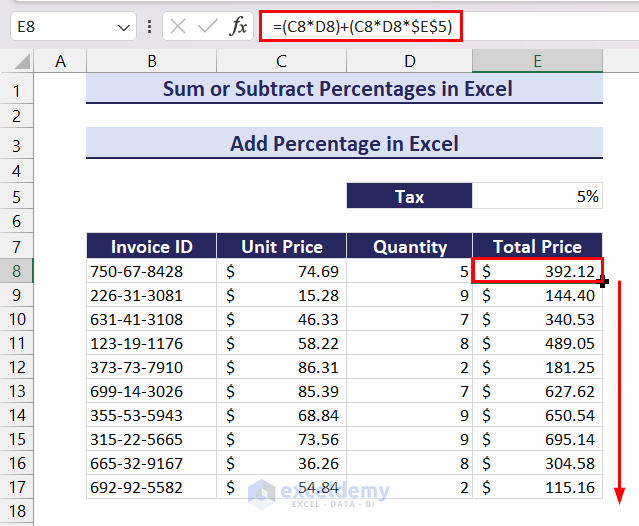
How to Subtract Percentages in Excel
Consider the following dataset. We have unit prices and sales quantity for a few invoices. For a 10% discount, we want to calculate the total price for each invoice.

Apply the following formula in cell E8 => Press the Enter key => Drag down the Fill Handle icon.
=(C8*D8)-(C8*D8*$E$5)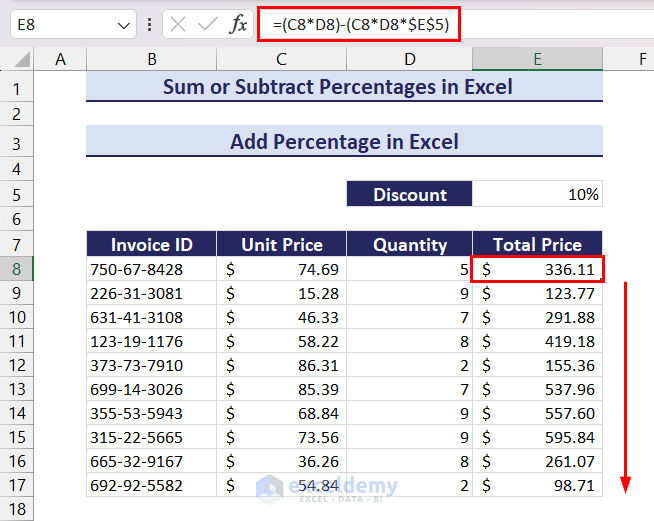
This concludes our article on how to sum or subtract percentages in Excel. We discussed two ideal examples that sum and subtract percentages respectively. We hope you will find this article useful. Let us know your thoughts in the comment section.
Sum or Subtract Percentages in Excel: Knowledge Hub
<<Go Back to Calculating Percentages in Excel | How to Calculate in Excel | Learn Excel
Get FREE Advanced Excel Exercises with Solutions!

