


Financial projections are essential for every startup. Start-up financial projections are not just numbers arranged in rows and columns. They are a story about how a business will grow, spend, earn, and survive. Whether you’re preparing a pitch deck, applying for funding, or simply trying to understand your company’s financial health, a well-designed Excel model can provide the insights needed to make informed decisions. The challenge is that many founders either create overly simplistic spreadsheets or build complex models that become difficult to maintain. Dynamic Excel templates solve this problem by automatically updating calculations, forecasts, and visualizations as assumptions change.
In this tutorial, we will show how to build 5 dynamic Excel templates for start-up financial projections. These templates will help startups track cash flow, monitor burn rate, forecast growth, and prepare investor-ready financial projections.
For founders, investors, and finance teams, a good projection model answers important questions such as:
- How much cash do we have left?
- When will we run out of money?
- How much revenue can we expect in the next 12 to 36 months?
- What happens if sales grow more slowly than expected?
- How much funding should we raise?
1. Burn Rate and Runway Tracking Template
For an early-stage start-up, cash management is one of the most important responsibilities. Even if the company has strong growth potential, it can fail if it runs out of cash before reaching the next funding round or profitability.
A Burn Rate and Runway Tracking Template helps founders understand how quickly the company is spending money and how many months of cash remain.
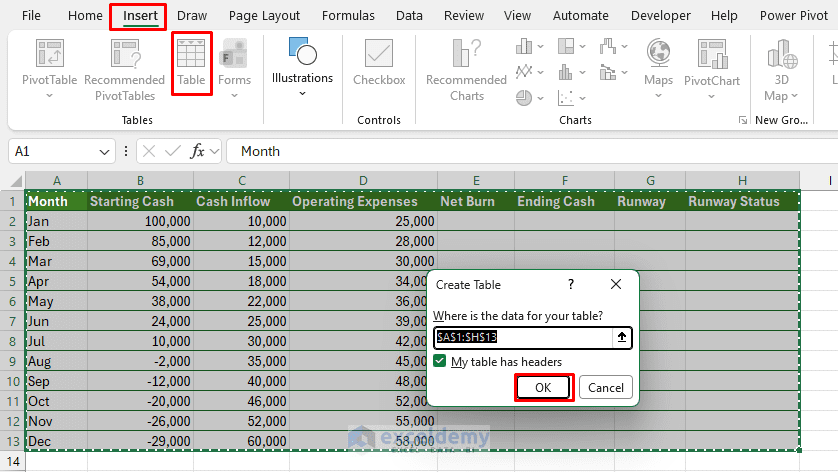
Convert Data into a Table:
Excel Tables make formulas easier to manage because they automatically expand when new rows are added.
- Select your data range
- Go to the Insert tab >> select Table
- Make sure My table has headers is checked
- Click OK
Key Formulas:
- Net Burn:
=[@[Operating Expenses]]-[@[Cash Inflow]]
It calculates net burn by subtracting Cash Inflow from Operating Expenses.
- Ending Cash:
=[@[Starting Cash]]+[@[Cash Inflow]]-[@[Operating Expenses]]
Calculates ending cash by subtracting Operating Expenses from total cash.
- Runway in Months:
=[@[Ending Cash]]/[@[Net Burn]]
It shows how many months the company can continue operating before cash runs out, based on its burn rate.
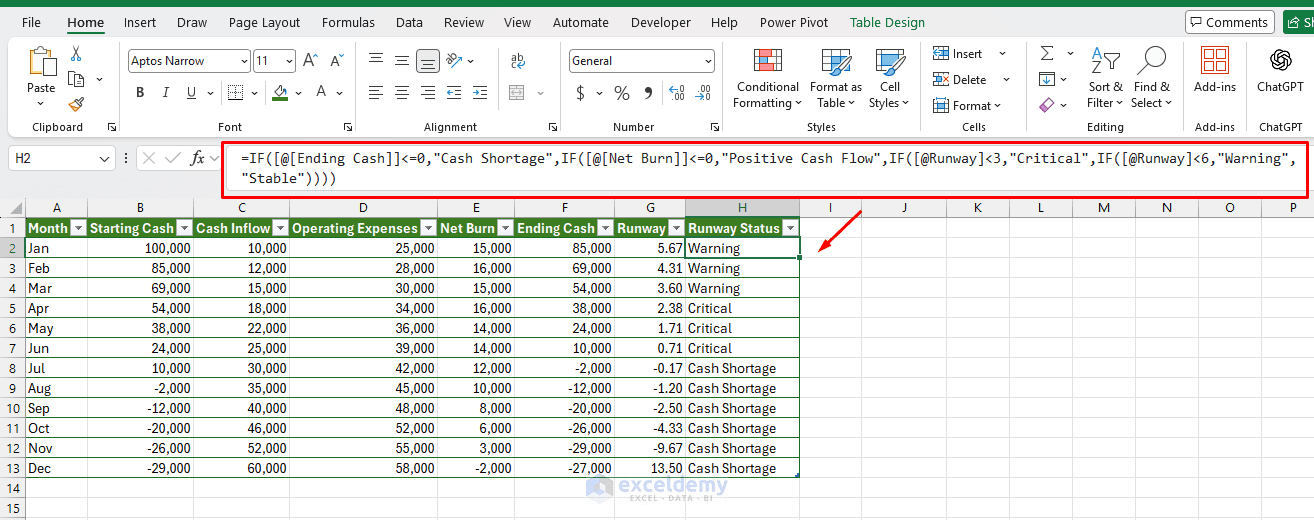
- Runway Status:
=IF([@[Ending Cash]]<=0,"Cash Shortage",IF([@[Net Burn]]<=0,"Positive Cash Flow",IF([@Runway]<3,"Critical",IF([@Runway]<6,"Warning","Stable"))))
Why This Template Is Useful:
This template helps start-ups identify whether spending is sustainable. It also helps founders decide when to reduce costs, increase sales efforts, or start fundraising.
For example, if the current runway is only 4 months, the company may need to raise capital immediately. If the runway is 14 months, the founder may have more time to focus on product development and customer acquisition.
2. Revenue Forecasting Template
Revenue forecasting is the heart of a start-up financial model. It estimates how much money the business expects to generate over time.
The structure of the revenue forecast depends on the start-up's business model. A SaaS company, an e-commerce business, and a marketplace will not forecast revenue in the same way.
Consider a SaaS start-up: revenue is usually based on customers, subscription price, churn, and new sign-ups.
Add Dynamic Features:
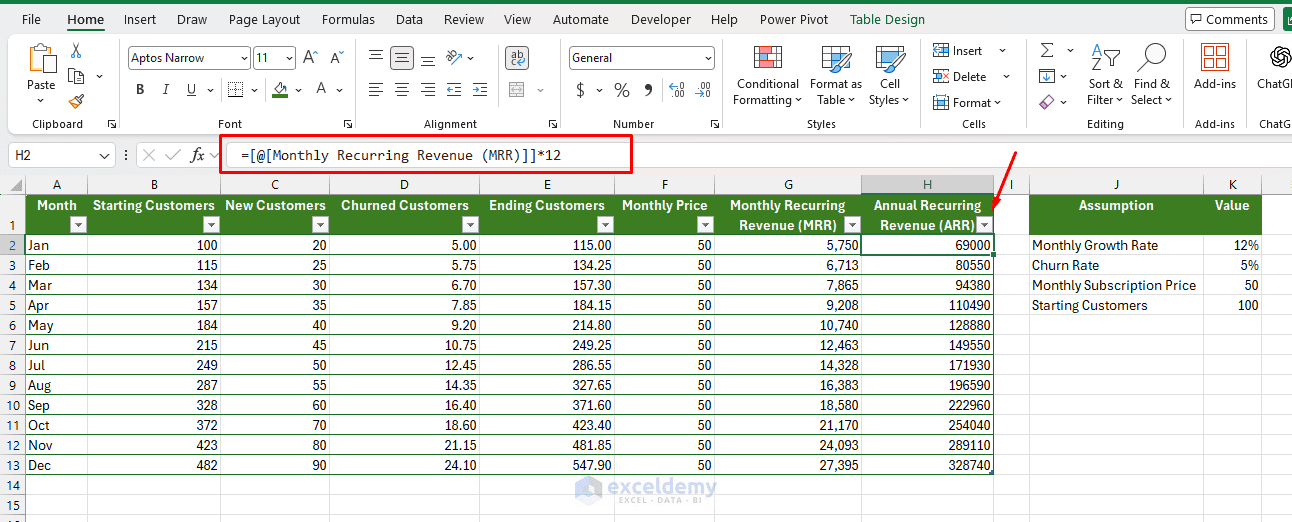
You can make the revenue forecast interactive by adding assumption cells at the top of the sheet:
| Assumption | Value |
| Monthly Growth Rate | 12% |
| Churn Rate | 5% |
| Monthly Subscription Price | 50 |
| Starting Customers | 100 |
Key Formulas:
- Churned Customers:
=Starting Customers*Churn Rate
=[@[Starting Customers]]*$K$3
- Ending Customers:
=[@[Starting Customers]]+[@[New Customers]]-[@[Churned Customers]]
- Monthly Recurring Revenue (MRR):
=[@[Ending Customers]]*[@[Monthly Price]]
- Annual Recurring Revenue (ARR):
=[@[Monthly Recurring Revenue (MRR)]]*12
You can link all monthly calculations to the assumptions. This allows users to change one assumption and instantly update the full forecast.
Formula for New Customers:
=Previous Month Ending Customers * Monthly Growth Rate
Why This Template Is Useful:
This template gives start-ups a clear view of how customer growth affects revenue. Investors often pay close attention to revenue growth, churn rate, and recurring revenue because these metrics show whether the business can scale.
You can also add scenario buttons or dropdowns for:
- Conservative growth
- Expected growth
- Aggressive growth
3. Operating Expense Forecast Template
A start-up's expenses can grow quickly. Salaries, software subscriptions, marketing campaigns, rent, legal fees, contractors, and cloud hosting costs can significantly affect cash flow.
An Operating Expense Forecast Template helps estimate future spending by category.
Key Formulas:
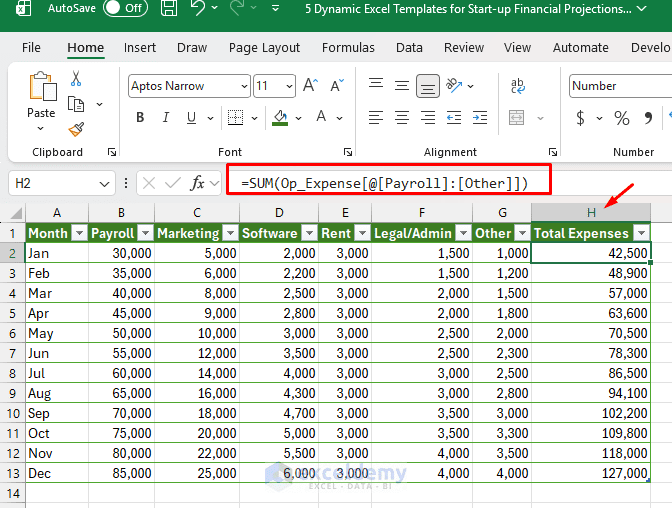
- Total Expenses:
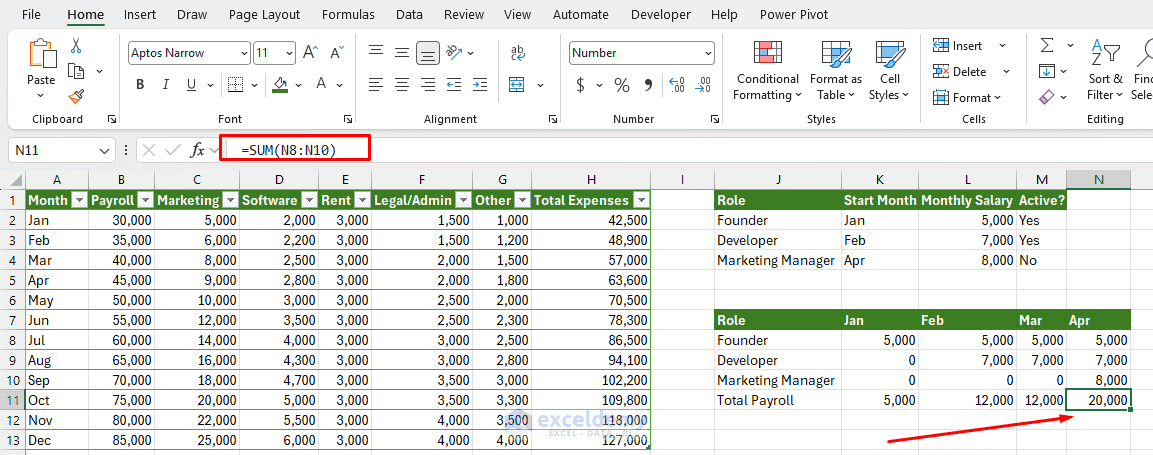
=SUM(Op_Expense[@[Payroll]:[Other]])
Payroll Planning Section:
Payroll is often the largest expense for a start-up. A strong template should include a hiring plan.
| Role | Start Month | Monthly Salary | Active? |
| Founder | Jan | 5,000 | Yes |
| Developer | Feb | 7,000 | Yes |
| Marketing Manager | Apr | 6,000 | No |
You can use formulas to include a salary only after the employee's start month.
=IF(CurrentMonth >= StartMonth, MonthlySalary, 0)
Why This Template Is Useful:
This template helps founders understand which costs are fixed and which are flexible. It also helps identify whether the company is hiring too quickly or spending too much on non-essential areas.
Add Dynamic Features:
To make the template more dynamic, include:
- Expense categories as dropdown lists
- Monthly growth rates for each expense category
- A hiring plan linked to payroll expenses
- A bar chart showing expense breakdown by category
- Conditional formatting for expenses above budget
- Budget variance and percentage formulas
4. Cash Flow Projection Template
A cash flow projection template shows how money moves in and out of the business. While the profit and loss statement shows revenue and expenses, cash flow focuses on actual cash availability.
This is especially important for start-ups because revenue does not always mean immediate cash. Customers may pay late, invoices may be outstanding, or large expenses may occur before revenue is collected.
Key Formulas:
- Net Cash Flow:
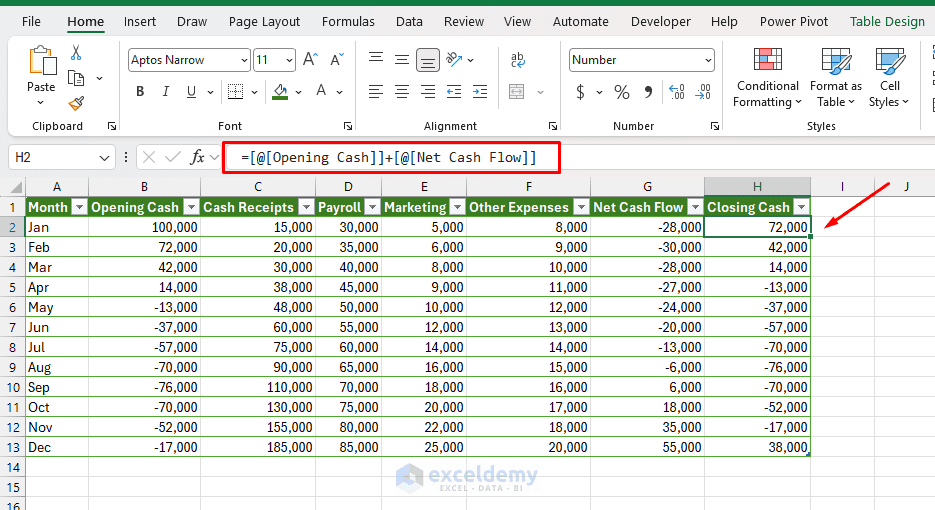
=[@[Cash Receipts]]-([@Payroll]+[@Marketing]+[@[Other Expenses]])
- Closing Cash:
=[@[Opening Cash]]+[@[Net Cash Flow]]
- Next Month's Opening Cash:
=Previous Month Closing Cash
=H2
Why This Template Is Useful:
A cash flow projection helps start-ups avoid cash surprises. A company may appear profitable on paper but still face a cash shortage if payments are delayed.
This template is also useful for investor discussions because it shows how funding will be used and when additional capital may be required.
You can also create a cash flow chart showing:
- Opening cash
- Cash inflows
- Cash outflows
- Closing cash
This gives founders and investors a quick visual summary of the company's financial position.
5. Investor Metrics and Scenario Dashboard Template
An Investor Metrics and Scenario Dashboard Template helps founders summarize the most important business performance indicators in one place. Investors usually want to see whether the start-up is growing efficiently. For this reason, the dashboard should include metrics like revenue growth rate, gross margin, CAC, LTV, MRR, and ARR.
Key Formulas:
- Gross Profit:
=[@Revenue]-[@COGS]
- Gross Margin:
=[@[Gross Profit]]/[@Revenue]
- Customer Acquisition Cost (CAC):
=[@[Marketing Spend]]/[@[New Customers]]
- MRR:
=[@Revenue]
- ARR:
=[@MRR]*12
- Revenue Growth Rate:
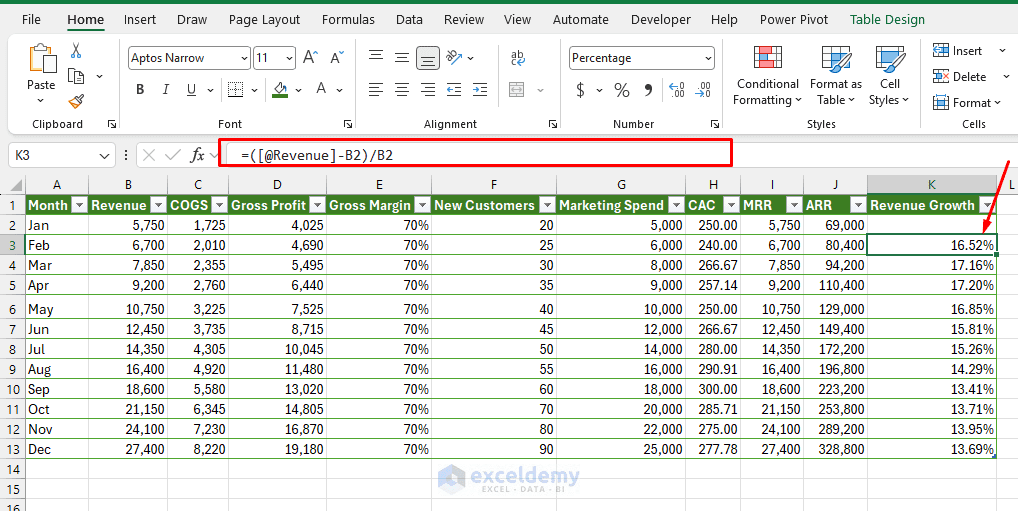
=(Current Month Revenue-Previous Month Revenue)/Previous Month Revenue
=([@Revenue]-B2)/B2
Keep the first month blank because there is no previous month to reference.
LTV and LTV Ratio:
Investors often compare customer lifetime value with customer acquisition cost. This shows whether the start-up is spending efficiently to acquire customers.
You can also add a small assumptions area:
| Assumption | Value |
| Average Revenue per Customer | 50 |
| Gross Margin | 70% |
| Monthly Churn Rate | 5% |
- LTV:
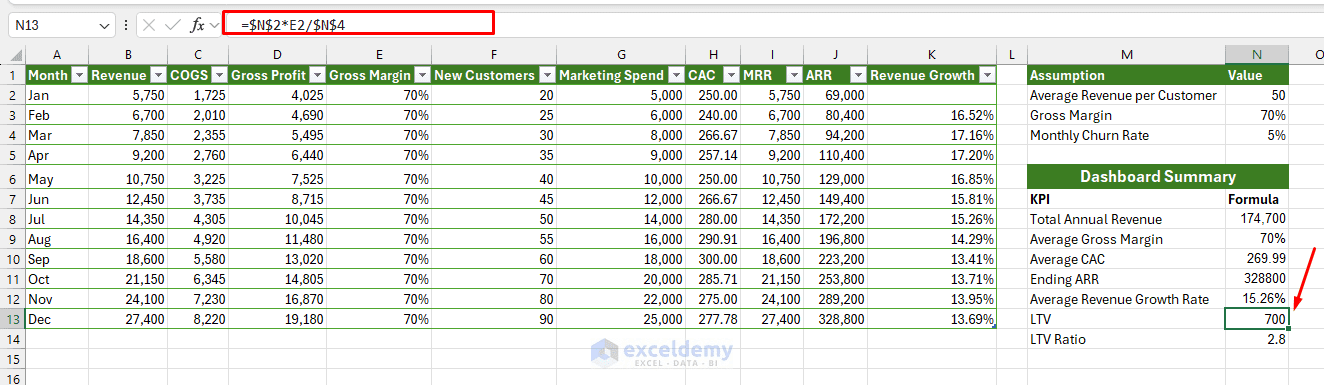
=Average Revenue per Customer*Gross Margin / Monthly Churn Rate
=$N$2*E2/$N$4
- LTV Ratio:
=N13/H2
This means the estimated customer lifetime value is 2.8 times the customer acquisition cost.
Simple Scenario Table:
You can add a small scenario table to compare different business cases:
| Scenario | Revenue Growth | Gross Margin | Churn Rate |
| Conservative | 5% | 60% | 8% |
| Base | 10% | 70% | 5% |
| Aggressive | 18% | 75% | 3% |
Use a dropdown to select a scenario, then use XLOOKUP to return the selected assumption.
=XLOOKUP(SelectedScenario, ScenarioList, RevenueGrowthList)
Dashboard Summary:
The investor dashboard can summarize the most important metrics like this:
| KPI | Formula |
| Total Annual Revenue | =SUM(B2:B13) |
| Average Gross Margin | =AVERAGE(E2:E13) |
| Average CAC | =AVERAGE(H2:H13) |
| Ending ARR | =LOOKUP(2,1/(J2:J13<>""),J2:J13) |
| Average Revenue Growth Rate | =AVERAGE(K3:K13) |
| LTV | =$N$2*E2/$N$4 |
| LTV Ratio | =N13/AVERAGE([CAC]) |
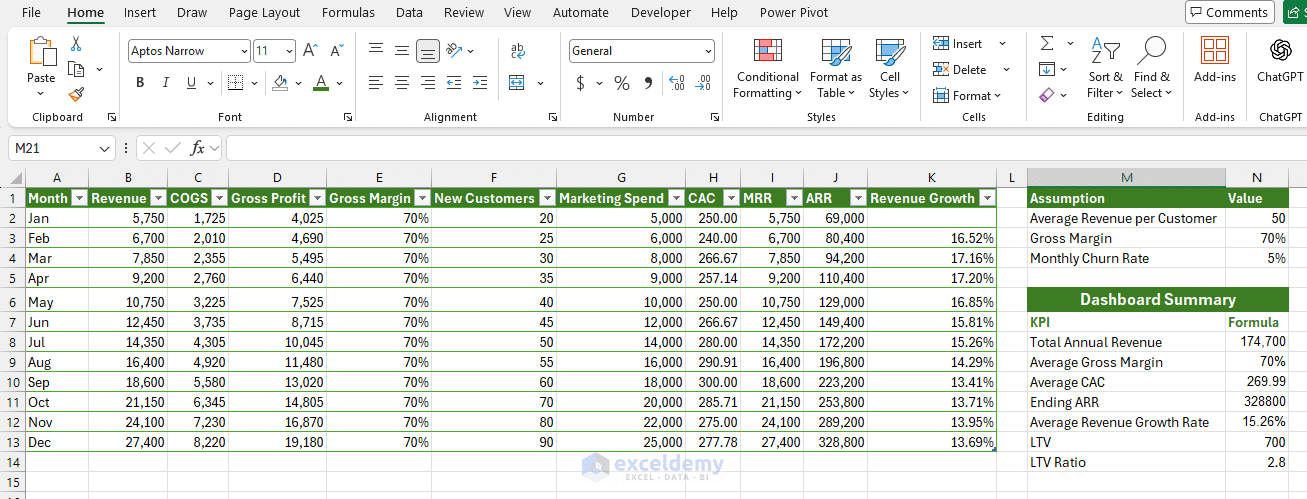
You can also create charts for:
- Monthly revenue growth
- Gross margin trend
- CAC trend
- MRR and ARR growth
- Scenario comparison
Why This Template Is Useful:
This template helps founders show the quality of business growth. A company may have increasing revenue, but investors also want to know whether that growth is efficient.
For example, if revenue is increasing but CAC is also rising too quickly, the business may become expensive to scale. If gross margin is strong and the LTV ratio is healthy, the start-up may look more attractive to investors.
This template is useful for pitch decks, investor meetings, board updates, and internal planning because it summarizes both financial performance and growth efficiency.
Conclusion
Dynamic Excel templates help start-ups make better financial decisions. Instead of manually updating numbers every month, founders can build assumption-driven models that automatically update revenue, expenses, cash flow, burn rate, and runway. Together, these five templates give founders a complete view of the business. They help answer critical questions about growth, spending, funding needs, and long-term sustainability.
Get FREE Advanced Excel Exercises with Solutions!


Please also share data file for better practice.
Hello Usman,
Here, I am attaching the Excel file. Download it to practice and make it your own.
5 Dynamic Excel Templates for Start-up Financial Projections.xlsx
Regards,
ExcelDemy
Hello Shamima
Thank you for this article that combine clarity with dynamic flexibility. Can you please provide me with the data files accompanying the articles for my practicing?
Hello Abdelmutaal,
You are most welcome. Thanks for your feedback and appreciation. Here, I am attaching the Excel file. Download it to practice and make it your own.
5 Dynamic Excel Templates for Start-up Financial Projections.xlsx
Regards,
ExcelDemy
Hello Shamima,
This link does not seem to contain the Excel file or does not download it properly. Please check and revert.
Thank you & best regards
Hello Abdelmutaal,
Please check now, article itself was linked instead of the Excel file.
Regards,
ExcelDemy