Latest Blog Posts

How to Remove 0 from Excel (7 Methods)

When we work with spreadsheets not prepared by us, we face different types of number formats in cells. For example, phone numbers may contain leading ...

How to Add Characters in Excel (with Formula, Flash Fill & VBA)

Here's an overview of a method where characters are added using Flash Fill. Download the Practice Workbook Add Characters.xlsm ...

How to Unhide Columns in Excel (8 Methods)

In this article, we are going to illustrate 7+ methods with examples to unhide columns in Excel. The feature to hide a column in Excel makes columns ...

How to Select Specific Data in Excel (6 Easy Methods)

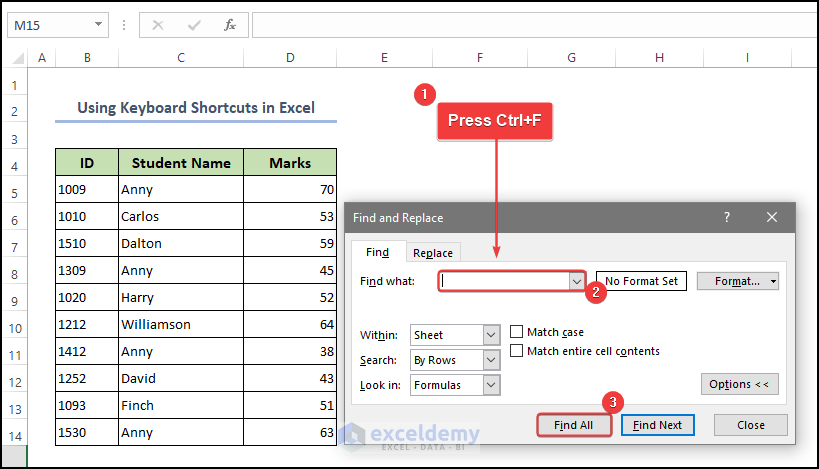
  We have a datasheet where ID, Marks, and Student Names are given in columns B, D, and C, respectively. We will use the dataset to select ...

How to Calculate in Excel If Cells are Not Blank: 7 Exemplary Formulas

Method 1 - Combine IF and AND Functions to Calculate If Cells are Not Blank Step 1: Add a row to show the calculation. Step 2: Go to ...

How to Remove Single Quotes in Excel (6 Ways)

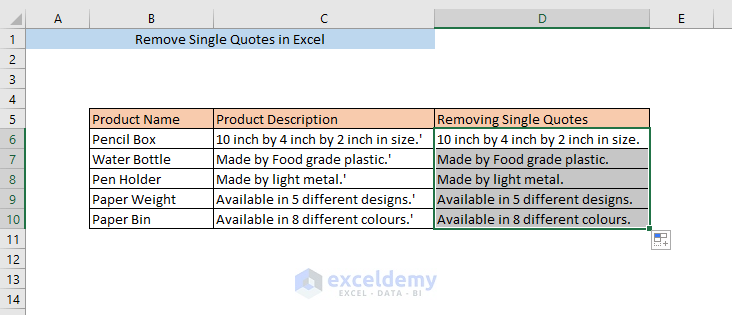
Consider a dataset of product descriptions for some products. The texts in the product description column lie between single quotation marks. If you ...

Why VLOOKUP Returns #N/A When Match Exists (with Solutions)

We will be using a sample product price list as a dataset to demonstrate all the reasons. Reason 1 - Lookup Value Doesn’t Exist in the ...

How to Apply Conditional Formatting to Color Text in Excel

While working with a big dataset in Excel that contains numerous entries, we need to find texts based on their specific text values, conditions, and ...

INDEX MATCH vs VLOOKUP Function (9 Practical Examples)

Here's an overview of using the INDEX-MATCH and the VLOOKUP functions in a dataset. INDEX-MATCH vs. VLOOKUP Function in Excel: 9 Examples ...

How to Use Nested VLOOKUP in Excel: 3 Methods

Method 1 - Using Nested VLOOKUP in Excel to Extract Product Price Steps: Click on the cell that you want the Price of the ID (e.g. cell beside ...

How to Use the VLOOKUP Function in Excel VBA – 4 Examples

Quick View: Sub VLOOKUP_with_User_Defined_Lookup_Value() Book = InputBox("Enter the Name of the Book: ") Set Rng = Range("B4:D13") MsgBox ...

How to Remove Partial Data from Multiple Cells in Excel (6 Methods)

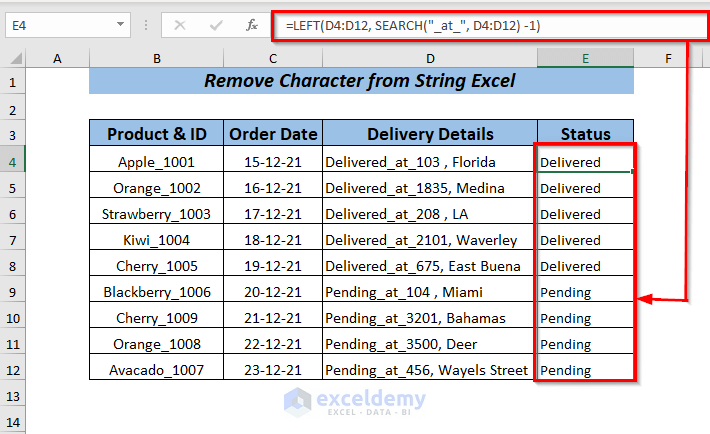
Dataset Overview To make the explanation clear, we'll use a dataset representing product information from a fruit shop, but some information is ...

How to Align Two Sets of Data in Excel (6 Examples)

  Below is a dataset showing two columns: Product List 1 and Product List 2. Next to them is a separate column, Aligned Dataset, where the ...

How to Sum Columns in Excel – 7 Methods

The following dataset represents the order summary of 6 products. To show details of the orders throughout the year: Method 1 - Getting ...

How to Name a Cell in Excel (2 Easy Ways)

In our dataset, we have multiple Products with the sold Quantity, Unit Price, and Total Price. Here's an overview of naming cell D5 using the Name ...

Close the CTA

Advanced Excel Exercises with Solutions PDF


ExcelDemy
Logo