Latest Blog Posts

If Cell is Blank Then Show 0 in Excel (4 Ways)

We have a dataset with production information of different factories. A unit is considered ready to sell when packaging is done. In the Unit Ready to ...

How to Apply a Double VLOOKUP in Excel

Introduction to the Excel VLOOKUP Function The VLOOKUP function is a powerful tool in Excel that allows you to search for a value in the leftmost ...

How to Convert Timestamp to Date in Excel (2 Suitable Cases)

Here's an overview of the dataset and the features we'll use to convert UNIX time and timestamps into an Excel date. How to Convert a ...

How to Unhide Rows in Excel – 8 Quick Methods

The sample dataset showcases item names and sales from January to March. Method 1 - Show Hidden Rows Using the Context Menu in Excel ...

How to Use Excel EXACT Function (6 Suitable Examples)

The Excel EXACT function tests two text strings and returns TRUE or FALSE depending on their exact match or otherwise respectively. The EXACT ...

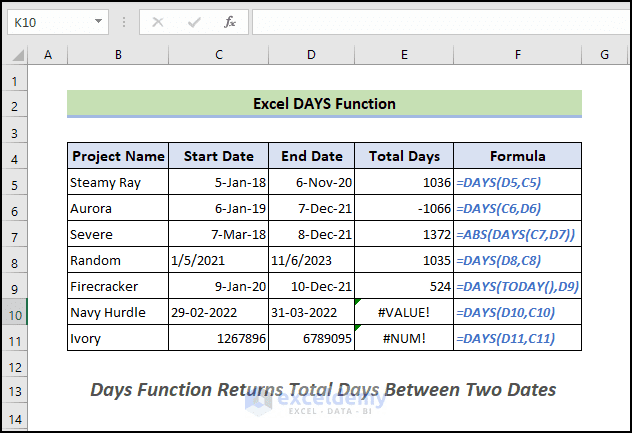
How to Use DAYS Function in Excel (5 Suitable Examples)

Example 1 - Using Excel DAYS Function to Get Estimated Time To estimate the total number of days needed to complete the project Steamy Ray from its ...

How to Use FIXED Function in Excel (6 Suitable Examples)

The FIXED function is a built-in function in Microsoft Excel. It is categorized as a String/Text Function. It is one commonly used procedure in ...

Excel Formula to Change Text Color Based on Value: 3 Ways

Method 1 - Using ISODD Function Steps: Select the column where you want to change the text color. Go to the Home tab. Select the New Rule ...

How to Use TIME Function in Excel (8 Suitable Examples)

The TIME function is a built-in function in Excel that is categorized as a Date/Time Function. TIME function of Microsoft Excel is one of the ...

How to Shift Cells Right in Excel (4 Quick Ways)

While working on a worksheet, you may need to shift your existing cells to add some extra data in between. When cells are shifted, the content of ...

How to Lock Columns in Excel (4 Methods)

The dataset below will be used for illustration. By default, an Excel worksheet has all its cells locked. But, it has no effect until the ...

If Statement in Excel VBA

In this article, I’ll show you how you can use the If statement in VBA in Excel. You’ll learn to use the If statement, along with to use the ElseIf ...

How to Freeze Columns in Excel (5 Methods)

While working with a big dataset sometimes we need to know how to Freeze Columns in Excel as well as Rows, or both of a worksheet. It’s necessary to ...

Conditional Formatting If Cell is Not Blank

Method 1 - Use the Conditional Formatting ‘Highlight Cell Rules’ Option If a Cell Is Not Blank Steps: Select the entire dataset B5:D13. ...

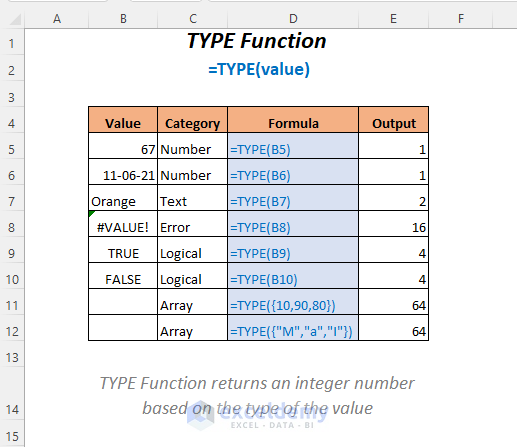
How to Use TYPE Function in Excel (8 Examples)

The TYPE function in Excel will return an integer number based on the type of data that you are entering. In this article, you will be able to know ...

Close the CTA

Advanced Excel Exercises with Solutions PDF


ExcelDemy
Logo