Latest Blog Posts

Using Excel to Clean and Prepare Data for Analysis (10 Examples)

Looking for ways of using Excel to clean and prepare data for analysis? Then, this is the right place for you. Sometimes, the data we get is not ...

How to Rearrange Columns Alphabetically in Excel (5 Methods)

In this article, we will demonstrate 5 easy methods for rearranging columns in Excel alphabetically. Method 1 - Using Excel Sort Feature ...

Excel Pivot Table Not Grouping Dates by Month (4 Solutions)

Dataset Overview The image below displays our dataset. We'll highlight common errors that might occur during the solution process and guide you on ...

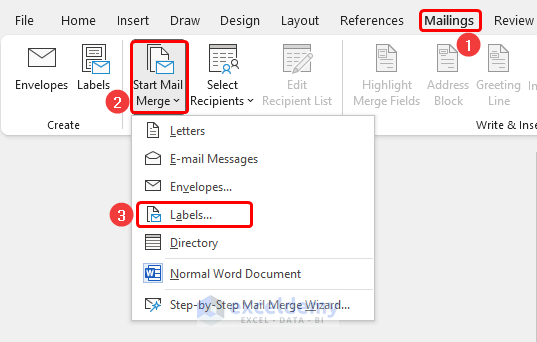
How to do a Mail Merge from Excel to Excel (Easy Steps)

Scenario Often, users have a few customer mailing credentials in an Excel file and need to fetch additional credentials that match existing data in ...

How to Calculate Area of Irregular Shape in Excel (3 Easy Methods)

To illustrate the calculations, we will use the sample dataset below. Method 1 - Determine Area of Irregular Shape by Simple Calculation ...

How to Format a Column for Email Addresses in Excel: 2 Easy Ways

Method 1 - Format Column in Excel for Email Addresses with ‘Data Validation’ Feature STEPS: Select cells that you want to format for email ...

How to Group Rows in Excel by Name (3 Methods)

Dataset Overview Our dataset to demonstrate these methods includes product, category, and amount information for different countries: ...

How to do a Mail Merge from Excel to Outlook with Attachments (2 Methods)

Method 1 - With Single Attachment In this method, we’ll demonstrate how to perform a mail merge from Excel to Outlook with a single attachment. ...

How to Separate City and State in Excel – 3 Methods

The dataset includes the name of cities and states. Method 1 - Using the Excel Text to Columns Wizard Steps: Add two columns: City ...

How to Rearrange Data in Excel (5 Examples)

Below is a dataset containing information on a department store in three columns: Customer ID, Customer Name, and Sales. Method 1 - Using ...

How to Clean Up Raw Data in Excel (10 Suitable Ways)

In Excel, it is a common thing that you need to clean up your raw data. You might need to remove duplicates or find and replace some specific cells ...

Convert Formula to Value in Multiple Cells in Excel (5 Effective Ways)

This article illustrates how to convert formula to value in multiple cells in excel. We usually use cell references in the formulas in Excel. ...

How to Group Time Intervals in Excel: 3 Suitable Ways

Method 1 - Group Time by Hour Intervals Go to the Insert tab in the top ribbon. Click on the Pivot Table option. Select the data ...

How to Consolidate Data from Multiple Rows in Excel (4 Methods)

In many cases, you may need to consolidate, merge, or combine data. In Microsoft Excel, you can do such types of tasks in bulk and within seconds. ...

Formula to Create Email Address in Excel (2 Methods)

Suppose you have the following dataset. Method 1 - Combine CONCATENATE, LOWER, and LEFT Functions to Create Email Addresses Steps: ...

Close the CTA

Advanced Excel Exercises with Solutions PDF


ExcelDemy
Logo