

Looking for a way to calculate VaR using the Delta-Normal method in Excel? Well, you have come to the right place. In this article, we will walk you through four easy steps to calculate VaR using the Delta-Normal method in Excel effectively and with appropriate illustrations.
Introduction to VaR
VaR stands for Value at Risk. It is a statistic that is used to forecast the biggest losses over a certain period of time. The magnitude and chance of possible losses in portfolios can be calculated using it. VaR is a tool used by financial companies to estimate and manage the degree of exposure to risk.
Calculate VaR Using Delta-Normal Method in Excel: 4 Easy Steps
In this article, we will demonstrate 4 easy steps to calculate VaR using the Delta-Normal method. We will use the following dataset for this purpose.
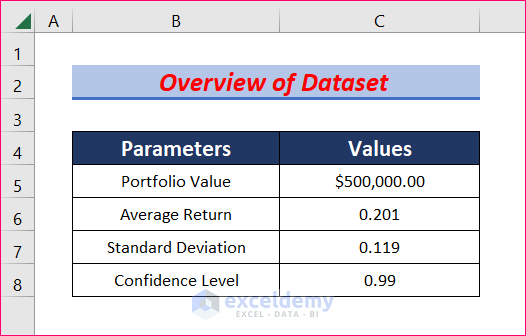
Step 1: Create Dataset with Proper Parameters
In this step, we will create a dataset with the necessary parameters. You must have the values of these parameters to calculate VaR using the Delta-Normal method in Excel.
- First of all, we will insert the value of the Portfolio.
- Next, we need the value of the Average Return. We assumed the Average Return value of 201.
- Then we require Standard Deviation. Let us take the value for a Standard Deviation as 119.
- Finally, 99 is taken as the Confidence Level.

Step 2: Find Minimum Return
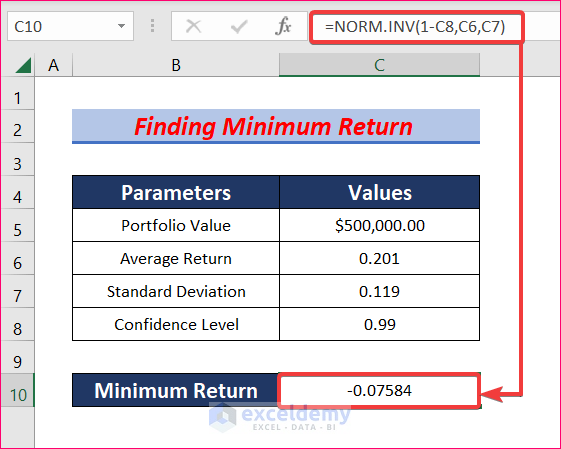
In this step, we will use the NORM.INV function to find the value of Minimum Return to calculate VaR using the Delta-Normal method. Let’s follow the instructions below to learn!
- First, select cell C10 and write down the following formula.
=NORM.INV(1-C8,C6,C7)- This formula returns the inverse of the normal distribution for the mean of 0.201 and a standard deviation of 0.119.
- After that, hit Enter to get the value of the Minimum Return. The minimum value is -0.07584.
Step 3: Calculate Value of Portfolio
Now we need to calculate the value of the new Portfolio to determine Delta-Normal VaR in Excel.
- First of all, select cell C11 and type the following formula.
=C5*(C10+1)- This formula will give the result of the Value of Portfolio as $462,082.30.

Read More: How to Calculate Delta in Excel
Step 4: Determine Value at Risk
Finally, we can determine the Value at Risk (VaR) using the previous and new Portfolio values.
- First, select cell C12 and write down the following formula in the formula bar.
=C5-C11- Then press the Enter button to get your desired result.
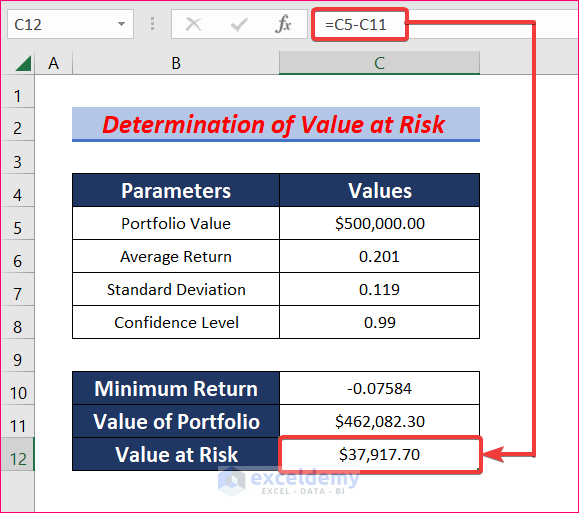
- Don’t forget to give proper cell references or you won’t get the desired result.
Download Practice Workbook
Download this practice workbook to exercise while you are reading this article.
Conclusion
Thanks for making it this far. I hope you find this article useful. Now you know four easy steps to calculate VaR using the Delta-Normal method in Excel. Please let us know if you have any further queries, and feel free to give us any recommendations in the comment section below.
Related Articles
- How to Calculate Option Greek Delta in Excel
- How to Calculate Delta Percentage in Excel
- How to Calculate Delta E Color in Excel
- How to Calculate Delta Delta CT in Excel
- Delta Neutral Strategy in Excel
- Delta Hedging Example in Excel
<< Go Back to Excel DELTA Function | Excel Functions | Learn Excel
Get FREE Advanced Excel Exercises with Solutions!

