Macros & Excel VBA

How to Open Another Workbook and Copy Data with Excel VBA – 4 Examples

You have two Excel files, Copying Data with VBA.xlsm is the Source File containing the data you want to copy, and Sales Report.xlsx is the ...

How to Open the File Dialog Default Folder with Excel VBA – 3 Methods

Method 1 - Using the VBA FileDialog Property to Open the File Dialog Default Folder Steps: Press ALT+F11 to open the VBA Module window. ...

How to Check If a Workbook is Open and Close It Using Excel VBA (5 Methods)

In the following picture, you can see that we have several workbooks. We want to check if a workbook is open and close it using VBA. ...

[Fixed!] Method Open of Object Workbooks Failed (4 Solutions)

Solution 1 - Use GetOpenFilename Method To solve the problem of “method open of object workbooks failed”, you need to use VBA. Microsoft Visual ...

VBA Code to Convert XML to Excel: 2 Methods

Method 1 - Go to VBA Module In this step, we will show how to get into the VBA module. Enter a blank Excel sheet. Go to the Sheet Name ...

How to Use Macro to Save Excel File with New Name (5 Ways)

Method 1 - Keeping File in Current Location Press Ctrl+F11 to open the VBA. Go to the Insert option and select the Module. The VBA ...

How to ReDim Preserve a 2D Array in Excel VBA – 2 Methods

This is the sample dataset created from a 2D array with three rows and two columns. Method 1 - ReDim Preserve the Last Dimension of a 2D ...

How to Add a Named Sheet in Excel Using VBA (6 Methods)

To add a sheet with a specific name in Excel using VBA, we’ll utilize the Sheets object. Below is the fundamental VBA code snippet to achieve this: ...

Create New Workbook and Save Using VBA in Excel

Excel is the most widely used tool for dealing with massive datasets. We can perform myriads of tasks of multiple dimensions in Excel. Visual Basic ...

Unable to Set the Visible Property of the Worksheet Class – 3 Solutions

  Sometimes trying to change the visible property in Microsoft Excel results in the error message "unable to set the visible property of the ...

How to Create a New Workbook and Name It Using Excel VBA (6 Methods)

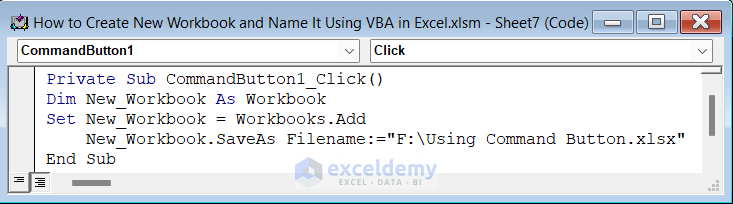
Method 1 - Using the Add Method We'll use the below workbook with several Worksheets. In the first method, we will create a new workbook and name it ...

How to Unhide All Sheets in Excel Using VBA (4 Examples)

Sometimes, we have to show all of our hidden sheets in the sheet name bar. Using Excel VBA code, we can do such a task within the blink of an eye. In ...

Excel VBA: Zoom to Fit Screen (4 Suitable Examples)

If you are looking for ways to zoom in to fit a screen using VBA in Excel, then you will find this article helpful. By using the VBA codes of this ...

Excel VBA: Add Sheet After Last (3 Ideal Examples)

Sometimes, you might add an Excel sheet after the last for the convenience of your work. Adding an Excel sheet after the last is an easy task. This ...

Excel VBA to Add Sheet If It Does Not Exist (with Quick Steps)

Excel VBA - Add Sheet If It Does Not Exist (A Quick View) Sub AddSheetIfNotExist() Dim addSheetName As String Dim requiredSheetName As String ...

Close the CTA

Advanced Excel Exercises with Solutions PDF


ExcelDemy
Logo