How to Add Confidence Interval Error Bars in Excel

The Confidence Interval is an important indicator of the limitations of estimates in a set of data. It is important to measure if enough simulations ...

How to Sum Absolute Value in Excel: 6 Easy Ways

We will consider a simple dataset that contains both negative and positive numbers. Method 1 - Use the ABS Function Inside the SUM ...

How to Make a Future Salary Calculator in Excel (with Easy Steps)

Here is our sample data set with salary components and their respective values. Step 1. Calculating Gross Salary Select cell C13. ...

How to Change Comment Color in Excel: 3 Suitable Examples

Method 1 - Using the Format Comment Option from Context Menu Steps We have comments presented for the marks obtained by each of the students in ...

How to Copy and Paste Formulas Without Changing Cell References in Excel

Let’s say we are dealing with a dataset in which different employees and their monthly salaries are shown. The first name “Sam” is the project ...

How to Find and Replace Multiple Words from a List in Excel – 8 Methods

This is an overview: Method 1 - Use the Nested SUBSTITUTE Function to Replace Multiple Words in Word Steps: Select C5 and use ...

How to Sort CSV File in Excel: 2 Quick Methods

Method 1 - Sort CSV File Automatically with Columns in Excel Create a text file like this with the information of Product, Quantity and Sales ...

How to Extract Month and Day from a Date in Excel – 6 Methods

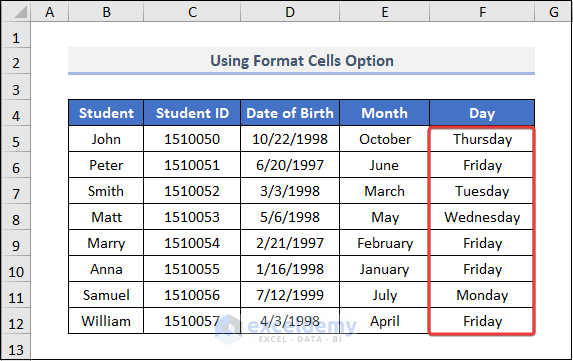
This dataset showcases Students and their Date of Birth.   Method 1 - Using the Format Cells Option Steps: Select the entire ...

[Solved]: Currency Format Not Working in Excel: 3 Methods

Method 1 - Use VALUE Function Steps: Choose a cell (F5) and write the following formula down- =VALUE(D5) Press ENTER and drag ...

How to Copy PDF File Names into Excel (9 Efficient Methods)

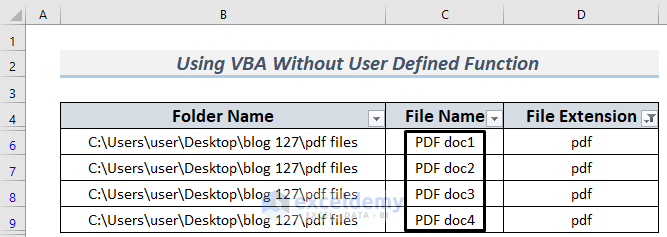
We can copy the names of the PDF files in a folder in various ways. A general presentation of an Excel sheet with PDF file names looks like the ...

How to Merge CSV Files in Excel (2 Easy Ways)

CSV files are comma-separated values files, and can be used to store tabular data. They can be opened in text editors like Notepad, or in spreadsheet ...

How to Create Stock Comparison Chart in Excel (3 Easy Methods)

Sometimes for stock visualization, you may need to prepare a Stock Comparison chart in Excel. Furthermore, you can easily visualize the situation ...

If Value Exists in Column Then Copy Another Cell in Excel (3 Ways)

There are 3 ways to copy another cell if a value exists in a column in Excel. This article will walk you through each of them. Suppose we have the ...

[Fixed!] Cannot Delete Comment in Excel (3 Suitable Solutions)

Comments help you to mention something about data. But after you are done with the comments you may want to delete them. Deleting comments is quite ...

How to Calculate Free Cash Flow in Excel (to Firm and Equity)

Part 1 - Calculating the Free Cash Flow to Firm (FCFF) Steps: To calculate Free Cash Flow to Firm (FCFF), we have collected an Income Statement ...

Close the CTA

Advanced Excel Exercises with Solutions PDF


ExcelDemy
Logo