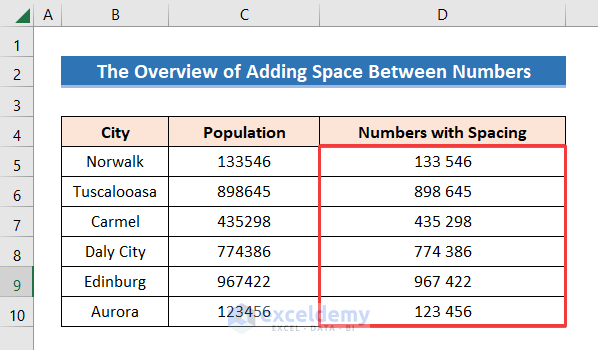
The dataset below showcases numbers with and without spacing. The following dataset contains population data of 6 cities in the United States. ...
Method 1 - Using Context Menu Steps: ➽ Select the rows that you want to delete. ➽ Right-click your mouse. ➽ Select Delete from the Context ...
Here's an overview of coloring cells based on various conditions. Excel Formula to Color Cell If the Value Follows a Condition: 3 ...
In this dataset, there are three categories: Fruit, Flower, and Food, each marked with a different color. Let's count the cells with a specific ...
We imported Name and ID data into Excel as merged text. We want to make a proper structure of Name and ID. How to Add Space Between Text ...
Method 1 - Using SUMIF Function Steps: ➤ Write the color of cells of the Sales column manually in the Color column. ➤ Select the output ...
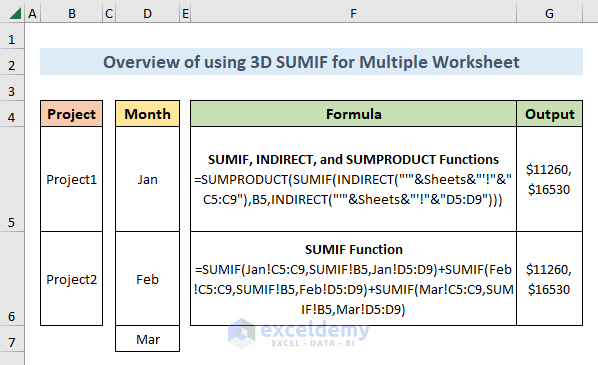
The sample Excel Workbook contains three Worksheets named Jan, Feb, and March. In each sheet, the B4:D9 cells contain the Employee, Project, and ...
Sometimes we need to color our Excel cell to make the dataset unique, highlighted, beautiful, and easy to visualize. In this article, we will know ...
In this tutorial, we will describe how to use the SUMIF function based on a partial match in three different scenarios: at the beginning of a value, ...
In this article, we will explain how to Fill across multiple worksheets in Excel, whether filling data, formats, or both. Example ...
Example 1 - Using SUMIFS Function with Asterisk (*) Wildcard 1.1 Text Contained Within a Text String Steps: Insert the formula in cell E5. ...
We have entries of certain Categories and Products in a dataset. We'll check if a cell contains text and then return a value in Excel. ...
In the following image, you will find an overview of extracting the cell color. GET.CELL Function in Excel: Overview The Basic Syntax: ...
This is an overview. The sample dataset has 8 rows and 2 columns. All cells are in General format. Method 1 - Use the COUNTIF ...
If there is a cell with #N/A, #VALUE, or #REF! value in the selected range in which you want to apply the SUM function, it will return #N/A. ...
Advanced Excel Exercises with Solutions PDF