Latest Blog Posts

How to Edit a Pivot Table in Excel – 5 Methods

This is a Pivot table containing a sample dataset: ordered items, unit pricing, quantities, and expenses. Method 1 - Changing the Data ...

How to Total a Column in Excel (7 Effective Methods)

To illustrate our methods for totaling a column, we'll use the following sample dataset. Method 1 - Using the SUM Function 1.1  - Sum ...

How to Perform Custom Filter in Excel (5 Ways)

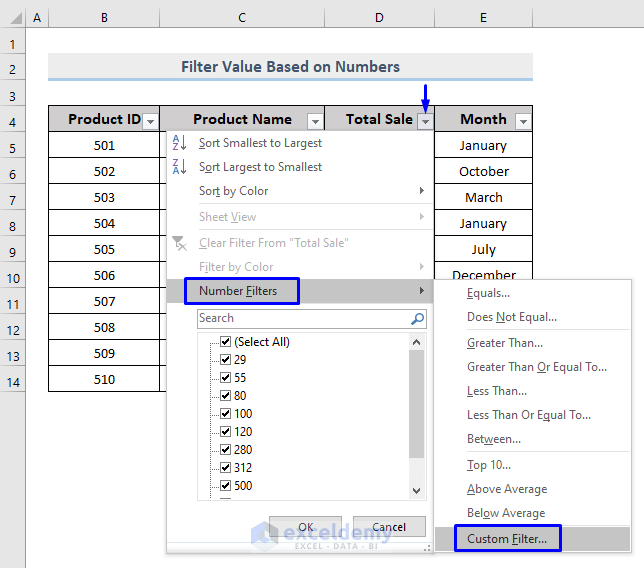
We will use the sample dataset provided below to perform our custom filter. Method 1 - Filter Value Based on Number in Excel Steps: ...

How to Use Sort Function in Excel VBA (8 Suitable Examples)

You may be accustomed to using the Sort & Filter option for sorting your data but there is a way to do this by using the Excel VBA SORT function ...

How to Use VBA FileDateTime Function in Excel (3 Uses)

In Microsoft Excel, we use the VBA FileDateTime function to find out the last modification date of any drive, file, or directory. In this article, we ...

Pivot Table Is Not Picking up Data in Excel (5 Reasons and Solutions)

Let's work with a dataset containing date-wise sales of some mobile phones to make a Pivot Table. Reason 1 - Excel Pivot Table Is Not ...

How to Remove Read Only from Excel (7 Easiest Ways)

An Excel file can be in Read Only mode for two reasons one is if any author has purposely done it for security issues otherwise anyone downloaded the ...

How to Fix “Wrap Text Not Working” in Excel (4 Possible Solutions)

Understanding the Wrap Text Feature in Excel In Excel, the Wrap Text feature is crucial for improving text readability. Let’s consider a dataset ...

How to Use Greater Than or Equal to Operator in Excel Formula

In Excel, the logical operator “greater than or equal to” is used to collate two data cells of matching data type. The sign “>=” is used to ...

How to Filter Horizontal Data in Excel (3 Methods)

The sample dataset contains sales data for 8 products that fall into 3 different categories. We will discuss 3 suitable methods to filter this ...

How to Remove Gridlines in Excel for Specific Cells (2 Methods)

Excel has horizontal and vertical gray lines called Gridlines. Gridlines separate one cell from another. Here's an overview of what a table looks ...

How to Use VBA ROUND Function in Excel (6 Quick Uses)

In this article, we will illustrate the use of the VBA Round function. Rounding is basically a mathematical term. It makes a decimal value shorter ...

How to Sort Data in Excel Using a Shortcut (7 Methods)

Method 1 - Excel Shortcut for Single Column Sorting In this method, we’ll demonstrate how to sort a single column using Excel shortcuts. Let’s ...

How to Fix If a Pivot Table Field Name Already Exists (2 Methods)

The dataset below contains some salespersons’ sales, units, and corresponding regions. Method 1 - Using Different Custom Names Steps: ...

How to Get a Count in Excel Pivot Table Calculated Field

The Calculated Field is a powerful feature used to analyze the values of some other fields in an Excel Pivot Table using formulas. By default, the ...

Close the CTA

Advanced Excel Exercises with Solutions PDF


ExcelDemy
Logo