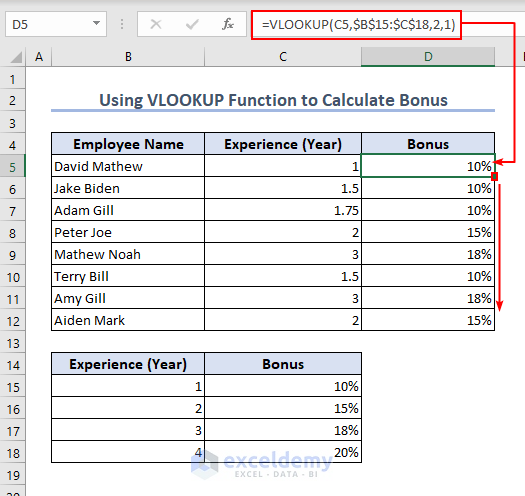
This is an overview: Download Practice Workbook Download the practice workbook. VLOOKUP.xlsx Solution 1 - The ...
Download Practice Workbook Download the worksheet. Performing VLOOKUP in Range.xlsx Example 1 - Applying the VLOOKUP ...
Excel Sum with VLOOKUP: Knowledge Hub How to Sum All Matches with VLOOKUP in Excel Use VLOOKUP to Sum Multiple Rows in Excel How to ...
The table below is an overview of table array to lookup values in Excel. Download Practice Workbook Table Array.xlsx What Is ...
VLOOKUP Between Worksheets in Excel: Knowledge Hub VLOOKUP and SUM Across Multiple Sheets VLOOKUP Example Between Two Sheets Perform ...
Advanced VLOOKUP in Excel: Knowledge Hub Use VLOOKUP for Multiple Columns VLOOKUP from Multiple Columns with Only One Return Use VLOOKUP ...
In this article, we'll describe four examples of how to use the VLOOKUP function with an exact match effectively. Here is the overview of the dataset ...
We will consider the following dataset. Here, we applied a VLOOKUP formula on Cell G5. Then, we'll copy the formula. Method 1 - ...
1. Find and Insert VLOOKUP Column Index Number Manually Find the column index number and then insert that in the formula manually in the VLOOKUP ...
Often, it is desired to hide the source data in Excel. This will keep the users from accidentally or willingly editing the source data. In this ...
We will use the following dataset to explain how you can remove a VLOOKUP formula from a cell or table. Method 1 - Use Ribbon Options to ...
Brief Description of the VLOOKUP Function In the below example, there is a movie dataset. Here, we used the VLOOKUP formula to extract data. ...
Method 1 - Dealing with Approximate Match One of the main differences between LOOKUP and VLOOKUP functions is that the LOOKUP function is bound to ...
Here's an overview of using the INDEX-MATCH and the VLOOKUP functions in a dataset. INDEX-MATCH vs. VLOOKUP Function in Excel: 9 Examples ...
Quick View: Sub VLOOKUP_with_User_Defined_Lookup_Value() Book = InputBox("Enter the Name of the Book: ") Set Rng = Range("B4:D13") MsgBox ...
Advanced Excel Exercises with Solutions PDF