

If you have been using Excel for some time, you probably know that VBA is a powerful tool to automate your tasks and streamline your workflows. But did you know that you can call an Excel VBA subroutine (or “sub”) from another sheet? This can save you a lot of time and effort when working with complex spreadsheets. In this article, we will explore different ways in Excel VBA to call sub from another sheet.

Create a Sub for a Sheet
We will use the following VBA code in a sub in Sheet1 and call this sub from different worksheets.

- First, you have to launch the VBA macro editor from your workbook. Go to the Developer tab >> Visual Basic.
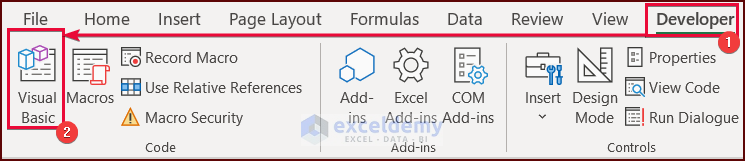
- Go to the VBA window of Sheet1 and put the following code there. Press the Run button or F5 key to run the code.

Public Sub Sub_1()
    MsgBox "Calling Sub_1"
End Sub
VBA Breakdown
Public Sub Sub_1()- This line declares a public subroutine called Sub_1. The Public keyword indicates that this subroutine can be accessed from any other module or program.
MsgBox "Calling Sub_1"- This line displays a MsgBox with the text “Calling Sub_1“
End Sub- This line marks the end of the subroutine.
This is the output of the reference sheet.

Excel VBA Call Sub from Another Sheet: 4 Easy Ways
We can call the sub from other sheets in Excel. In this article, we have demonstrated 4 easy ways in detail to call sub from another sheet in Excel VBA.
1. Using the Sub Name to Call Sub from Another Sheet
We can use the following VBA code to call a sub from another sheet by using the sub name in Excel VBA.

Go to the VBA window of Sheet2 and put the following code there. Press the Run button or F5 key to run the code.
Sub CallingSub_1()
    Sheets("Call_Sub").Sub_1
End Sub
VBA Breakdown
Sub CallingSub_1()- This line declares a subroutine called CallingSub_1.
Sheets("Call_Sub").Sub_1- This line calls the Sub_1 subroutine from the Call_Sub The Sheets object refers to a collection of all the worksheets in the workbook. Call_Sub is the name of a worksheet, and Sub_1 is the name of a subroutine within that worksheet.
End Sub- This line marks the end of the subroutine.
So, when this subroutine is executed, it will call the Sub_1 subroutine in the Call_Sub worksheet.

Read More: VBA to Call Sub From Another Workbook in Excel
2. Use Worksheets Collection to Call Sub from Another Sheet in Excel VBA
We can use the following VBA code to call a sub from another sheet by using Worksheets in Excel VBA.

Go to the VBA window of Sheet3 and put the following code there. Press the Run button or F5 key to run the code.
Sub CallingSub_2()
    Worksheets("Call_Sub").Sub_1
End Sub
VBA Breakdown
Sub CallingSub_2()- This line declares a subroutine called CallingSub_2.
Worksheets("Call_Sub").Sub_1- This line calls the Sub_1 subroutine from the Call_Sub The Worksheets object also refers to a collection of all the worksheets in the workbook. Call_Sub is the name of a worksheet, and Sub_1 is the name of a subroutine within that worksheet.
End Sub- This line marks the end of the subroutine.

3. Use Call Function to Call Sub from Another Sheet in Excel
We can use the following VBA code to call a sub from another sheet by using the Call function in Excel VBA.

Go to the VBA window of Sheet4 and put the following code there. Press the Run button or F5 key to run the code.
Sub CallingSub_3()
    Call Sheets("Call_Sub").Sub_1
End Sub
VBA Breakdown
Sub CallingSub_3()- This line declares a subroutine called CallingSub_3.
Call Sheets("Call_Sub").Sub_1- This line calls the Sub_1 subroutine from the Call_Sub worksheet, using the Call The Sheets object refers to a collection of all the worksheets in the workbook. Call_Sub is the name of a worksheet, and Sub_1 is the name of a subroutine within that worksheet.
End Sub- This line marks the end of the subroutine.

4. Use Application.Run Method to Call Sub from Another Sheet in Excel
We can use the following VBA code to call a sub from another sheet by using the Application.Run in Excel VBA.

Go to the VBA window of Sheet5 and put the following code there. Press the Run button or F5 key to run the code.
Sub CallingSub_4()
    Application.Run Sheets("Call_Sub").Sub_1
End Sub
VBA Breakdown
Sub CallingSub_4()- This line declares a subroutine called CallingSub_4.
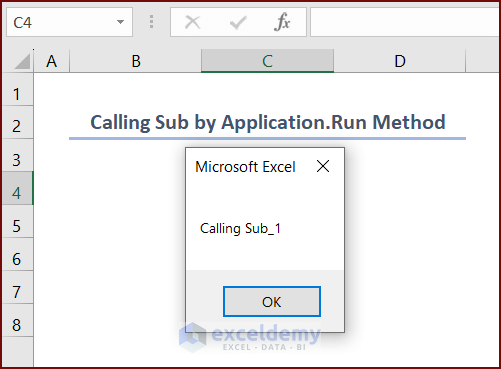
Application.Run Sheets("Call_Sub").Sub_1- This line uses the Run method to run the Sub_1 subroutine from the Call_Sub worksheet. The Sheets object refers to a collection of all the worksheets in the workbook. Call_Sub is the name of a worksheet, and Sub_1 is the name of a subroutine within that worksheet.
End Sub- This line marks the end of the subroutine.
Excel VBA Call Sub from This Workbook
We can use the following VBA code to call a sub from the ThisWorkbook module in Excel VBA.

Go to the VBA window of ThisWorkbook and put the following code there. Press the Run button or F5 key to run the code.
Sub CallingSub_5()
    With Sheets("Call_Sub")
        Call .Sub_1
    End With
End Sub
VBA Breakdown
Sub CallingSub_5()- This is the beginning of a new subroutine named CallingSub_5.
 With Sheets("Call_Sub")
        Call .Sub_1
End With- These three lines of code call a subroutine named Sub_1 that is located within the worksheet named Call_Sub using the With statement.
End Sub- This line marks the end of CallingSub_5.

Excel VBA Call Sub from Another Module
We can use the following VBA code to call a sub from another module in Excel VBA.
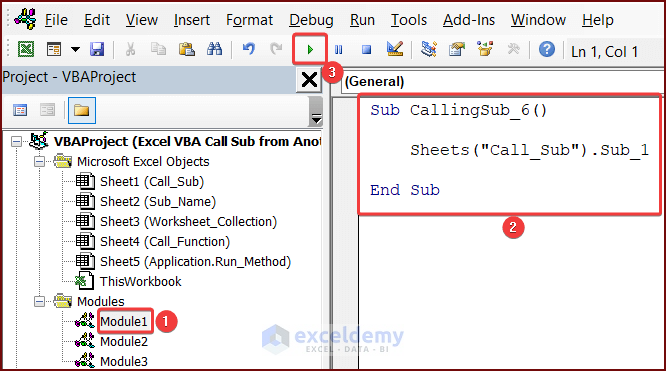
Paste the following code in your Module1 and press the Run button or F5 key to run the code.
Sub CallingSub_6()
    Sheets("Call_Sub").Sub_1
End Sub
VBA Breakdown
Sub CallingSub_6()- This line declares a subroutine called CallingSub_6.
Sheets("Call_Sub").Sub_1- This line calls the Sub_1 subroutine from the Call_Sub The Sheets object refers to a collection of all the worksheets in the workbook. Call_Sub is the name of a worksheet, and Sub_1 is the name of a subroutine within that worksheet.
End Sub- This line marks the end of the subroutine.
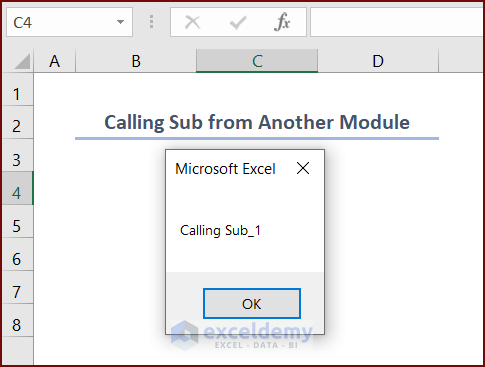
So, when this subroutine is executed, it will call the Sub_1 subroutine in the Call_Sub worksheet.
Read More: Excel VBA to Call Private Sub from Another Module
Call Sub Within Sub in Excel VBA
We can use the following VBA code to call a sub within a sub in Excel VBA.

Paste the following code in Module 2 and press the Run button or F5 key to run the code.
Sub MainSub()
    Call Sub1
End Sub
Sub Sub1()
    MsgBox "Calling Sub within a Sub"
End Sub
VBA Breakdown
Sub MainSub()
    Call Sub1
End Sub- This section of code defines a subroutine named MainSub. The Call statement is used to call another subroutine named Sub1.
Sub Sub1()
    MsgBox "Calling Sub within a Sub"
End Sub- This section defines the subroutine Sub1. When called it displays a message saying “Calling Sub within a Sub”.
Overall, when MainSub is executed, it will call Sub1 which will display a MsgBox.

VBA Call Sub with Multiple Arguments in Excel
We can use the following VBA code to call a sub with multiple arguments in Excel VBA.
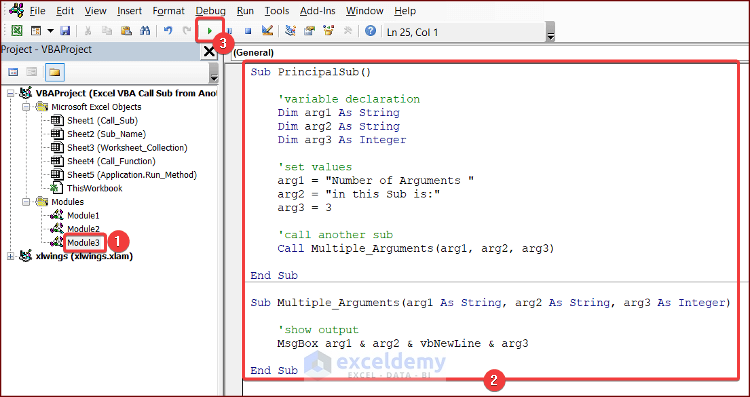
Paste the following code in your Module 3 and press the Run button or F5 key to run the code.
Sub PrincipalSub()
    'variable declaration
    Dim arg1 As String
    Dim arg2 As String
    Dim arg3 As Integer
    'set values
    arg1 = "Number of Arguments "
    arg2 = "in this Sub is:"
    arg3 = 3
    'call another sub
    Call Multiple_Arguments(arg1, arg2, arg3)
End Sub
Sub Multiple_Arguments(arg1 As String, arg2 As String, arg3 As Integer)
    'show output
    MsgBox arg1 & arg2 & vbNewLine & arg3
End Sub
VBA Breakdown
Sub PrincipalSub()- The first line declares a new subroutine named PrincipalSub.
Dim arg1 As String
    Dim arg2 As String
Dim arg3 As Integer- These lines declare three variables arg1, arg2 of String and arg3 of Integer data type respectively.
  arg1 = "Number of Arguments "
    arg2 = "in this Sub is:"
arg3 = 3- These lines assign values to the variables.
Call Multiple_Arguments(arg1, arg2, arg3)
End Sub- The next line calls a sub named Multiple_Arguments and passes the three variables into the sub as arguments.
Sub Multiple_Arguments(arg1 As String, arg2 As String, arg3 As Integer)- The first line declares a new subroutine named Multiple_Arguments and defines three arguments arg1, arg2 are of String and arg3 of Integer data types.
MsgBox arg1 & arg2 & vbNewLine & arg3
End Sub- This line displays a MsgBox with the values of the three arguments concatenated together, using the ampersand (&) operator for string concatenation and the vbNewLine keyword for adding a new line.
Putting it all together, when PrincipalSub is executed, it declares three variables (arg1, arg2, and arg3) and sets their values. It then calls Multiple_Arguments and passes it the values of arg1, arg2, and arg3 as arguments. When Multiple_Arguments is called, it concatenates the three arguments and displays them in a MsgBox.

Read More: Excel VBA to Call Sub with Parameters
Things to Remember
There are a few things to remember when calling sub from another sheet in Excel VBA.
- Make sure that the sub which is called from another sheet is Public.
- Make sure that you specify the correct sheet name and sub name.
- For multiple codes in one module, please ensure you follow the sequence of the codes.
Frequently Asked Questions
1. Can I call a private subroutine from another sheet?
No, private subroutines can only be called from within the same module. If you want to call a subroutine from another module or sheet, you must declare it as a public subroutine.
2. Can I call a subroutine from a hidden sheet?
Yes, you can call a subroutine from a hidden sheet as long as the sheet is not very hidden. Very hidden sheets can only be accessed by VBA code and not through the Excel interface.
3. Can I call a subroutine from a different workbook?
Yes, you can call a subroutine from a different workbook by referencing the workbook and sheet in the code.
Download Practice Workbook
You can download this workbook while going through the article.
Conclusion
In this article, we have discussed 4 easy ways in Excel VBA to call sub from another sheet. This article will allow users to use Excel more efficiently and effectively. If you have any questions regarding this essay, feel free to let us know in the comments.
Further Readings
- How to Call Private Sub in Excel VBA
- How to Use Excel VBA Sub to Return Value
- How to Use Excel VBA to Call Private Sub from Userform
- How to Run a Private Sub in VBA
- Excel VBA Private Sub vs Sub (Comparison & Differences)


