Excel Functions

How to Lock Table Array in Excel (2 Effective Ways)

In this tutorial, I am going to show you 2 effective ways how to lock table array in Excel. You can apply these methods to any type of dataset and ...

How to Find Table Array in Excel: 4 Methods

Method 1 - Using Name Manager to Find Table Array in Excel Steps: Go to the Formulas tab. Click on the Defined Names group drop-down. ...

How to Name a Table Array in Excel (With Easy Steps)

Step 1 - Creating a Table Array Arrange the dataset. In this case, we have the Salesperson in Column B and two years, 2021 and 2022, in Columns ...

How to Hide VLOOKUP Source Data in Excel (5 Easy Ways)

Often, it is desired to hide the source data in Excel. This will keep the users from accidentally or willingly editing the source data. In this ...

How to Apply VLOOKUP to Return Blank Instead of 0 or NA

We will use a dataset with two columns, “Employee” and “Height(cm),” to demonstrate our methods. The value “Ross” is not listed on the primary ...

How to Convert Date to the Week Number of the Month in Excel (5 Methods)

Dataset Overview Suppose we have a dataset containing sales records for a shop, including the date of each transaction. Our goal is to convert these ...

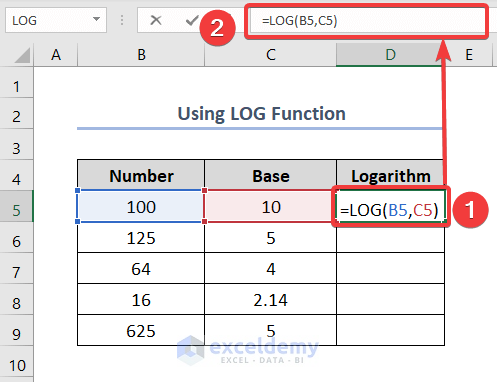
How to Calculate a Logarithm in Excel (6 Methods)

What is a Logarithm? A logarithm is a mathematical operation that quantifies how a specific number, known as the base, grows by repeatedly ...

Troubleshooting Excel VLOOKUP Drag Down Issues (11 Solutions)

Dataset Overview To demonstrate the solutions, we will use a dataset of 10 employees of any organization. The dataset contains employees’ IDs, ...

How to Use VLOOKUP to Find a Value Within a Range

To demonstrate how to use VLOOKUP to find a value within a range, we'll use the following dataset, which contains information about some Employees - ...

How to Use VLOOKUP If Condition Lies Between Multiple Ranges in Excel

We’re going to show you 5 quick methods of using VLOOKUP if a condition is between multiple ranges in Excel. For this purpose, we’ve taken a dataset ...

Transfer Data from One Excel Worksheet to Another Automatically with VLOOKUP: 4 Cases

Method 1 - Using VLOOKUP Function to Transfer Data from One Worksheet of the Same Workbook to Another Steps: Using the VLOOKUP function, you need ...

How to Use Multiple IF Conditions in Excel (3 Examples)

Example 1 - Nested IF Conditions We’ll apply a nested formula to handle multiple IF conditions in Excel. Consider a dataset where we want to set ...

How to Trim Part of Text in Excel (9 Easy Methods)

Method 1 - Using Find and Replace to Trim a Part of Text in Excel We have the dataset (B5:B10), containing a list of names. We will replace the text ...

How to Add Dashes to SSN in Excel (6 Methods)

Microsoft Excel offers multiple ways to add dashes to social security numbers (SSNs), including using formulas or the Format Cells dialog box. In ...

How to Use VLOOKUP Table Array Based on Cell Value in Excel

We are using a dataset where we stored some data on sports equipment. We have the Product IDs, Product Names, and their previous and current prices. ...

Close the CTA

Advanced Excel Exercises with Solutions PDF


ExcelDemy
Logo