
Nested IF formulas are useful for handling multiple conditions in Excel. However, as the number of conditions increases, formulas become longer, harder to understand, and more difficult to maintain. A formula that starts as a simple decision tree quickly turns into a “nested IF monster” that is hard to read, hard to audit, and easy to break when requirements change. With ChatGPT, you can simplify these formulas using IFS, SWITCH, or lookup tables without changing the intended results.
In this tutorial, we’ll show how to refactor nested IF monsters into IFS, SWITCH, or lookup tables with ChatGPT.
1. Simplify Nested IF Formulas with IFS (Range and Condition Logic)
Suppose you have a sales dataset with sales amounts in column H. You want to assign a performance category based on the following conditions:
| Sales Amount | Performance |
|---|---|
| $1,500 or more | Excellent |
| 1,000–1,499.99 | Good |
| 500–999.99 | Average |
| Below $500 | Poor |
The traditional nested IF formula is:
=IF(H2>=1500,"Excellent",IF(H2>=1000,"Good",IF(H2>=500,"Average","Poor")))Although the formula works, the nested IF statements make it difficult to read.
Prompt to ChatGPT:
I have the following nested IF formula in Excel:
=IF(H2>=1500,"Excellent",IF(H2>=1000,"Good",IF(H2>=500,"Average","Poor")))
Rewrite it using IFS to make it easier to read and maintain.
Preserve the original conditions and results. Explain the new formula briefly.
ChatGPT-generated formula:
=IFS(H2>=1500,"Excellent",H2>=1000,"Good",H2>=500,"Average",TRUE,"Poor")IFS checks each condition from left to right:
- H2>=1500 → Excellent
- H2>=1000 → Good
- H2>=500 → Average
- TRUE → Poor if none of the previous conditions are met
Using TRUE at the end acts like the final else condition in your original nested IF. This version is easier to read and maintain because it avoids multiple nested IF functions.
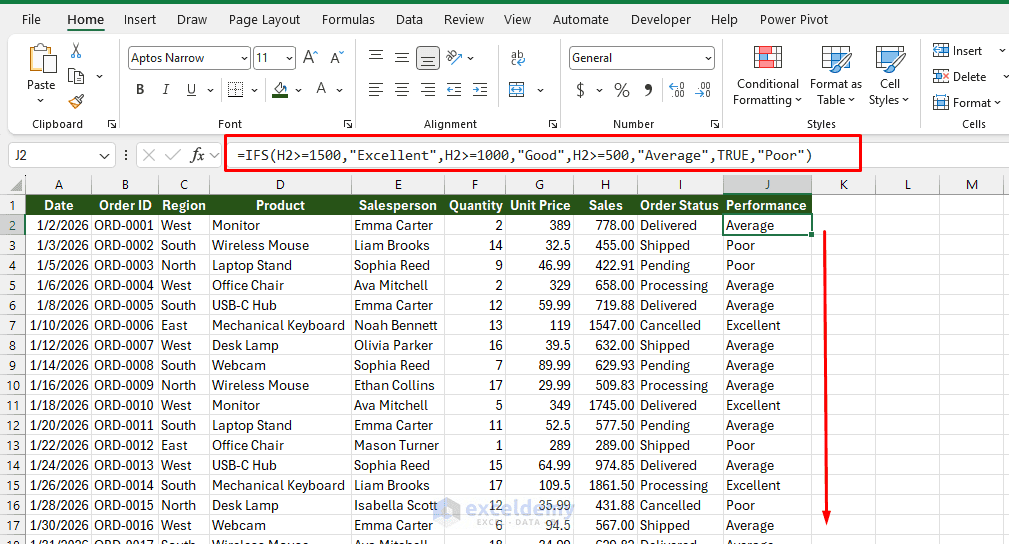
Why IFS is better: It removes repeated IF functions and makes multiple conditional rules easier to review.
2. Replace Nested IF (Exact-Match Conditions) with SWITCH
IFS is useful for testing ranges or different logical conditions. However, when the same cell is repeatedly compared with fixed values, SWITCH is usually cleaner. The SWITCH function is particularly useful when you need to compare one cell against several exact values.
Suppose column I contains order statuses such as Pending, Processing, Shipped, and Delivered. You want to assign a corresponding message.
Your existing formula is:
=IF(I2="Pending","Not Started",IF(I2="Processing","In Progress",IF(I2="Shipped","On the Way",IF(I2="Delivered","Completed","Unknown"))))Ask ChatGPT:
Refactor this nested IF formula using Excel's SWITCH function:
=IF(I2="Pending","Not Started",IF(I2="Processing","In Progress",IF(I2="Shipped","On the Way",IF(I2="Delivered","Completed","Unknown"))))
Keep the same outputs, including "Unknown" for unmatched values.
ChatGPT-generated formula:
=SWITCH(I2,"Pending","Not Started","Processing","In Progress","Shipped","On the Way","Delivered","Completed","Unknown")Explanation:
The SWITCH function checks the value in I2 and returns the corresponding result:
- Pending → Not Started
- Processing → In Progress
- Shipped → On the Way
- Delivered → Completed
- Any other value → Unknown
The final “Unknown” is the default result when no value matches.
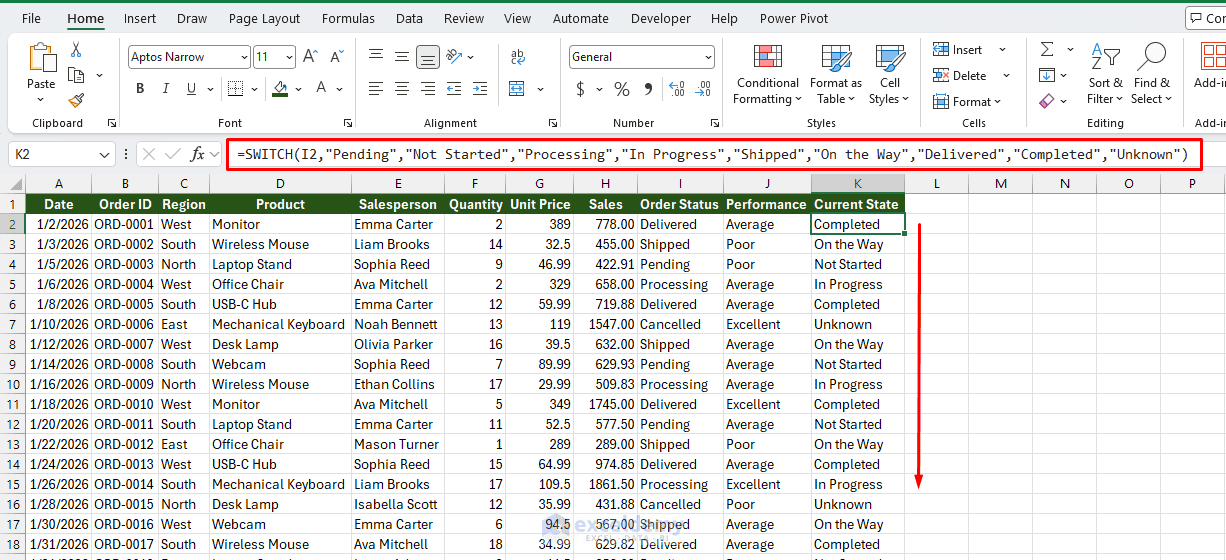
This formula preserves all the original outputs while making the logic shorter, clearer, and easier to maintain. Unlike IFS, which handles logical conditions such as >=500, SWITCH is most convenient for matching specific values.
3. Convert Nested IF into a Lookup Table
When business rules are likely to change, putting every rule directly inside a formula is not always the best design. A lookup table is often more practical than a long formula.
Suppose you have the following nested IF formula for calculating commission rates:
=IF(H2>=1500,0.15,IF(H2>=1000,0.1,IF(H2>=700,0.05,0.02)))Instead of keeping the thresholds inside the formula, you can store them in a separate table.
ChatGPT Prompt:
I use this nested IF formula to calculate commission rates:
=IF(H2>=1500,0.15,IF(H2>=1000,0.1,IF(H2>=700,0.05,0.02)))
Convert it into an Excel lookup table and an XLOOKUP formula.
Provide the lookup table, explain where to place it, and ensure the new formula
returns the same commission rates.
ChatGPT-generated lookup table:
Step 1: Create the lookup table
Place the following table in O1:P5:
| Minimum Sales | Commission Rate |
|---|---|
| 0 | 2% |
| 700 | 5% |
| 1000 | 10% |
| 1500 | 15% |
Keep the minimum sales values sorted in ascending order.
Step 2: Enter the XLOOKUP formula
In the cell where you want to calculate the commission rate, enter:
=XLOOKUP(H2,$O$2:$O$5,$P$2:$P$5,"",-1)Understand the formula:
- H2 — Sales amount to evaluate.
- $O$2:$O$5 — Minimum sales thresholds.
- $P$2:$P$5 — Corresponding commission rates.
- “” — Returns a blank if no matching threshold is found.
- -1 — Finds an exact match or the next smaller value.
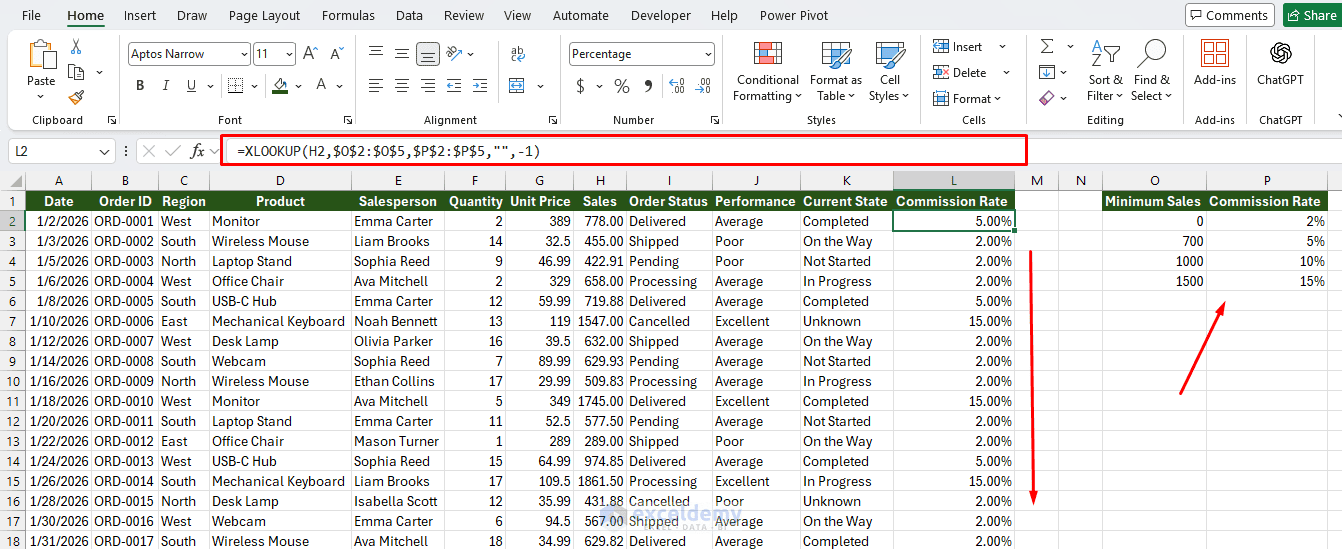
Important: For sales amounts of zero or greater, the lookup formula returns the same rates as your original nested IF. For negative sales, the original formula returns 2%, whereas this lookup returns a blank. To preserve that behavior for all numeric values, use:
=XLOOKUP(H2,$O$2:$O$5,$P$2:$P$5,2%,-1)The main advantage is that you can update commission rates directly in the table without rewriting the formula.
4. Ask ChatGPT to Choose the Best Alternative
Sometimes the main problem is not rewriting the formula; it is deciding whether to use IFS, SWITCH, or a lookup table. Instead of selecting a function yourself, ask ChatGPT to analyze the formula.
Ask ChatGPT:
Analyze my nested IF formula and recommend the best replacement using IFS, SWITCH,
or a lookup table.
=IF(B2="Gold",0.2,IF(B2="Silver",0.1,IF(B2="Bronze",0.05,0)))

Compare the alternatives based on readability, ease of maintenance, and scalability.
Provide the recommended formula and explain your choice.
ChatGPT may recommend:
For your current formula, SWITCH is the best replacement.
=SWITCH(B2,"Gold",20%,"Silver",10%,"Bronze",5%,0)Why SWITCH?
- It is shorter and more readable than nested IF or IFS.
- It evaluates one cell against several exact text values.
- It preserves all the original results, including 0 for unmatched values.
- It requires no additional lookup table.
When to choose XLOOKUP instead: If you expect to add more membership levels or frequently update the rates, use a lookup table with XLOOKUP. You can then modify the table without editing the formula, provided the lookup ranges include the new entries.
Final recommendation: Use SWITCH for your three fixed membership levels. Choose XLOOKUP when flexibility and scalability become more important.
5. Verify and Test Refactored Formulas with ChatGPT
Refactoring should improve readability without changing the formula’s behavior. You can ask ChatGPT to create test cases that compare the original and simplified formulas.
ChatGPT Prompt:
Compare my original nested IF formula with its refactored IFS version. Generate test
cases covering every condition, boundary values, blank cells, and unexpected inputs.
Identify any differences in the results and suggest corrections if necessary.
ChatGPT may return:
| Sales Amount | Expected Result |
|---|---|
| 499 | Poor |
| 500 | Average |
| 999 | Average |
| 1,000 | Good |
| 1,499 | Good |
| 1,500 | Excellent |
| 2,000 | Excellent |
You should also test blank cells, text values, and negative numbers when they may occur in your dataset.
6. Handle Multi-Condition Monsters
Real nested IFs often mix conditions:
=IF(AND(B2>=50000,D2="Yes"),"Gold",IF(AND(B2>=50000,D2="No"),"Silver",IF(B2>=20000,"Bronze","None")))Prompt for ChatGPT:
Refactor this formula into IFS:
=IF(AND(B2>=50000,D2="Yes"),"Gold",IF(AND(B2>=50000,D2="No"),"Silver",IF(B2>=20000,"Bronze","None")))
Then tell me whether any condition is redundant or unreachable, and whether a
lookup table would be cleaner.
ChatGPT may return:
=IFS(AND(B2>=50000,D2="Yes"),"Gold",AND(B2>=50000,D2="No"),"Silver",B2>=20000,"Bronze",TRUE,"None")The formula checks conditions from left to right and returns the result for the first TRUE condition.
No condition is entirely redundant or unreachable. However, the conditions overlap.
- B2>=20000 also includes values of 50000 or more, but Gold and Silver take priority.
- If D2 contains something other than “Yes” or “No”, a value of B2 ≥ 50000 returns “Bronze”.
- If D2 is guaranteed to contain only “Yes” or “No”, the second AND condition can be simplified.
The simplified formula would be:
=IFS(AND(B2>=50000,D2="Yes"),"Gold",B2>=50000,"Silver",B2>=20000,"Bronze",TRUE,"None")This simplified version is equivalent only when D2 is restricted to Yes or No.
Refactor a Larger Nested IF Formula
Consider this formula for categorizing sales orders:
=IF(H2>=1500,"Very High",IF(H2>=1000,"High",IF(H2>=700,"Medium",IF(H2>=500,"Low","Very Low"))))Using IFS, ChatGPT can rewrite it as:
=IFS(
H2>=1500,"Very High",
H2>=1000,"High",
H2>=700,"Medium",
H2>=500,"Low",
TRUE,"Very Low"
)
The logic has not changed, but the structure is easier to understand and modify.
For an even more maintainable workbook, you could ask ChatGPT to convert the same rules into a lookup table instead.
Which Method Should You Use?
Before you open ChatGPT, classify what your nested IF is actually doing.
| If your formula… | Use | Why |
|---|---|---|
| Checks ranges or mixed conditions (>=, AND, OR) in order | IFS | Flat, readable, same logic as nested IF |
| Compares one cell to exact values (codes, names, IDs) | SWITCH | One expression, no repeated cell reference |
| Maps values to results that change over time (tiers, rates, categories) | Lookup table | Logic lives in cells, not in the formula |
A simple rule: if the rules are data, they belong in a table, not a formula. IFS and SWITCH make the formula shorter, but a lookup table removes the need to edit the formula at all.
Pro Tips for Better Results with ChatGPT
- Always paste the full original formula (and a couple of sample input/output pairs if possible)
- Specify your Excel version (“I am on Microsoft 365” or “Excel 2016”)
- Ask for both formula and table-based solutions so you can choose
- Request “no volatile functions” or “prefer non-array formulas” if you have performance constraints
- After receiving the suggestion, ask: “Can you make this even more robust against blank cells and unexpected values?”
Conclusion
By following this tutorial, you can easily refactor nested IF monsters into IFS, SWITCH, or lookup tables with ChatGPT. ChatGPT can help turn complicated nested IF formulas into cleaner and more manageable Excel solutions. Use IFS for multiple conditions, SWITCH for exact-value comparisons, and lookup tables when you need flexibility. The most important instruction when prompting ChatGPT is to preserve the original logic and outputs. Always test the refactored formula before replacing the original, especially when your workbook contains important business calculations.
Get FREE Advanced Excel Exercises with Solutions!