

Microsoft Excel is a powerful program. In addition to this, it is quite easy and handy to operate. Also, productivity and utilization are increasing day by day. Fortunately, it can be widely used in banks and other financial institutions. But this software can also be used to figure out how long a bond will last. In this article, I will give you an overview of bond duration and two suitable examples to calculate the duration of a bond in Excel. Hence, go through it carefully and save your time.
Overview of Bond Duration
In general, a fixed-income tool used by investors to borrow money from the capital market is called a bond. Companies, governments, and business entities use bonds to raise funds from the capital market. Moreover, the owners of bonds are the debtholders, creditors, or bond issuers. Therefore, a bond’s duration measures the change in bond prices with the fluctuation of interest rates within the time period a bond is valid for. In addition to this, it figures out how much the price of a fixed income instrument changes when the interest rate changes. The risk of interest rates going up as the length of the bond’s time period goes up, and vice versa.
Types of Bond Duration Formula in Excel
Most of the time, there are three main kinds of bond duration: Macaulay Duration, Modified Duration, and Effective Duration. In this part, I will provide an overview of these durations with their respective formulas.
1. Macaulay Duration Formula
Macaulay duration refers to the price of a bond which is sensitive to the change in interest rates in the market. In this case, the time difference between the bond cash flows starting at time zero is weighted averaged in order to determine the value. However, bonds with long durations have higher interest rate risk, and bonds with short durations have lower interest rate risk. It is the simplest process to calculate the duration. Hence, you can use the following formula to apply the Macaulay duration.

Here,
PVi = Present value at time 0 of cash flow
ti = Time period
P = Bond price
2. Modified Duration Formula
Modified duration refers to the price of a bond which is sensitive to the change in the yield to maturity. If the Macaulay duration is divided by a factor of (1+y/m), the Modified duration can be identified. Moreover, it provides a better output than the Macaulay duration. Hence, the formula can be written as follows.

Here,
y = Annual yield to maturity
m = Total number of coupon payments per period
3. Effective Duration Formula in Excel
In general, the duration measure, known as Effective duration, calculates the percentage price change that would occur if there was a change of 1% in the yield curve as a whole. Moreover, the Effective duration method provides better output than the Macaulay duration. The formula for the Effective duration can be written below.

Here,
Pd = Price when the yield curve goes down
Pi = Price if the yield curve shows a 1% upward trend
P0 = Bond price
2 Suitable Examples to Calculate Duration of a Bond in Excel
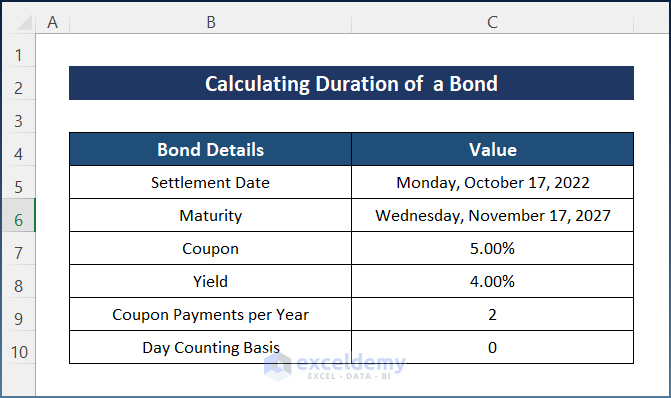
In the financial world, we often need to figure out how long a bond will last. In this part, I will show you two suitable examples to help you understand how to calculate the duration of a bond in Excel. For example, you have a $1,000 zero-coupon bond that is settled on October 17, 2022, yielding 4% with a 5% coupon rate, and the maturity date is on November 17, 2027. For the purpose of demonstration, I have used the following sample dataset.
1. Calculate Duration of a Bond Using DURATION Function (Macaulay Duration)
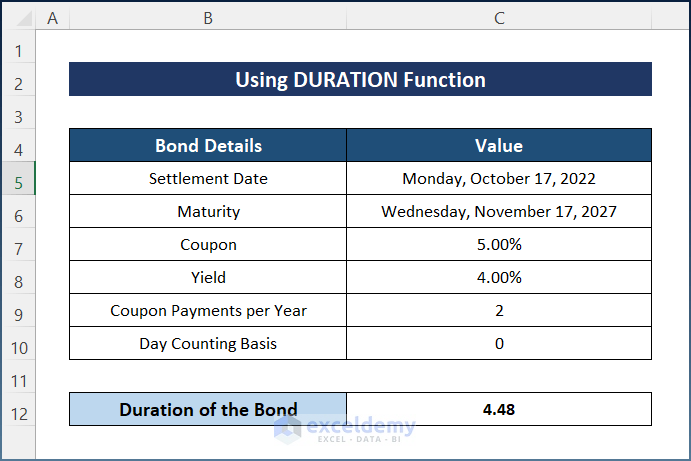
Fortunately, you can calculate the duration of a bond easily by using the DURATION function. It calculates the Macaulay duration. Generally, it includes six different arguments, consisting of five required arguments and one optional argument. Moreover, it is quite easy and handy to operate. Hence, go through the steps below to complete the task.
📌 Steps:
- At first, select Cell C12 and write down the following formula.
=DURATION(C5,C6,C7,C8,C9)

- Finally, press the Enter key to get the bond duration.
Note: Maintain the exact Time format, I have used for the Settlement Date and Maturity. Otherwise, it will show errors.
Read More: Calculate Bond Payments in Excel
2. Calculate Duration of a Bond Using MDURATION Function (Modified Duration)
Usually, the MDURATION function is used to determine the duration of security by applying the modified Macaulay method along with an assumed par value of $100. It calculates the Modified duration. You can compare bonds with various maturities and coupon rates easily using both Duration and Modified duration. In addition to that, combining DURATION and MDURATION can be even more advantageous. However, follow the steps below in order to calculate the duration of a bond easily.
📌 Steps:
- Firstly, select Cell C12 and insert the following formula.
=MDURATION(C5,C6,C7,C8,C9)

- Lastly, hit the Enter key and the bond duration will appear as the following image.

Note: You have to maintain the exact Time format that I have selected for the Settlement Date and Maturity. Otherwise, it will show errors.
Read More: How to Calculate Coupon Rate in Excel
💬 Things to Remember
- Firstly, you must have to insert the dates by storing them as a date format for the Settlement and Maturity arguments, otherwise, the MDURATION function can return an error. That means you will have to select the format of the cells as a date and then insert the date.
- Secondly, the day-counting basis is an optional argument. So, you can keep the value as zero.
- Thirdly, you can use both the DURATION and MDURATION functions according to your choice.
Download Practice Workbook
You can download the workbook used for the demonstration from the download link below.
Conclusion
These are all the steps you can follow to calculate the duration of a bond in Excel. Hopefully, you can now easily create the needed adjustments. I sincerely hope you learned something and enjoyed this guide. Please let us know in the comments section below if you have any queries or recommendations.
Related Articles
- Calculate Bond Price from Yield in Excel
- How to Calculate Clean Price of a Bond in Excel
- Calculate Face Value of a Bond in Excel
- How to Calculate the Issue Price of a Bond in Excel
- Calculate Bond Price with Negative Yield in Excel
- Compute Floating Rate Bond Valuation in Excel
- Calculate Price of a Semi Annual Coupon Bond in Excel
- How to Calculate Present Value of a Bond in Excel
<< Go Back to Bond Price Formula Excel|Excel Formulas for Finance|Excel for Finance|Learn Excel
Get FREE Advanced Excel Exercises with Solutions!

