
Md. Abdullah Al Murad

About author

Md. Abdullah Al Murad is a computer engineer who loves exploring Excel and VBA programming. Programming, to him, is a time-saving tool for efficiently managing data, files, and internet tasks. He is proficient in C, C++, Python, JavaScript, HTML, SQL, MySQL, PostgreSQL, Microsoft Office, and VBA and goes beyond the basics. He holds a B.Sc. in Computer Science and Engineering from American International University-Bangladesh. He has transitioned into the role of a content developer. Beyond his work, find him immersed in books, exploring new places during travels, and enjoying movies and TV series in his downtime.

Designation

Excel & VBA Content Developer at ExcelDemy in SOFTEKO.

Lives in

Dhaka, Bangladesh.

Education

B.Sc. in Computer Science and Engineering, American International University-Bangladesh.

Expertise

Data Analysis, Content Writing, C, C++, Python, JavaScript, HTML, SQL, MySQL, PostgreSQL, Microsoft Office.

Experience

  • Technical Consultant at Midas Software Solutions LTD
  • Teaching assistant at American International University-Bangladesh.

Latest Posts From Md. Abdullah Al Murad

0
How to Minus Number of Days or a Date from Today in Excel

Method 1 - Subtract a Number of Days from Today Steps We put the number of days that are going to be deleted from today’s date in column B. Select ...

0
How to Add Days to Date Using Excel Formula (5 Easy Ways)

Watch Video – Add Days to Date Using Excel Formula Date Basics in Excel If we need to add dates to Excel, we can enter the numbers and ...

1
Percentage Difference Between Two Percentages in Excel: 2 Easy Methods

Method 1 - Percentage Difference Between Columns in Excel Steps: Click on cell E5 and insert the following formula. =(D5-C5)/AVERAGE(C5:D5) ...
0
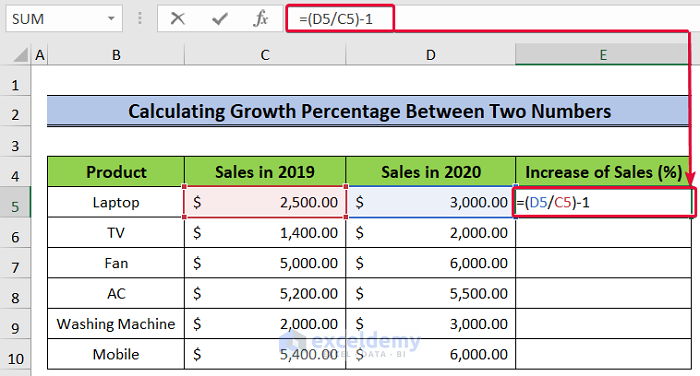
How to Calculate Growth Percentage with Formula in Excel

Method 1 - Calculating Growth Percentage Between Two Numbers in Excel To show this process, let’s assume we have a dataset of products with sales records for ...

0
How to Find the Percentage of Two Numbers in Excel

Method 1 - Using a Formula to Find a Percentage of Two Numbers Steps: Choose a cell (E5) and apply the following formula- =(C5-D5)/D5 Hit ...

0
How to Link Data in Excel from One Sheet to Another (5 Methods)

Dataset Overview We’ll use a concise dataset with 6 rows and 2 columns. We’ve formatted all the cells containing dollar values in Accounting format, but you ...

0
How to Shift Cells in Excel: 5 Easy Methods

Method 1 - Using Copy and Paste Commands Step 1: Select the cell range B5:B9, as I want to copy the employees' names rather than write them again. ...

Browsing All Comments By: Md. Abdullah Al Murad
Close the CTA

Advanced Excel Exercises with Solutions PDF


ExcelDemy
Logo

