Multiply in Excel

How to Create a Multiplication Formula in Excel (5 Easy Ways)

We will consider a dataset that has four columns, B, C, D, and E called Product, Unit Price, Unit, and Total Price. Method 1 - Multiply ...

Multiplying Cells With Values in Excel: 3 Examples

The following dataset contains sales across a small company for the first 5 days of each month; however, not every day of every month recorded sales. ...

How to Multiply from Different Sheets in Excel (5 Methods)

In Microsoft Excel multiplying values is one of the most frequently used functions. There are several ways to perform this. However, it becomes ...

How to Divide and Multiply in One Excel Formula: 4 Methods

Method 1 - Using Traditional Division and Multiplication Formula Steps Select the cell D5 and enter the following formula: =(B5/C5)*B5 ...

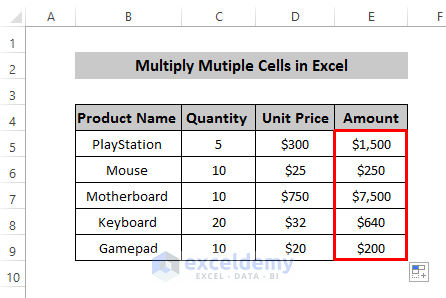
How to Multiply Multiple Cells in Excel – 4 Methods

The sample dataset showcases product quantity and unit price. Method 1 - Using the Asterisk Sign to Multiply Multiple Cells in Excel ...

How to Do Matrix Multiplication in Excel (5 Examples)

Method 1 - Performing Matrix Multiplication of Two Arrays in Excel Let’s take two individual matrices A and B. In Excel, we will treat them as ...

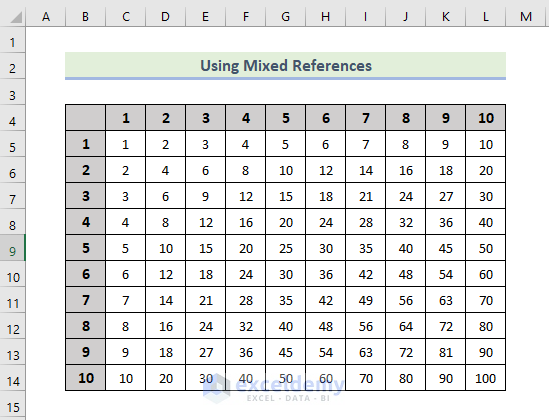
How to Make Multiplication Table in Excel (4 Methods)

If you are looking for some special tricks to make a multiplication table in Excel, you've come to the right place. There are numerous ways to make a ...

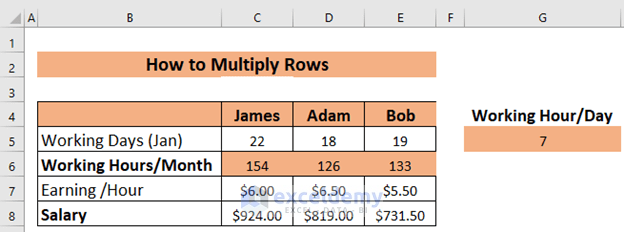
How to Multiply Rows in Excel (4 Easy Ways)

Method 1 - Basic Ways to Multiply Rows in Excel Multiply a Row by a Cell Select the appropriate cell (C6 in this example) and type the ...

How to Multiply Two Columns in Excel (5 Easiest Methods)

We'll use a sample dataset as an example to help you understand how to multiply columns. We are given Names of some Items in column B, Prices in ...

How to Multiply a Column by a Number in Excel (3 Easy Methods)

Download the Practice Book Multiplying Column by Number.xlsm 3 Easy Methods to Multiply a Column by a Number in Excel In the ...

How to Multiply by Percentage in Excel – 4 Easy Methods

Method 1 - Using the Multiplication Operator to Multiply by Percentage For Increment: Use the following formula: Amount * (1 + Percentage ...

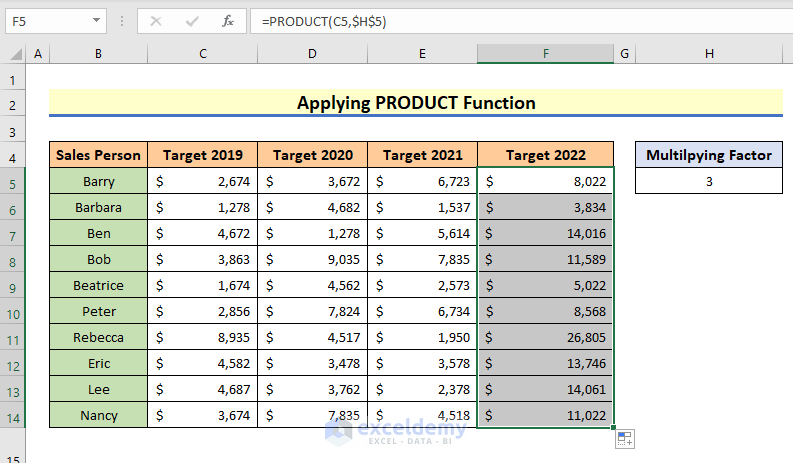
How to Multiply a Column in Excel by a Constant (4 Easy Ways)

Watch Video – Multiply a Column by a Constant in Excel Let us use the following dataset. We have the employee records of a ...

How to Multiply Two Columns and Then Sum in Excel (3 Examples)

Example 1 - Multiply Two Columns and Sum Their Products Using SUMPRODUCT Function in Excel Multiply column D and column E. The cell range for ...

Advanced Excel Exercises with Solutions PDF


ExcelDemy
Logo