This is an overview: The sample dataset showcases records of quarterly sales in three different sheets: Quarter 1, Quarter 2, and Quarter 3. Two different types of products are sold: Software and…
Below is a dataset of sales information. The dataset has three columns: Region, Product Name, and Price. Each column represents the sales amount of a particular product in a different region. Method…
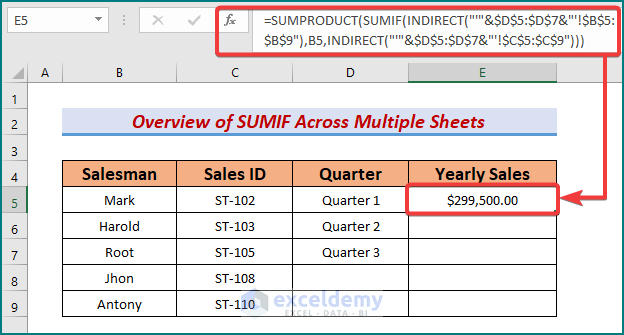
In our datasheet, we have Quarterly sales by different salesmen across different sheets. Now we want to calculate the yearly sales of different salesmen. For that, we have to sum up the…
Combining Excel SUMIF and VLOOKUP functions is one of the most popular formulas to gather values from multiple sheets and sum values based on a criterion. In this article, we are going…
In the sample dataset, we want to get the total price of Apples by adding the price in the January, February, March and Discount columns using the SUMIF function. Method 1 -…
You may need to calculate the sum of multiple columns. Once you know the methods it will seem as easy as you like. This article will show you how to sum up…
We will use a sample dataset where the sales of computers of different brands have been recorded over 6 months. Method 1 - Using the SUMPRODUCT Function to Sum Based on Column…
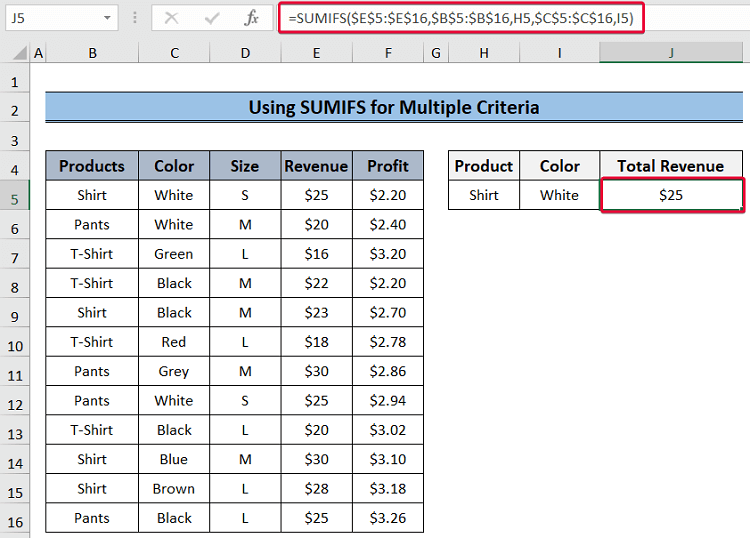
This is the sample dataset: Method 1 - Using the SUMIF Function with a Single Criterion Steps: Select I6 and enter the formula below. Press Enter. You will see the total revenue…