About author
Mehedi Hassan, having earned a BSc in Naval Architecture & Engineering from Bangladesh University of Engineering and Technology, functions as an Excel & VBA Content Developer at ExcelDemy. His deep interest in research and innovation aligns seamlessly with his fervor for Excel. In this role, Mehedi not only skillfully addresses challenging issues but also exhibits enthusiasm and expertise in gracefully navigating intricate situations, emphasizing his unwavering dedication to consistently delivering outstanding content. His interests are Advanced Excel, Data Analysis, Charts & Dashboards, Power Query, and Excel VBA. Apart from creating Excel tutorials, he is interested in Data Analysis with MS Excel, AutoCAD, Rhinoceros, ANSYS, Adobe Illustrator, Adobe Premiere Pro, and Report Writing.
Designation
Excel & VBA Content Developer at ExcelDemy in SOFTEKO.
Lives in
Dhaka, Bangladesh.
Education
B.Sc. in
Naval Architecture & Marine Engineering,
BUET.
Expertise
Microsoft Suite, AutoCAD, Rhinoceros, ANSYS, Adobe Illustrator, Adobe Premiere Pro
Experience
- Technical Content Writing
- Undergraduate Projects
- Design of an Inland Cargo Vessel
- Hydrodynamic Performance Analysis of a Hydrofoil Supported High Speed Vessel


 Mehedi Hassan


Hello Bart,

Thank you for reaching out. Your problem has a very simple solution. Instead of writing the code in a Sub Procedure, create an Event, Worksheet_SelectionChange in each of your Worksheet and simply paste your code.
Do the same thing in every worksheet except the Index worksheet and modify the code as per your requirements. In this way, you don’t have to run the code every time.
Here’s the modified code:
Here is the result:
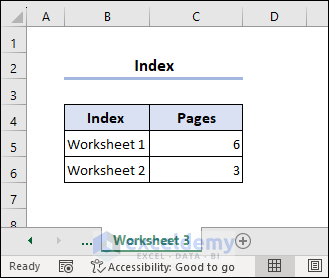
Hopefully, this will solve your problem.
Regards
Hassan Shuvo || Exceldemy
Hello Jaye,
Hope you are doing well.
#NAME error appears when you have a syntax problem in your formula. There shouldn’t be any #NAME error appearance when you add a new sheet to your workbook. We have checked out the VBA and the function and didn’t find any problem.
We recommend you share your file or at least a Screenshot of the problem with us and we will get back to you about a solution.
Regards
Hassan Shuvo || ExcelDemy