I am needing help with sorting a data table I am working on. Below is an example set of data.
Column A is raw data that I'm starting with. Column B 'Section' has been extracted with a formula, which may or may not be needed.
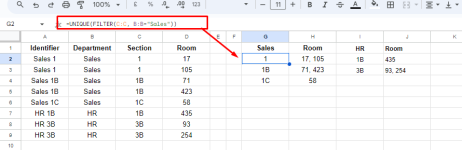
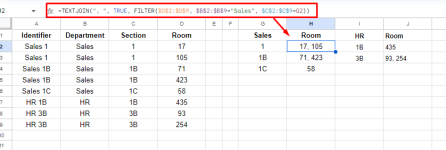
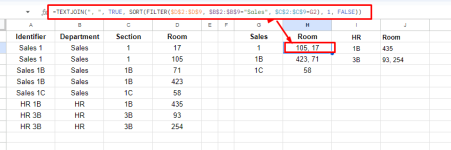
I'm wanting to find all unique values in the 'Identifier' column (A) and return all corresponding values from the 'Room' column (C). Taking into account there will be duplicates in Column A, I want results from Column C returned in a single cell separated by commas for each unique value. I am familiar with CONCATENATE, for inserting ", " and joining values if needed. But I can't figure out whether a FILTER option is sufficient or creating a custom formula, or some array formula is needed. Being able to list the different departments at the top of each section of sorted/filtered data using a formula would be AWESOME, but if I have to do that manually, I'm ok with that.
I am currently working in Google Sheets, but can copy into Excel if there's not an equivalent in Sheets. I do have access to Excel 365.
This is my first time to post to any Excel forum, but this is an important project and need some swift help. I feel like there is probably a simple solution, but I'm stumped at the moment! Any help would be greatly appreciated.
Column A is raw data that I'm starting with. Column B 'Section' has been extracted with a formula, which may or may not be needed.
I'm wanting to find all unique values in the 'Identifier' column (A) and return all corresponding values from the 'Room' column (C). Taking into account there will be duplicates in Column A, I want results from Column C returned in a single cell separated by commas for each unique value. I am familiar with CONCATENATE, for inserting ", " and joining values if needed. But I can't figure out whether a FILTER option is sufficient or creating a custom formula, or some array formula is needed. Being able to list the different departments at the top of each section of sorted/filtered data using a formula would be AWESOME, but if I have to do that manually, I'm ok with that.
I am currently working in Google Sheets, but can copy into Excel if there's not an equivalent in Sheets. I do have access to Excel 365.
This is my first time to post to any Excel forum, but this is an important project and need some swift help. I feel like there is probably a simple solution, but I'm stumped at the moment! Any help would be greatly appreciated.
| Starting Data | Desired Result | ||||||
A | B | C | D | E | F | G | |
| Identifier | Department | Section | Room | Sales | |||
| Sales 1 | Sales | 1 | 17 | 1 | 17, 105 | ||
| Sales 1 | Sales | 1 | 105 | 1B | 71, 423 | ||
| Sales 1B | Sales | 1B | 71 | 1C | 58 | ||
| Sales 1B | Sales | 1B | 423 | ||||
| Sales 1C | Sales | 1C | 58 | HR | |||
| HR 1B | HR | 1B | 435 | 1B | 435 | ||
| HR 3B | HR | 3B | 93 | 3B | 93, 254 | ||
| HR 3B | HR | 3B | 254 |