
Hello!
My spreadsheet shows (in columns) each month and below it has Actuals numbers and Budget numbers.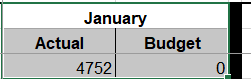 (there is a column between each month) There is the Year to Date Totals at the end. I need to sum all of the Actual numbers for the YTD. This is the formula I am using =SUMIF$B$4:$AJ$4,"<"&$B$3,B6:AJ6) which works fine but it is giving me the total for Actual and Budget together. How can I separate them?
Thanks!
My spreadsheet shows (in columns) each month and below it has Actuals numbers and Budget numbers.
(there is a column between each month) There is the Year to Date Totals at the end. I need to sum all of the Actual numbers for the YTD. This is the formula I am using =SUMIF$B$4:$AJ$4,"<"&$B$3,B6:AJ6) which works fine but it is giving me the total for Actual and Budget together. How can I separate them?Thanks!
